What you should know first: read Part 9: Embeddings Explained (what a vector is and how cosine similarity works). Basic Python or Node.js is enough. Docker is helpful for the PostgreSQL example, but not required.
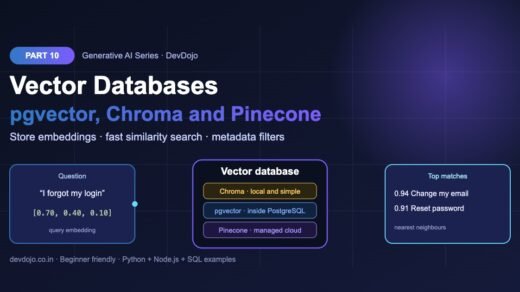
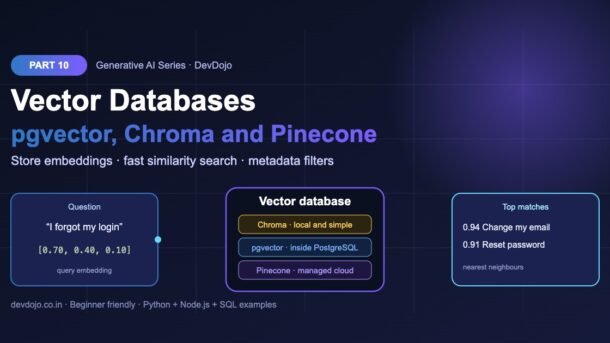
In Part 9 we turned text into embeddings and searched them with a simple loop. That works for 100 documents, but what about 1 million? You need a place to store vectors and search them fast. That place is a vector database. In this part you will learn what a vector database is, how indexes like HNSW make search fast, and how to use the three most popular options: Chroma (local and simple), pgvector (vectors inside PostgreSQL) and Pinecone (fully managed cloud). Every example is runnable, and the Chroma and pgvector outputs below are from real runs.
- A vector database stores embeddings (plus the original text and metadata) and finds the nearest vectors to a question very quickly.
- It uses an approximate nearest neighbour (ANN) index such as HNSW, so it does not compare the question with every row.
- Chroma:
pip install chromadb, runs inside your app, perfect for learning and prototypes. - pgvector: adds a
vectorcolumn type to PostgreSQL. Search withORDER BY embedding <=> query LIMIT 5. - Pinecone: a managed, serverless cloud service. No servers to run, pay for what you use.
- Use metadata filters (topic, user, language) together with vector search, and always use the same embedding model for documents and questions.
Full Generative AI roadmap (30 parts)
Beginner
- What Is Generative AI and How Do LLMs Work?
- Tokens, Context Windows and Model Parameters
- Your First LLM API Calls in Python and Node.js (OpenAI, Anthropic, Gemini)
- Prompt Engineering Basics: Roles, Instructions and Examples
- Temperature, Top-p and Controlling Model Output
- Run LLMs Locally with Ollama
- Streaming Responses and Building a Simple Chat UI
- Structured Outputs: Getting Reliable JSON from LLMs
Intermediate
- Embeddings Explained: Turning Text into Vectors
- Vector Databases: pgvector, Chroma and Pinecone You are here
- RAG Fundamentals: Retrieval-Augmented Generation Coming soon
- Document Loading and Chunking Strategies Coming soon
- Better RAG: Hybrid Search, Re-ranking and Query Rewriting Coming soon
- Function Calling and Tool Use Coming soon
- Conversation Memory and Long Context Management Coming soon
- Multimodal AI: Vision, Images and Audio Inputs Coming soon
- How Image Generation Works: Diffusion Models Basics Coming soon
- LangChain vs LlamaIndex: When to Use a Framework Coming soon
- Testing LLM Apps: Evals, Metrics and Test Sets Coming soon
- Cutting Cost and Latency: Caching, Batching and Model Choice Coming soon
Advanced
- Fine-Tuning vs Prompting vs RAG: Choosing the Right Tool Coming soon
- Fine-Tuning an Open Model with LoRA Coming soon
- Transformers Deep Dive: Attention Explained Simply Coming soon
- Reasoning Models and Thinking Time Coming soon
- Guardrails, Safety and Prompt Injection Defence Coming soon
- Monitoring and Tracing LLM Apps in Production Coming soon
- Serving Open Models: vLLM, Quantization and GPUs Coming soon
- Building a Production GenAI App End to End Coming soon
- Responsible AI: Privacy, Licensing and Bias Coming soon
- Final Project: Build Your Own AI Knowledge Assistant Coming soon
What Is a Vector Database?
A normal database answers questions like “give me the order with id 42” or “all users from Pune”. It matches exact values. A vector database answers a different question: “which stored items are most similar in meaning to this one?”
Each row in a vector database usually has four things:
"d1" or a UUID.text-embedding-3-small.topic, user_id, language or created_at for filtering.This is the engine behind semantic search, “related articles”, recommendation systems and, most importantly for this series, RAG (Retrieval-Augmented Generation), which we build in Part 11. If you want a sneak peek, our standalone RAG tutorial with Python and pgvector shows the full flow.
How Vector Search Works
Every vector database, from a tiny local Chroma file to a huge Pinecone index, follows the same two steps:
- Indexing (once): split your content into pieces, create an embedding for each piece, and store id + vector + text + metadata.
- Searching (every question): embed the user’s question with the same model, then ask the database for the
top_knearest vectors, optionally with a filter liketopic = "payments".
Indexes: HNSW and IVFFlat (Why Search Is Fast)
The simple way to search is to compare the question with every stored vector. This is called exact or brute-force search. It is 100% accurate, but it gets slow when you have millions of rows.
Vector databases solve this with an approximate nearest neighbour (ANN) index. It gives you almost the same results (usually 95–99% of the true top matches) in a tiny fraction of the time.
| Index | How it works (simple) | Good for | Trade-off |
|---|---|---|---|
| None (exact) | Checks every vector | Under ~10,000 rows, tests | Slow on big data |
| HNSW | A layered graph of “neighbour” links; search hops toward the closest point | Most apps; fast and accurate | Uses more memory, slower to build |
| IVFFlat | Groups vectors into clusters, then searches only the closest clusters | Large data with less memory | Build it after loading data; tune lists/probes |
Chroma and Pinecone choose and manage the index for you. In pgvector you create it yourself with one SQL line, as you will see below.
Distance Metrics: Cosine, Euclidean and Dot Product
A vector database needs to know how to measure “closeness”. You pick one metric when you create the collection or index:
| Metric | Meaning | pgvector operator | When to use |
|---|---|---|---|
| Cosine | Angle between vectors (direction only) | <=> | Default choice for text embeddings |
| Euclidean (L2) | Straight-line distance | <-> | Images and some older models |
| Inner product (dot) | Dot product; equals cosine when vectors are normalised | <#> (returns the negative) | Normalised embeddings, max speed |
Most databases return a distance (smaller is closer). For cosine, similarity = 1 - distance. You will see this conversion in every example.
Setup
Create a folder called devdojo-vectordb and install the packages. You only need the ones for the database you want to try.
# Python packages for this part
$ pip install chromadb "psycopg[binary]" pgvector numpy pinecone
# Node.js packages
$ npm install pg pgvector
# PostgreSQL 17 with pgvector already installed (needs Docker)
$ docker run -d --name pgvector -e POSTGRES_PASSWORD=postgres -p 5432:5432 pgvector/pgvector:pg17
To keep the examples free and runnable without an API key, we use tiny 3-number “embeddings”. Think of the numbers as [account, payments, delivery]. Real models give 384 to 3,072 numbers, but the code is exactly the same. Later we swap in real embeddings.
Option 1: Chroma – The Easiest Vector Database
Chroma is an open-source vector database that runs inside your Python app, like SQLite. No server, no account. PersistentClient saves everything to a folder so your data survives restarts.
import chromadb
from data import DOCS

# Saves data in ./chroma_db so it survives restarts
client = chromadb.PersistentClient(path="./chroma_db")

collection = client.get_or_create_collection(
    name="support_faq",
    configuration={"hnsw": {"space": "cosine"}},
)

collection.upsert(
    ids=[d[0] for d in DOCS],
    documents=[d[1] for d in DOCS],
    embeddings=[d[2] for d in DOCS],
    metadatas=[{"topic": d[3]} for d in DOCS],
)
print("Stored:", collection.count(), "documents")

# Question: "I forgot my login" (its embedding)
results = collection.query(
    query_embeddings=[[0.70, 0.40, 0.10]],
    n_results=2,
)
for doc, dist in zip(results["documents"][0], results["distances"][0]):
    print(f"{1 - dist:.3f}  {doc}")

# Same search, but only inside the "payments" topic
results = collection.query(
    query_embeddings=[[0.20, 0.90, 0.20]],
    n_results=1,
    where={"topic": "payments"},
)
print("Filtered:", results["documents"][0][0])$ python chroma_demo.py
Stored: 6 documents
0.940 Change the email on my account
0.911 How do I reset my password?
Filtered: Refund not received yet# Tiny 3-number "embeddings" so the demo runs without an API key.
# Numbers mean roughly [account, payments, delivery].
DOCS = [
("d1", "How do I reset my password?", [0.95, 0.10, 0.02], "account"),
("d2", "Change the email on my account", [0.85, 0.15, 0.05], "account"),
("d3", "My UPI payment failed", [0.10, 0.95, 0.05], "payments"),
("d4", "Refund not received yet", [0.12, 0.80, 0.30], "payments"),
("d5", "When will my order reach Pune?", [0.03, 0.10, 0.97], "delivery"),
("d6", "Track my parcel", [0.05, 0.15, 0.90], "delivery"),
]This editor has two files: chroma_demo.py and the shared data.py. Click the tabs to switch, then press ▶ Run to see the real output.
What happened:
get_or_create_collectioncreates a “table” for vectors. We set"space": "cosine"so distances use cosine.upsertinserts new rows or updates existing ones with the same id, so you can run the script again safely.queryreturns the closest documents with their distances. We print1 - distto show similarity.where={"topic": "payments"}is a metadata filter: search only inside rows that match.
embeddings, Chroma creates them for you with a small default model (it downloads the model the first time). That is handy for demos, but for real apps choose your model on purpose, as we did in Part 9.Option 2: pgvector – Vectors Inside PostgreSQL
pgvector is a PostgreSQL extension that adds a vector column type, distance operators and HNSW/IVFFlat indexes. If your app already uses PostgreSQL (Supabase, Neon, AWS RDS and Google Cloud SQL all support it), this is often the best choice: your vectors live next to your users, orders and permissions, and you can use normal SQL WHERE, JOIN and transactions.
Step 1: Create the table and index
-- 1. Turn on the pgvector extension (once per database)
CREATE EXTENSION IF NOT EXISTS vector;

-- 2. A normal table with one extra column of type vector(3)
CREATE TABLE IF NOT EXISTS faq (
  id        text PRIMARY KEY,
  question  text NOT NULL,
  topic     text NOT NULL,
  embedding vector(3) NOT NULL   -- use vector(1536) for text-embedding-3-small
);

-- 3. An HNSW index for fast cosine search
CREATE INDEX IF NOT EXISTS faq_embedding_idx
  ON faq USING hnsw (embedding vector_cosine_ops);

INSERT INTO faq VALUES
  ('d1', 'How do I reset my password?',    'account',  '[0.95,0.10,0.02]'),
  ('d3', 'My UPI payment failed',          'payments', '[0.10,0.95,0.05]'),
  ('d5', 'When will my order reach Pune?', 'delivery', '[0.03,0.10,0.97]')
ON CONFLICT (id) DO NOTHING;

-- 4. Nearest neighbours: <=> is cosine distance
SELECT question, round((1 - (embedding <=> '[0.70,0.40,0.10]'))::numeric, 3) AS similarity
FROM faq
ORDER BY embedding <=> '[0.70,0.40,0.10]'
LIMIT 2;$ psql -h localhost -U postgres -f schema.sql
CREATE EXTENSION
CREATE TABLE
CREATE INDEX
INSERT 0 3
question | similarity
-----------------------------+------------
How do I reset my password? | 0.911
My UPI payment failed | 0.586
(2 rows)Press ▶ Run to see what psql printed when we ran this file against PostgreSQL with pgvector.
The key line is ORDER BY embedding <=> '[...]' LIMIT 2: “sort by cosine distance to the question and give me the two closest rows”. The HNSW index makes this fast. Use vector_cosine_ops for <=>, vector_l2_ops for <-> and vector_ip_ops for <#>; the operator in your query must match the index or PostgreSQL will not use it.
Step 2: Insert and search from Python and Node.js
import numpy as np
import psycopg
from pgvector.psycopg import register_vector
from data import DOCS

conn = psycopg.connect("postgresql://postgres:postgres@localhost:5432/postgres",
                       autocommit=True)
register_vector(conn)  # lets psycopg send/receive numpy arrays as vectors

for doc_id, text, emb, topic in DOCS:
    conn.execute(
        """INSERT INTO faq (id, question, topic, embedding)
           VALUES (%s, %s, %s, %s)
           ON CONFLICT (id) DO UPDATE SET embedding = EXCLUDED.embedding""",
        (doc_id, text, topic, np.array(emb)),
    )

query = np.array([0.20, 0.90, 0.20])  # "money is stuck"
rows = conn.execute(
    """SELECT question, 1 - (embedding <=> %s) AS similarity
       FROM faq
       WHERE topic = %s
       ORDER BY embedding <=> %s
       LIMIT 2""",
    (query, "payments", query),
).fetchall()

for question, sim in rows:
print(f"{sim:.3f} {question}")$ python pg_search.py
0.988 Refund not received yet
0.981 My UPI payment failedimport pg from "pg";
import pgvector from "pgvector/pg";
const client = new pg.Client(
"postgresql://postgres:postgres@localhost:5432/postgres"
);
await client.connect();
await pgvector.registerTypes(client); // teaches pg about the vector type
const query = pgvector.toSql([0.2, 0.9, 0.2]); // "money is stuck"
const { rows } = await client.query(
`SELECT question, 1 - (embedding <=> $1) AS similarity
FROM faq
WHERE topic = $2
ORDER BY embedding <=> $1
LIMIT 2`,
[query, "payments"]
);
for (const r of rows) {
console.log(`${Number(r.similarity).toFixed(3)} ${r.question}`);
}
await client.end();$ node pg_search.mjs
0.988 Refund not received yet
0.981 My UPI payment failedSame search in Python and Node.js. Click the tabs to switch language, then press ▶ Run.
Both versions load all six documents, then search with a filter plus vector sort in one SQL query. Notice how normal SQL (WHERE topic = ...) and vector search mix naturally. The helper libraries pgvector.psycopg and pgvector/pg convert between arrays and the vector type for you.
vector(3) must equal your model’s output size. For text-embedding-3-small use vector(1536); for nomic-embed-text in Ollama use vector(768).Option 3: Pinecone – Fully Managed in the Cloud
Pinecone is a hosted vector database. You do not install or scale anything; you create an index with an API call and send vectors over HTTPS. Its serverless indexes grow automatically and there is a free starter plan. Sign up, copy your API key and set it as PINECONE_API_KEY.
import os
from pinecone import Pinecone, ServerlessSpec
from data import DOCS

pc = Pinecone(api_key=os.environ["PINECONE_API_KEY"])
index_name = "support-faq"

# Create a serverless index once (dimension = size of your vectors)
if not pc.has_index(index_name):
    pc.create_index(
        name=index_name,
        dimension=3,
        metric="cosine",
        spec=ServerlessSpec(cloud="aws", region="us-east-1"),
    )

index = pc.Index(index_name)

index.upsert(
    vectors=[
        {"id": d[0], "values": d[2], "metadata": {"text": d[1], "topic": d[3]}}
        for d in DOCS
    ],
    namespace="demo",
)

result = index.query(
    vector=[0.20, 0.90, 0.20],          # "money is stuck"
    top_k=2,
    include_metadata=True,
    filter={"topic": {"$eq": "payments"}},
    namespace="demo",
)
for match in result.matches:
print(f"{match.score:.3f} {match.metadata['text']}")$ python pinecone_demo.py
0.988 Refund not received yet
0.981 My UPI payment failedPinecone runs in the cloud, so you need a free API key. Press ▶ Run to see what the output looks like.
ServerlessSpec(cloud="aws", region="us-east-1")chooses where the index lives.namespacesplits one index into separate groups, for example one per customer.- Pinecone returns a similarity score (higher is better) instead of a distance, and filters use MongoDB-style operators like
{"$eq": "payments"}. - Pinecone is eventually consistent: a vector you just upserted can take a moment to appear in queries.
Using Real Embeddings Instead of Toy Vectors
Toy vectors helped us see the mechanics. In a real app you get vectors from an embedding model, exactly like Part 9. Here is Chroma with OpenAI embeddings; the same embed() function also works with pgvector and Pinecone.
import chromadb
from openai import OpenAI

openai_client = OpenAI()  # reads OPENAI_API_KEY
MODEL = "text-embedding-3-small"

def embed(texts):
    response = openai_client.embeddings.create(model=MODEL, input=texts)
    return [item.embedding for item in response.data]

faq = [
    "How do I reset my password?",
    "My UPI payment failed",
    "When will my order reach Pune?",
]

db = chromadb.PersistentClient(path="./chroma_db")
collection = db.get_or_create_collection(
    name="support_faq_openai",
    configuration={"hnsw": {"space": "cosine"}},
)
collection.upsert(
    ids=[f"faq-{i}" for i in range(len(faq))],
    documents=faq,
    embeddings=embed(faq),
    metadatas=[{"model": MODEL}] * len(faq),
)

question = "I forgot my login"
results = collection.query(query_embeddings=embed([question]), n_results=1)
print("Question:", question)
print("Best match:", results["documents"][0][0])$ python real_embeddings.py
Question: I forgot my login
Best match: How do I reset my password?Swap the toy vectors for real ones from Part 9. Press ▶ Run to see example output.
Notice that "I forgot my login" shares no words with “How do I reset my password?”, yet it is the top result. That is the power of semantic search, and it is exactly the “retrieval” step of RAG.
Which Vector Database Should You Choose?
Click your situation to see a recommendation:
Pick Chroma. One pip install, no account, data saved in a local folder. Perfect for tutorials, hackathons and prototypes. When you grow, Chroma also offers a server mode and a hosted cloud.
Pick pgvector. No new system to learn or pay for. You keep one database, one backup and one set of permissions, and you can join vectors with your existing tables. It comfortably handles millions of vectors with an HNSW index.
Pick Pinecone (or another managed service). You get an API key and an endpoint; scaling, backups and replicas are handled for you. Great for small teams that do not want to run databases.
Hundreds of millions of vectors? Look at Pinecone, or dedicated engines like Qdrant, Weaviate and Milvus, which add features such as sharding, quantization and hybrid search. Measure with your own data before you decide.
| Feature | Chroma | pgvector | Pinecone |
|---|---|---|---|
| Setup | pip install chromadb | Extension in PostgreSQL | Sign up + API key |
| Where it runs | In your app or a Chroma server | Your PostgreSQL server | Pinecone cloud |
| Cost | Free (open source) | Free (you pay for Postgres) | Free tier, then usage-based |
| Filtering | where={...} | Any SQL WHERE / JOIN | filter={...} |
| Index | HNSW (automatic) | HNSW or IVFFlat (you create) | Managed (automatic) |
| Result value | Distance | Distance (via operator) | Similarity score |
Common Errors and Fixes
| Error / symptom | Why it happens | Fix |
|---|---|---|
expected 1536 dimensions, not 768 (pgvector) | Column size and model output size are different | Use vector(N) that matches your model, or re-embed with the right model |
type "vector" does not exist | Extension not enabled in this database | Run CREATE EXTENSION vector; (once per database) |
Chroma: Collection expecting embedding with dimension of 3, got 1536 | The collection was first filled with a different model | Create a new collection per model, or delete and re-index |
| Search results look random | Documents and questions embedded with different models | Always use the same model (and version) for both |
| pgvector query is slow even with an index | Operator does not match the index ops, or the filter removes most rows | Match <=> with vector_cosine_ops; add a normal index on the filter column |
| Pinecone: new vectors missing from results | Writes are eventually consistent | Wait a moment, or check with describe_index_stats() |
Pinecone: 401 Unauthorized | API key missing or wrong | Set PINECONE_API_KEY and never hard-code it |
Best Practices
- Store the text with the vector. You need it to show results and to send context to the LLM in RAG.
- Save the model name in metadata (for example
model: "text-embedding-3-small"). When you change models, you must re-embed everything. - Use
upsertwith stable ids (likefile_name + chunk_number) so re-running your indexing script does not create duplicates. - Batch your inserts. Send 100–500 vectors per request instead of one at a time.
- Filter by user or tenant so one customer can never see another customer’s documents.
- Start simple. Chroma or pgvector covers most projects. Move to a dedicated service only when you measure a real need.
- Measure quality. Keep 10–20 test questions with the expected answers and check that they appear in the top results after every change.
Practice Task
Build a small “DevDojo article finder”:
- Write 8–10 short article summaries (one line each) about any topics you like, and give each one a
categorysuch asai,frontendordevops. - Create embeddings for them with OpenAI or Ollama (Part 9) and store them in Chroma.
- Ask three questions and print the top 3 results with their similarity.
- Bonus: repeat with pgvector and add
WHERE category = 'ai'. Do both databases return the same order?
FAQ
Do I really need a vector database for a small project?
No. For a few thousand vectors, a simple list in memory with cosine similarity (like Part 9) is fine. Use a vector database when you need to save data, search quickly at scale, filter by metadata or share the data between servers.
Is pgvector as good as a dedicated vector database?
For most apps, yes. With an HNSW index, pgvector handles millions of vectors with fast queries, and you keep all the benefits of PostgreSQL. Dedicated databases shine at very large scale or when you need advanced features out of the box.
What is the difference between distance and similarity?
Distance says how far apart two vectors are (smaller is closer). Similarity says how alike they are (bigger is closer). For cosine, similarity = 1 − distance.
Can I change the embedding model later?
Yes, but you must re-create the embeddings for all documents with the new model. Vectors from different models cannot be compared. Keep the original text so re-embedding is easy.
Is Chroma ready for production?
Chroma works well for small and medium apps, and it has a client-server mode and a hosted cloud for bigger deployments. Many teams prototype in Chroma and move to pgvector or a managed service later; because the concepts are the same, the switch is small.
How many results (top_k) should I fetch?
For search pages, 5–10. For RAG, 3–8 chunks is a good start. Too few may miss the answer; too many add noise and cost. We will tune this in Part 11 and Part 13.
Conclusion
A vector database is simply a place to store embeddings and find the nearest ones fast. You learned how ANN indexes like HNSW make search quick, how to choose a distance metric, and how to store and search vectors with Chroma, pgvector and Pinecone, including metadata filters. With embeddings (Part 9) and a vector database (Part 10), you now have everything needed for the most popular GenAI pattern of all.
New posts every day on DevDojo
Follow the full Generative AI series: one practical part at a time, from beginner to production. Bookmark devdojo.co.in and share this part with a friend who is learning AI.