What you should know first: read Part 8: Structured Outputs for Reliable JSON and Part 3: Your First LLM API Calls. You need Python 3.10+ or Node.js 20+, and either an OpenAI API key or a free local model in Ollama (Part 6).
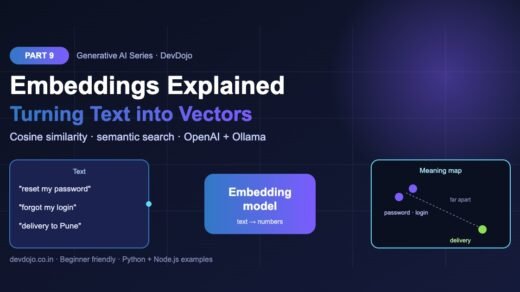
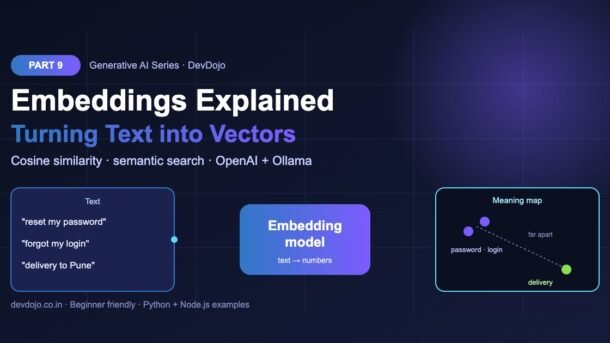
So far in this series, we have used LLMs to write text. Today we use AI to understand text. Embeddings turn any sentence into a list of numbers (a vector) that captures its meaning. Sentences that mean the same thing get similar numbers, even when they share no words. In this part you will learn what embeddings are, how cosine similarity measures “closeness”, how to create embeddings with OpenAI and with a free local Ollama model, and how to build a small semantic search in Python and Node.js. This is the foundation for vector databases (Part 10) and RAG (Part 11).
- An embedding is a fixed-length list of numbers that represents the meaning of a piece of text.
- Texts with similar meaning have vectors that point in a similar direction. “Forgot my login” lands near “reset my password”.
- We measure closeness with cosine similarity: near 1 means very similar, near 0 means unrelated.
- Create embeddings with
client.embeddings.create(model="text-embedding-3-small", input=[...])or for free withollama.embed(model="nomic-embed-text", input=[...]). - Semantic search = embed your documents once, embed the question, then return the documents with the highest similarity.
- Always use the same model for documents and questions, and cache vectors so you never pay twice.
Full Generative AI roadmap (30 parts)
Beginner
- What Is Generative AI and How Do LLMs Work?
- Tokens, Context Windows and Model Parameters
- Your First LLM API Calls in Python and Node.js (OpenAI, Anthropic, Gemini)
- Prompt Engineering Basics: Roles, Instructions and Examples
- Temperature, Top-p and Controlling Model Output
- Run LLMs Locally with Ollama
- Streaming Responses and Building a Simple Chat UI
- Structured Outputs: Getting Reliable JSON from LLMs
Intermediate
- Embeddings Explained: Turning Text into Vectors You are here
- Vector Databases: pgvector, Chroma and Pinecone Coming soon
- RAG Fundamentals: Retrieval-Augmented Generation Coming soon
- Document Loading and Chunking Strategies Coming soon
- Better RAG: Hybrid Search, Re-ranking and Query Rewriting Coming soon
- Function Calling and Tool Use Coming soon
- Conversation Memory and Long Context Management Coming soon
- Multimodal AI: Vision, Images and Audio Inputs Coming soon
- How Image Generation Works: Diffusion Models Basics Coming soon
- LangChain vs LlamaIndex: When to Use a Framework Coming soon
- Testing LLM Apps: Evals, Metrics and Test Sets Coming soon
- Cutting Cost and Latency: Caching, Batching and Model Choice Coming soon
Advanced
- Fine-Tuning vs Prompting vs RAG: Choosing the Right Tool Coming soon
- Fine-Tuning an Open Model with LoRA Coming soon
- Transformers Deep Dive: Attention Explained Simply Coming soon
- Reasoning Models and Thinking Time Coming soon
- Guardrails, Safety and Prompt Injection Defence Coming soon
- Monitoring and Tracing LLM Apps in Production Coming soon
- Serving Open Models: vLLM, Quantization and GPUs Coming soon
- Building a Production GenAI App End to End Coming soon
- Responsible AI: Privacy, Licensing and Bias Coming soon
- Final Project: Build Your Own AI Knowledge Assistant Coming soon
What Are Embeddings? Turning Text into Vectors
Computers are great with numbers but have no idea what words mean. An embedding model fixes that. You give it text, and it gives you back a list of numbers, for example 1,536 numbers for OpenAI’s text-embedding-3-small. This list is called a vector or an embedding.
Each number is like one “direction of meaning” the model has learned while reading huge amounts of text. No single number means “animal” or “food” on its own, but together they place your text at a point in a very large space. The important rule is simple:
Three facts to remember:
Why Keyword Search Is Not Enough
Classic search (like SQL LIKE '%password%') only finds documents that contain the exact words. Real users type things like “can’t log in”, “locked out” or “login nahi ho raha”. Keyword search misses all of these. Embeddings search by meaning, which unlocks:
- Semantic search in docs, products or support articles.
- RAG (Retrieval-Augmented Generation): find the right paragraphs and give them to an LLM so it answers from your data.
- Recommendations: “people who read this also liked…” by finding nearby items.
- Clustering and de-duplication: group similar tickets or detect near-duplicate questions.
- Classification: compare a text to example vectors for each label.
Cosine Similarity Explained (with Code You Can Run)
To know if two vectors are “close”, we look at the angle between them. Cosine similarity gives a score:
- Close to 1 → same direction → very similar meaning.
- Around 0 → unrelated.
- Negative → opposite direction (rare with modern text models).
The formula is: dot(a, b) / (length(a) × length(b)). The dot product multiplies matching numbers and adds them up. Let us try it with tiny 3-number vectors so you can see the math clearly:
import math

# Tiny 3-number "embeddings" so you can see the math.
# Real models give 384 to 3072 numbers per text.
words = {
    "cat":    [0.90, 0.80, 0.10],
    "kitten": [0.85, 0.75, 0.20],
    "car":    [0.10, 0.20, 0.95],
}

def cosine_similarity(a, b):
    dot = sum(x * y for x, y in zip(a, b))
    len_a = math.sqrt(sum(x * x for x in a))
    len_b = math.sqrt(sum(y * y for y in b))
    return dot / (len_a * len_b)

print("cat vs kitten:", round(cosine_similarity(words["cat"], words["kitten"]), 3))
print("cat vs car: ", round(cosine_similarity(words["cat"], words["car"]), 3))$ python similarity.py
cat vs kitten: 0.996
cat vs car: 0.293// Tiny 3-number "embeddings" so you can see the math.
// Real models give 384 to 3072 numbers per text.
const words = {
cat: [0.9, 0.8, 0.1],
kitten: [0.85, 0.75, 0.2],
car: [0.1, 0.2, 0.95],
};
function cosineSimilarity(a, b) {
const dot = a.reduce((sum, x, i) => sum + x * b[i], 0);
const lenA = Math.hypot(...a);
const lenB = Math.hypot(...b);
return dot / (lenA * lenB);
}
console.log("cat vs kitten:", cosineSimilarity(words.cat, words.kitten).toFixed(3));
console.log("cat vs car: ", cosineSimilarity(words.car, words.cat).toFixed(3));$ node similarity.mjs
cat vs kitten: 0.996
cat vs car: 0.293Click the similarity.py / similarity.mjs tabs to switch language, then press ▶ Run to see the real output.
“cat” and “kitten” score 0.996 (almost the same direction), while “cat” and “car” score only 0.293, even though the words look alike. Real embeddings work exactly the same way, just with hundreds or thousands of numbers.
Setup: Install the SDKs
We will use two options side by side: the OpenAI API (cloud, paid per token, very cheap for embeddings) and Ollama (free, runs on your laptop). Pick one or try both.
# Python
$ pip install openai ollama
# Node.js (in a folder with "type": "module" or use .mjs files)
$ npm install openai ollama
# Cloud option: set your OpenAI key
$ export OPENAI_API_KEY="sk-..."
# Free local option: pull an embedding model in Ollama
$ ollama pull nomic-embed-text
Create Embeddings with the OpenAI API
The embeddings endpoint takes a model and an input. The input can be one string or a list of strings. Sending a list is faster and cheaper than one request per text.
from openai import OpenAI

client = OpenAI()  # reads OPENAI_API_KEY from your environment

texts = [
    "How do I reset my password?",
    "I forgot my login details",
    "What is the delivery time to Pune?",
]

resp = client.embeddings.create(
    model="text-embedding-3-small",
    input=texts,          # send many texts in one call
)

for item, text in zip(resp.data, texts):
    vec = item.embedding
    print(f"{text!r} -> {len(vec)} numbers, first 3: {[round(x, 3) for x in vec[:3]]}")

print("tokens used:", resp.usage.total_tokens)$ python embed_openai.py
'How do I reset my password?' -> 1536 numbers, first 3: [0.012, -0.034, 0.051]
'I forgot my login details' -> 1536 numbers, first 3: [0.008, -0.029, 0.047]
'What is the delivery time to Pune?' -> 1536 numbers, first 3: [-0.041, 0.017, 0.006]
tokens used: 24import OpenAI from "openai";
const client = new OpenAI(); // reads OPENAI_API_KEY from your environment
const texts = [
"How do I reset my password?",
"I forgot my login details",
"What is the delivery time to Pune?",
];
const resp = await client.embeddings.create({
model: "text-embedding-3-small",
input: texts, // send many texts in one call
});
resp.data.forEach((item, i) => {
const vec = item.embedding;
const first3 = vec.slice(0, 3).map((x) => x.toFixed(3));
console.log(`"${texts[i]}" -> ${vec.length} numbers, first 3: [${first3}]`);
});
console.log("tokens used:", resp.usage.total_tokens);$ node embed-openai.mjs
"How do I reset my password?" -> 1536 numbers, first 3: [0.012, -0.034, 0.051]
"I forgot my login details" -> 1536 numbers, first 3: [0.008, -0.029, 0.047]
"What is the delivery time to Pune?" -> 1536 numbers, first 3: [-0.041, 0.017, 0.006]
tokens used: 24Switch between the Python and Node.js tabs and press ▶ Run. The output shown is an example: real values depend on the model.
Notice that every text gives 1,536 numbers, no matter how long it is. The first two sentences (password and login) will also have similar values overall, while the delivery question will look different. You never read these numbers yourself; you only compare them. See the official OpenAI embeddings guide for the full list of options.
Choosing an Embedding Model
There is no single “best” model. Click the tabs to compare four popular choices:
text-embedding-3-small — the best default for most apps. Cheap, fast and good quality.
text-embedding-3-large — higher accuracy for hard or multilingual search, at a higher price and twice the storage.
nomic-embed-text in Ollama — free, private, runs on your laptop. Great for learning and for data that must not leave your machine.
all-MiniLM-L6-v2 via the Sentence Transformers Python library — a tiny, popular open model. Fast even on CPU.
For most beginners: start with text-embedding-3-small if you already use OpenAI, or nomic-embed-text in Ollama if you want everything free and local. Leaderboards like the MTEB leaderboard rank many more models if you need to go deeper.
Build a Semantic Search in Python and Node.js
Now let us put it all together. We will search a tiny “help centre” by meaning. The flow has four steps:
This example uses Ollama so it is completely free. First run ollama pull nomic-embed-text, then:
import ollama  # pip install ollama  (and run: ollama pull nomic-embed-text)

MODEL = "nomic-embed-text"

docs = [
    "To reset your password, click 'Forgot password' on the login page.",
    "We deliver to Pune, Mumbai and Delhi within 3 to 5 working days.",
    "You can cancel an order from the My Orders page before it ships.",
    "Our support team is available on chat from 9 AM to 9 PM IST.",
]

def embed(texts):
    return ollama.embed(model=MODEL, input=texts)["embeddings"]

def cosine(a, b):
    dot = sum(x * y for x, y in zip(a, b))
    return dot / ((sum(x * x for x in a) ** 0.5) * (sum(y * y for y in b) ** 0.5))

doc_vectors = embed(docs)                 # 1. embed every document once
question = "I can't log in to my account"
query_vector = embed([question])[0]       # 2. embed the question

scored = [(cosine(query_vector, v), d) for v, d in zip(doc_vectors, docs)]
scored.sort(reverse=True)                 # 3. highest similarity first

print("Question:", question)
for score, doc in scored[:2]:
print(f"{score:.2f} {doc}")$ python semantic_search.py
Question: I can't log in to my account
0.71 To reset your password, click 'Forgot password' on the login page.
0.52 Our support team is available on chat from 9 AM to 9 PM IST.import ollama from "ollama"; // npm i ollama (and run: ollama pull nomic-embed-text)
const MODEL = "nomic-embed-text";
const docs = [
"To reset your password, click 'Forgot password' on the login page.",
"We deliver to Pune, Mumbai and Delhi within 3 to 5 working days.",
"You can cancel an order from the My Orders page before it ships.",
"Our support team is available on chat from 9 AM to 9 PM IST.",
];
const embed = async (texts) =>
(await ollama.embed({ model: MODEL, input: texts })).embeddings;
const cosine = (a, b) => {
const dot = a.reduce((s, x, i) => s + x * b[i], 0);
return dot / (Math.hypot(...a) * Math.hypot(...b));
};
const docVectors = await embed(docs); // 1. embed every document once
const question = "I can't log in to my account";
const [queryVector] = await embed([question]); // 2. embed the question
const scored = docVectors
.map((v, i) => ({ score: cosine(queryVector, v), doc: docs[i] }))
.sort((a, b) => b.score - a.score); // 3. highest similarity first
console.log("Question:", question);
for (const { score, doc } of scored.slice(0, 2)) {
console.log(`${score.toFixed(2)} ${doc}`);
}$ node semantic-search.mjs
Question: I can't log in to my account
0.71 To reset your password, click 'Forgot password' on the login page.
0.52 Our support team is available on chat from 9 AM to 9 PM IST.Click the tabs to compare Python and Node.js. Press ▶ Run to see example output.
The question “I can’t log in to my account” does not contain the words “reset” or “password”, yet the password article comes first. That is semantic search. In a real app you would store doc_vectors in a vector database instead of a Python list, which is exactly what Part 10 covers. If you want to see a full working version with PostgreSQL, our RAG tutorial with Python and pgvector shows where this leads.
embed() function body with client.embeddings.create(model="text-embedding-3-small", input=texts) and return [d.embedding for d in resp.data]. The rest of the code stays the same.Save Money: Cache and Shorten Your Vectors
Two easy wins for real projects:
- Cache embeddings. The same text with the same model always gives the same vector, so store it and never pay twice.
- Shorten vectors. OpenAI’s
text-embedding-3models accept adimensionsparameter. A 512-number vector uses one third of the storage of 1,536 numbers and is faster to compare, with only a small loss in quality.
import json, hashlib
from pathlib import Path
from openai import OpenAI

client = OpenAI()
CACHE = Path("embeddings_cache.json")
cache = json.loads(CACHE.read_text()) if CACHE.exists() else {}

def embed_cached(text, model="text-embedding-3-small", dims=512):
    key = hashlib.sha256(f"{model}:{dims}:{text}".encode()).hexdigest()
    if key not in cache:                       # only pay for new text
        resp = client.embeddings.create(model=model, input=text, dimensions=dims)
        cache[key] = resp.data[0].embedding
        CACHE.write_text(json.dumps(cache))
    return cache[key]

vec = embed_cached("Embeddings turn text into numbers")
print(len(vec), "numbers (shortened with dimensions=512)")$ python cache_embeddings.py
512 numbers (shortened with dimensions=512)Press ▶ Run to see example output. Run it twice: the second run reads from embeddings_cache.json and makes no API call.
Common Errors and Fixes
| Problem | Why it happens | Fix |
|---|---|---|
| Search results look random | Documents and question were embedded with different models | Use exactly the same model (and dimensions) for both |
ValueError / shapes do not match | Comparing a 768-number vector with a 1,536-number vector | Check len(vec); re-embed old data after a model change |
| “maximum context length” error | Text is longer than the model’s input limit | Split long documents into chunks before embedding |
model "nomic-embed-text" not found | Model not downloaded in Ollama | Run ollama pull nomic-embed-text |
| 429 rate limit errors | One API call per text in a loop | Send a list in input (batching) and add retries |
| All scores are very close (e.g. 0.70–0.80) | Normal for many models; scores are relative, not absolute | Rank by score and test a threshold on your own data |
Best Practices for Embeddings
- One model per index. Store the model name next to each vector so you know what you are comparing.
- Clean your text first. Remove HTML tags, menus and repeated footers before embedding.
- Batch requests. Embed hundreds of texts per call instead of one at a time.
- Embed once, search many times. Documents are embedded when they change, not on every search.
- Keep the original text. A vector cannot be turned back into text, so always store the text (or an ID) with it.
- Evaluate on real questions. Write 20 real user questions with the expected answer and check how often the right document is in the top 3.
- Mind privacy. Embeddings are derived from your data. Use a local model if the data must not leave your servers.
Practice Task
Build a “similar questions” finder.
- Write 10 short FAQ questions about any topic (your college, a shop, a product).
- Embed them all with one call (OpenAI or Ollama).
- For a new question typed by the user, print the 3 most similar FAQ questions with their scores.
- Bonus: if the best score is below a threshold you choose (say 0.5), print “No good match found”.
- Bonus 2: save the vectors to a JSON file so the second run is instant.
FAQ
What is the difference between an embedding and a token?
A token is a small piece of text (part of a word) that a model reads, as we saw in Part 2. An embedding is a list of numbers that represents the meaning of a whole text, made by an embedding model.
Can I use ChatGPT models like GPT to make embeddings?
No. Chat models generate text. You need a dedicated embedding model such as text-embedding-3-small, nomic-embed-text or a Sentence Transformers model.
How many dimensions should I use?
Start with the model default. If storage or speed matters, try a smaller dimensions value (like 512) and check that search quality is still good on your own test questions.
Are embeddings expensive?
They are much cheaper than chat completions, because the model only reads text and does not generate any. With Ollama or Sentence Transformers they are completely free, you only pay for your own hardware.
Do embeddings work for Hindi and other Indian languages?
Many modern models are multilingual and work reasonably well for Hindi and other languages, but quality varies. Test with your own sentences, and consider a larger or specifically multilingual model if results are weak.
Do I need a vector database?
For a few thousand texts, a simple list in memory (like our example) is fine. For more data, fast filtering and persistence, use a vector database. That is the topic of Part 10.
Conclusion
Embeddings turn text into vectors so your code can compare meaning instead of matching words. You learned how cosine similarity works, how to create embeddings with OpenAI and Ollama in Python and Node.js, how to build a small semantic search, and how to cache and shorten vectors to save money. Every RAG system, smart search box and recommendation feature you build from now on starts with these few lines of code.
New posts every day on DevDojo
Follow the full Generative AI series from basics to production. Bookmark devdojo.co.in and come back for Part 10.