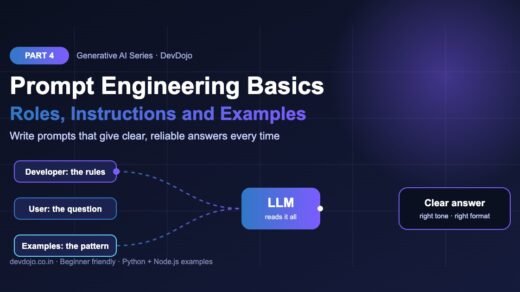
What you should know first: read Part 4: Prompt Engineering Basics and Part 3: Your First LLM API Calls. It also helps to remember what tokens are from Part 2.
Ask an LLM the same question twice and you often get two different answers. Sometimes that is great (brainstorming), and sometimes it is a bug (data extraction). In this part you will learn how temperature and top-p help with controlling model output: how a model actually picks each word, what the temperature, top-p and top-k settings change, how max tokens and stop sequences end an answer, and which of these dials still work on today’s reasoning models from OpenAI, Anthropic and Google. You will run two small simulations (no API key needed) to see sampling happen, then use the real settings in Python and Node.js.
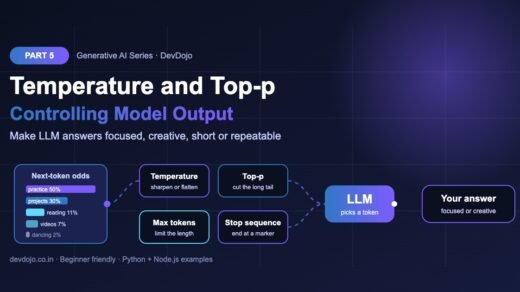
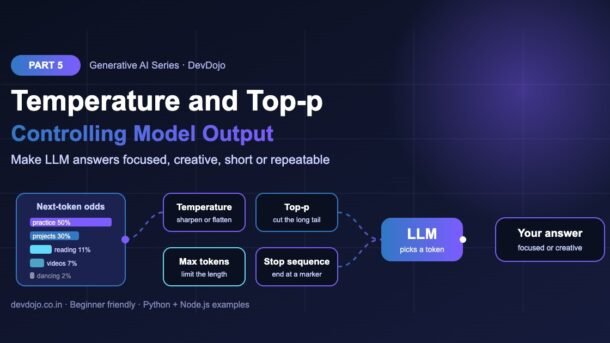
- An LLM gives every possible next token a probability, then samples one. Sampling settings change those odds.
- Temperature sharpens (low, like 0.2) or flattens (high, like 1.2) the odds. Low = focused and repeatable, high = varied and creative.
- Top-p keeps only the most likely words that add up to p (for example 90%); top-k keeps the k most likely words. Change temperature or top-p, not both.
- Max tokens limits answer length and stop sequences end the answer at a marker. These work on almost every model.
- Many new reasoning models reject custom temperature: GPT-6 accepts it only with reasoning effort
none, and newer Claude models accept only the defaults. Use prompts, verbosity and structured outputs instead. - Open models (Ollama, vLLM) still give you every dial, including a seed for repeatable results.
Full Generative AI roadmap (30 parts)
Beginner
- What Is Generative AI and How Do LLMs Work?
- Tokens, Context Windows and Model Parameters
- Your First LLM API Calls in Python and Node.js (OpenAI, Anthropic, Gemini)
- Prompt Engineering Basics: Roles, Instructions and Examples
- Temperature, Top-p and Controlling Model Output You are here
- Running Open Models Locally with Ollama Coming soon
- Streaming Responses and Building a Simple Chat UI Coming soon
- Structured Outputs: Getting Reliable JSON from LLMs Coming soon
Intermediate
- Embeddings Explained: Turning Text into Vectors Coming soon
- Vector Databases: pgvector, Chroma and Pinecone Coming soon
- RAG Fundamentals: Retrieval-Augmented Generation Coming soon
- Document Loading and Chunking Strategies Coming soon
- Better RAG: Hybrid Search, Re-ranking and Query Rewriting Coming soon
- Function Calling and Tool Use Coming soon
- Conversation Memory and Long Context Management Coming soon
- Multimodal AI: Vision, Images and Audio Inputs Coming soon
- How Image Generation Works: Diffusion Models Basics Coming soon
- LangChain vs LlamaIndex: When to Use a Framework Coming soon
- Testing LLM Apps: Evals, Metrics and Test Sets Coming soon
- Cutting Cost and Latency: Caching, Batching and Model Choice Coming soon
Advanced
- Fine-Tuning vs Prompting vs RAG: Choosing the Right Tool Coming soon
- Fine-Tuning an Open Model with LoRA Coming soon
- Transformers Deep Dive: Attention Explained Simply Coming soon
- Reasoning Models and Thinking Time Coming soon
- Guardrails, Safety and Prompt Injection Defence Coming soon
- Monitoring and Tracing LLM Apps in Production Coming soon
- Serving Open Models: vLLM, Quantization and GPUs Coming soon
- Building a Production GenAI App End to End Coming soon
- Responsible AI: Privacy, Licensing and Bias Coming soon
- Final Project: Build Your Own AI Knowledge Assistant Coming soon
How an LLM picks the next word
In Part 1 we learned that an LLM writes one token at a time. At every step the model gives a raw score (called a logit) to every token in its vocabulary. A function called softmax turns those scores into percentages that add up to 100%. Then the model does not simply take the top word: it samples, like rolling a weighted dice. A word with 50% wins half the time, a word with 2% wins now and then.
That dice roll is why the same prompt can give different answers. The output-control settings in this post change the dice before it is rolled, or decide when to stop rolling:
Project setup
Use the same project folder and .env file (with your API keys) from Part 3. The first two demos are pure Python and plain JavaScript, so you can run them without any key or package.
# Python: SDKs from Part 3
$ pip install -U openai anthropic python-dotenv
# Node.js
$ npm install openai @anthropic-ai/sdk
# the two sampling demos need no packages and no API key
$ python temperature_demo.py
What temperature does in an LLM
Temperature divides every score by a number T before softmax. A small T (like 0.2) makes big scores much bigger than small ones, so the top word wins almost every time. A large T (like 1.5) squeezes the scores together, so rare words get a real chance. T = 1 leaves the model’s odds unchanged. Let’s see it with five candidate words for the sentence “The best way to learn coding is …”.
# See how temperature reshapes the next-token probabilities
import math

# Toy scores (logits) for the word after: "The best way to learn coding is ..."
logits = {"practice": 4.0, "projects": 3.5, "reading": 2.5,
          "videos": 2.0, "dancing": 0.5}

def softmax(scores, temperature=1.0):
    scaled = {w: s / temperature for w, s in scores.items()}
    biggest = max(scaled.values())
    exps = {w: math.exp(s - biggest) for w, s in scaled.items()}
    total = sum(exps.values())
    return {w: e / total for w, e in exps.items()}

for t in (0.2, 0.7, 1.0, 1.5):
    probs = softmax(logits, t)
    row = "  ".join(f"{w}={p:.0%}" for w, p in probs.items())
print(f"T={t:<4} {row}")$ python temperature_demo.py
T=0.2 practice=92% projects=8% reading=0% videos=0% dancing=0%
T=0.7 practice=60% projects=29% reading=7% videos=3% dancing=0%
T=1.0 practice=50% projects=30% reading=11% videos=7% dancing=2%
T=1.5 practice=41% projects=29% reading=15% videos=11% dancing=4%// See how temperature reshapes the next-token probabilities
const logits = { practice: 4.0, projects: 3.5, reading: 2.5,
videos: 2.0, dancing: 0.5 };
function softmax(scores, temperature = 1.0) {
const scaled = Object.entries(scores).map(([w, s]) => [w, s / temperature]);
const biggest = Math.max(...scaled.map(([, s]) => s));
const exps = scaled.map(([w, s]) => [w, Math.exp(s - biggest)]);
const total = exps.reduce((sum, [, e]) => sum + e, 0);
return exps.map(([w, e]) => [w, e / total]);
}
for (const t of [0.2, 0.7, 1.0, 1.5]) {
const row = softmax(logits, t)
.map(([w, p]) => `${w}=${Math.round(p * 100)}%`)
.join(" ");
console.log(`T=${t.toFixed(1).padEnd(4)} ${row}`);
}$ node temperature-demo.mjs
T=0.2 practice=92% projects=8% reading=0% videos=0% dancing=0%
T=0.7 practice=60% projects=29% reading=7% videos=3% dancing=0%
T=1.0 practice=50% projects=30% reading=11% videos=7% dancing=2%
T=1.5 practice=41% projects=29% reading=15% videos=11% dancing=4%Click the tabs to switch between Python and Node.js, then click ▶ Run to see the real output.
temperature_demo.py run below.)Look at the numbers. At T=0.2 “practice” wins 92% of the time and “reading” almost never appears. At T=1.5 even “dancing” gets 4%. Over a 500-token answer those small chances add up, which is why very high temperatures produce strange or off-topic text.
0 as “always take the top token” (called greedy decoding). Even then, hosted models can return slightly different text because of how the servers batch and compute numbers. Low temperature means more repeatable, not perfectly repeatable.Top-p and top-k explained
Temperature changes the odds of all words. Top-p and top-k instead remove unlikely words before the dice roll:
- Top-k keeps only the k most likely tokens. With
top_k=2only “practice” and “projects” can be picked. - Top-p (also called nucleus sampling) sorts the tokens and keeps adding them until their total reaches p. With
top_p=0.9it keeps words until 90% is covered. When the model is confident, that may be one word; when it is unsure, it may be many. This makes top-p smarter than a fixed top-k.
top_p. Everything after the cut-off can never be picked.# Top-k and top-p (nucleus) sampling on a toy distribution
import random
probs = {"practice": 0.50, "projects": 0.30, "reading": 0.11,
"videos": 0.07, "dancing": 0.02}
def top_k(p, k):
keep = sorted(p.items(), key=lambda x: x[1], reverse=True)[:k]
return dict(keep)
def top_p(p, threshold):
keep, running = {}, 0.0
for word, prob in sorted(p.items(), key=lambda x: x[1], reverse=True):
keep[word] = prob
running += prob
if running >= threshold: # stop once we cover enough probability
break
return keep
def sample(p, rng):
words, weights = zip(*p.items()) # choices() renormalises the weights
return rng.choices(words, weights=weights)[0]
print("top_k=2 keeps:", list(top_k(probs, 2)))
print("top_p=0.9 keeps:", list(top_p(probs, 0.9)))
rng = random.Random(42) # a fixed seed makes the demo repeatable
picks = [sample(top_p(probs, 0.9), rng) for _ in range(8)]
print("8 samples with top_p=0.9:", picks)$ python top_p_demo.py
top_k=2 keeps: ['practice', 'projects']
top_p=0.9 keeps: ['practice', 'projects', 'reading']
8 samples with top_p=0.9: ['projects', 'practice', 'practice', 'practice', 'projects', 'projects', 'reading', 'practice']Click ▶ Run to see which words survive each filter and eight real samples.
Notice that “videos” and “dancing” can never appear in the samples, no matter how many times you run it. That is the job of top-p: cut off the long tail of odd words while still allowing some variety.
Max tokens and stop sequences
The next two settings do not change which word is picked. They decide when the answer ends, and they work on almost every model, including reasoning models.
Max tokens
Max tokens is a hard ceiling on output length. The parameter has different names: max_output_tokens in the OpenAI Responses API, max_tokens in the Claude Messages API (required there), maxOutputTokens in Gemini and num_predict in Ollama. It protects your bill and your UI, but it does not make the model write shorter. It simply cuts the answer off. To get a short complete answer, ask for it in the prompt (“in 2 sentences”) and keep max tokens as a safety net. On reasoning models, thinking tokens also count toward this limit, so do not set it too low.
Stop sequences
A stop sequence is text that ends generation the moment it appears; the stop text itself is not included in the answer. Use it to stop after one list item, before a second “Q:” in a Q&A template, or at a closing tag. Claude calls it stop_sequences, Chat Completions-style APIs and Ollama call it stop, and Gemini calls it stopSequences.
Which models still accept temperature and top-p?
Here is the twist for modern developers: the newest reasoning models are taking these dials away. When a model “thinks” before it answers, the vendor tunes sampling for you. Code written a year ago with temperature=0 can now fail with a 400 error. This is what the official docs say right now:
| Model family | Temperature / top-p | What to use instead |
|---|---|---|
| GPT-6 Luna, GPT-6 Sol (OpenAI) | Allowed only with reasoning.effort: "none"; otherwise remove them | text.verbosity, max_output_tokens, structured outputs |
| GPT-6 Astra, GPT-6.1 Sol (OpenAI) | Not supported (no none effort) | Reasoning effort, verbosity, prompt |
| Claude Opus 4.7 and newer, e.g. Opus 5.5, Sonnet 5 | Default only: any other temperature, top_p or top_k returns a 400 error | max_tokens, stop_sequences, clear prompts |
| Gemini 3 (Google) | Accepted, but Google recommends keeping the default 1.0 | Thinking level, maxOutputTokens |
| Open models (Ollama, vLLM) | Fully supported, plus top_k, seed, penalties | — |
Sources: OpenAI’s Using GPT-6 guide and Anthropic’s model migration notes. Rules change often, so check the model page before you ship.
temperature and top_p cannot both be specified if you send both. Send one or none.Controlling model output with the OpenAI and Claude APIs
Now let’s use the real settings. The Python file calls GPT-6 Luna with reasoning effort none (so temperature is allowed) and compares temperature=0 with 1.2. The Node.js file calls Claude with max_tokens and a stop sequence that ends the list before tip 4, and checks stop_reason to see why the answer ended.
# Control GPT-6 Luna's output: randomness, length and detail
from dotenv import load_dotenv
from openai import OpenAI

load_dotenv()
client = OpenAI()

def ask(prompt, temperature):
    response = client.responses.create(
        model="gpt-6-luna",
        reasoning={"effort": "none"},  # temperature works only with "none"
        temperature=temperature,       # change temperature OR top_p, not both
        max_output_tokens=40,          # hard limit on answer length
        text={"verbosity": "low"},     # low / medium / high detail
        input=prompt,
    )
    return response.output_text.strip()

prompt = "Suggest one name for a chai delivery app. Reply with the name only."
for t in (0.0, 1.2):
    names = [ask(prompt, t) for _ in range(3)]
print(f"temperature={t}:", names)$ python settings_openai.py
temperature=0.0: ['ChaiNow', 'ChaiNow', 'ChaiNow']
temperature=1.2: ['Kulhad Express', 'ChaiNow', 'Sip Sutra']// Claude: control answer length and where the answer stops
import Anthropic from "@anthropic-ai/sdk";
const client = new Anthropic(); // reads ANTHROPIC_API_KEY
const msg = await client.messages.create({
model: process.env.ANTHROPIC_MODEL ?? "claude-haiku-5-5",
max_tokens: 200, // required: upper limit for the answer
stop_sequences: ["\n4."], // stop before tip number 4
// No temperature or top_p: newer Claude models only accept the defaults
messages: [
{ role: "user", content: "Give 5 short tips for learning Git, numbered 1. to 5." },
],
});
console.log(msg.content[0].text);
console.log("stop_reason:", msg.stop_reason);
console.log("stop_sequence:", JSON.stringify(msg.stop_sequence));$ node --env-file=.env settings-claude.mjs
1. Commit small changes often, with clear messages.
2. Learn branches early: create one for every feature.
3. Run git status before every commit.
stop_reason: stop_sequence
stop_sequence: "\n4."Switch tabs to see both files and click ▶ Run. Your output will differ: that is the point of sampling.
Two habits from this code are worth copying into every project:
- Always check why the answer ended. Claude returns
stop_reason(end_turn,max_tokensorstop_sequence). With OpenAI, a response cut by the limit hasstatus: "incomplete"withincomplete_details.reasonset to"max_output_tokens". Show a “continue” button or retry with a higher limit instead of displaying half an answer. - Keep the model name in config. When you switch from Luna to Astra, temperature stops being allowed. A small settings function (next section) handles this in one place.
Bonus: every dial on a local model
Open models running on your own machine with Ollama accept all the classic settings. We will set up Ollama properly in Part 6; here is a sneak peek of the options object:
# open models give you every dial (full Ollama guide in Part 6)
$ curl http://localhost:11434/api/generate -d '{
  "model": "qwen3:8b", "prompt": "Name a chai app", "stream": false,
  "options": {"temperature": 0.2, "top_p": 0.9, "top_k": 40,
              "seed": 42, "num_predict": 50, "stop": ["\n"]}
}'
Recommended settings by task
There is no single “best” temperature. Pick settings by the job the model is doing. Click a task:
You want the same answer every time: pull a date from an email, classify a ticket, fill a form. Low temperature plus a strict format is the winning combo. On models that reject temperature, rely on the format and examples instead.
Friendly and natural, but not random. A little variety stops the bot from sounding robotic, while staying on topic.
Taglines, story ideas, app names. Higher temperature gives fresh ideas; a top-p below 1 keeps the really strange words out. Above about 1.3 text often stops making sense.
Code must be correct, not creative. Keep randomness low and make sure the limit is big enough, or the code gets cut off in the middle of a function.
In code, keep these presets in one place and strip the settings a model does not accept. This tiny helper runs without any API key:
# Pick output settings by task, and drop the ones a model rejects
PRESETS = {
    "extract":  {"temperature": 0.0, "top_p": 1.0, "max_tokens": 300},
    "chat":     {"temperature": 0.7, "top_p": 1.0, "max_tokens": 600},
    "creative": {"temperature": 1.0, "top_p": 0.95, "max_tokens": 900},
}

# Models that only accept the default sampling values
NO_SAMPLING = ("claude-opus-5", "claude-sonnet-5", "gpt-6-astra", "gpt-6.1-sol")

def build_settings(task, model, reasoning="none"):
    settings = dict(PRESETS[task])
    fixed = model.startswith(NO_SAMPLING)
    if fixed or (model.startswith("gpt-6") and reasoning != "none"):
        settings.pop("temperature")
        settings.pop("top_p")
    return settings

for model in ("gpt-6-luna", "claude-opus-5-5", "qwen3:8b"):
    print(f"{model:<16}", build_settings("extract", model))
print("gpt-6-luna (reasoning=low)", build_settings("chat", "gpt-6-luna", "low"))$ python output_presets.py
gpt-6-luna {'temperature': 0.0, 'top_p': 1.0, 'max_tokens': 300}
claude-opus-5-5 {'max_tokens': 300}
qwen3:8b {'temperature': 0.0, 'top_p': 1.0, 'max_tokens': 300}
gpt-6-luna (reasoning=low) {'max_tokens': 600}Click ▶ Run: Claude Opus 5.5 and GPT-6 Luna with reasoning switched on get only the length limit, while the local Qwen model keeps every setting.
Repeatable output and seeds
In the top_p_demo.py file we used random.Random(42). A seed fixes the random dice so the same input gives the same picks, which is great for tests and demos. Ollama and most open-model servers accept a seed option, and combined with temperature 0 you get near-identical output on the same machine and model version.
Hosted APIs are different: they make no promise of identical output, and many of them do not let you change sampling at all. For reliable results with hosted models, use these instead:
- A strict format in the prompt, plus few-shot examples (Part 4).
- Structured outputs with a JSON schema, so the answer must fit a shape (Part 8).
- Validation in code: check the answer and retry once if it is wrong.
- Logging of the model name, settings and prompt version for every request, so you can explain any change in behaviour.
Common errors and fixes
| Problem or error | Likely cause | Fix |
|---|---|---|
Unsupported parameter: 'temperature' (OpenAI) | GPT-6 model with reasoning effort other than none | Remove temperature and top_p, or set reasoning.effort to none on Luna/Sol. |
400 error for temperature on Claude | Newer Claude models accept only default sampling | Delete temperature, top_p and top_k from the request. |
temperature and top_p cannot both be specified | Both sent to a Claude model | Send only one of them (or none). |
| Answer cut off mid-sentence | Max tokens too low (thinking tokens count too) | Raise the limit, ask for a shorter answer in the prompt, and check stop_reason / status. |
| Answer is empty | Stop sequence appears right at the start (for example "\n") | Use a more specific stop text, such as "\n4." or "</answer>". |
| Output is random or nonsense | Temperature too high (above about 1.3) | Lower it to 0.7–1.0, or add top_p=0.9 instead. |
| “temperature=0 but answers still change” | Hosted servers are not fully deterministic | Use structured outputs and validation; use a seed with local models for tests. |
| Gemini 3 loops or gives weak reasoning | Temperature set well below the default 1.0 | Go back to the default and control output with the prompt. |
Best practices for controlling model output
- Start with the defaults. Change a setting only when you can name the problem it fixes.
- Change one dial at a time: temperature or top-p, never both.
- Control length with the prompt (“3 bullets”) and use max tokens only as a safety limit.
- Prefer format over randomness tricks for reliable output: clear instructions, examples and structured outputs work on every model.
- Keep settings per model in config and strip parameters a model rejects, so a model upgrade does not become an outage.
- Handle the stop reason in your UI, so users never see a silently truncated answer.
- Test with a fixed set of prompts whenever you change settings or models (more on this in Part 19 on evals).
Practice task
Build a tiny “temperature lab” for yourself:
- Extend
temperature_demo.pyso it also samples 20 words at each temperature (userandom.Random(7)) and prints how many times each word was chosen. - Add a
top_koption and comparetop_k=3withtop_p=0.9atT=1.5. Which one blocks “dancing”? - With an API key, run
settings_openai.pyfive times at temperature 0 and five times at 1.2. Count how many unique names you get. - Change the Claude stop sequence so the answer stops after tip 2, and print
stop_reason. - Add a
"code"preset tooutput_presets.pyand a test that checks Claude Opus models never receivetemperature.
FAQ: temperature, top-p and controlling model output
What is the best temperature for an LLM?
There is no single best value. Use 0–0.2 for extraction and code, about 0.7 for chatbots and 0.9–1.2 for creative work. If the model does not accept temperature, keep the default and control output with the prompt.
What is the difference between temperature and top-p?
Temperature changes the odds of every word (sharper or flatter). Top-p removes the unlikely words whose total probability falls outside p. Both control randomness, so change only one of them.
Does temperature 0 give the same answer every time?
Not always. It makes the model pick the most likely token, but hosted APIs can still vary slightly because of how servers compute numbers. Use structured outputs and validation when you need dependable results.
Why does GPT-6 or Claude reject my temperature setting?
Reasoning models are tuned by the vendor to work best with default sampling. GPT-6 Luna and Sol accept temperature only when reasoning effort is none, and newer Claude models return a 400 error for non-default values.
Does max tokens make the answer shorter?
No. It only cuts the answer off when the limit is reached. Ask for a short answer in the prompt and keep max tokens as a safety net.
What is top-k and should I use it?
Top-k keeps only the k most likely tokens. It is common with open models (Ollama uses 40 by default). Most hosted APIs do not need it; top-p is usually the better filter.
Conclusion
You now know how an LLM really picks its words, and how to control model output: temperature sharpens or flattens the odds, top-p and top-k cut off unlikely words, max tokens and stop sequences decide when the answer ends, and a seed makes local runs repeatable. Just as important, you know that many modern reasoning models now lock the sampling dials, so the most reliable control is a clear prompt, a strict format and code that checks the answer. Learn more in Google’s prompt design strategies.
Missed the previous part? Read Part 4: Prompt Engineering Basics. Want a broader view of AI tooling? See our OpenAI Agents SDK tutorial.
New posts every day on DevDojo
Follow the full Generative AI series – 30 parts from “what is an LLM” to building a production AI assistant. Bookmark devdojo.co.in and tell us in the comments which temperature you use most.