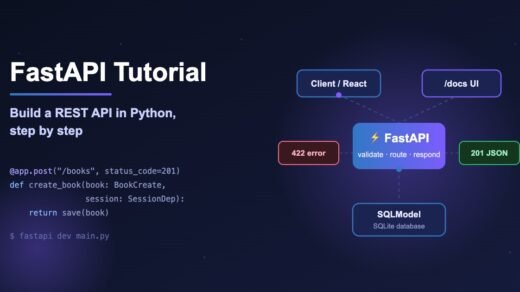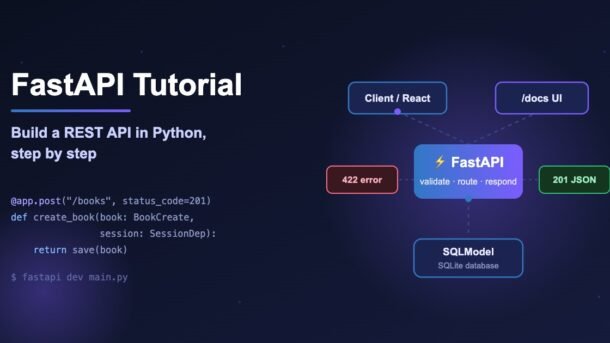
If you know a little Python and want to build your own backend, this FastAPI tutorial is the fastest way to get there. In about 30 minutes you will build a real REST API for a small bookstore — create, read, update and delete books — with automatic data validation, a SQLite database, interactive documentation and tests. Every code example here was run against the latest releases (FastAPI 0.143, Pydantic 2.14, SQLModel 0.0.48) before publishing, so you can copy, paste and run.
- FastAPI is a modern Python web framework for building APIs. You write normal Python functions with type hints, and FastAPI turns them into validated, documented API endpoints.
- Install with
pip install "fastapi[standard]"and start a live-reloading server withfastapi dev main.py. - Pydantic models check incoming data for you. Bad input automatically gets a clear
422error. - SQLModel lets one class work as both a database table and an API model.
- Free interactive docs are available at
/docs— no extra setup. - Test everything with
TestClientandpytest, and run in production withfastapi run.
What is FastAPI and why use it?
FastAPI is an open-source Python framework for building web APIs — the part of an app that sends and receives JSON data. Your React app, mobile app or another service calls these APIs to save and load data. FastAPI was created by Sebastián Ramírez and is now one of the most popular Python frameworks on GitHub, used by companies like Microsoft, Uber and Netflix, and by countless startups in India and around the world.
The big idea is simple: you describe your data with Python type hints, and FastAPI does the boring work for you. It reads the incoming request, converts and checks the data, calls your function, and turns the result back into JSON.
/docs, generated from your code.pip. You do not need to know Django, Flask or databases. If you want a refresher on what is new in Python itself, read our guide on Python 3.15 new features.Step 1: Install FastAPI
FastAPI needs Python 3.10 or newer (check with python --version). Always create a virtual environment — a private folder of packages for this one project — so it does not clash with other projects.
# 1. Create a project folder and a virtual environment
mkdir books-api && cd books-api
python -m venv .venv

# 2. Activate it
source .venv/bin/activate        # macOS / Linux
# .venv\Scripts\activate         # Windows (PowerShell or CMD)

# 3. Install FastAPI with its standard extras + SQLModel
pip install "fastapi[standard]" sqlmodel
The [standard] part installs useful extras: the fastapi command-line tool, the Uvicorn server, and helpers for forms and email validation. Without it you only get the core library.
Step 2: Your first FastAPI app
Create a file called hello.py with two endpoints (an endpoint is one URL + one HTTP method that your API answers):
from fastapi import FastAPI

app = FastAPI(title="DevDojo Books API")


@app.get("/")
def home():
    return {"message": "Hello from FastAPI!"}


@app.get("/books/{book_id}")
def read_book(book_id: int, show_price: bool = False):
    return {"book_id": book_id, "show_price": show_price}
Start the development server:
fastapi dev hello.pyfastapi dev starts the server at http://127.0.0.1:8000 and reloads automatically whenever you save a file. Now open these in your browser:
http://127.0.0.1:8000/→{"message": "Hello from FastAPI!"}http://127.0.0.1:8000/books/7?show_price=true→{"book_id": 7, "show_price": true}http://127.0.0.1:8000/books/abc→ a422error, becauseabcis not an integerhttp://127.0.0.1:8000/docs→ interactive documentation where you can click “Try it out”
Notice what happened. book_id appears in the URL path, so FastAPI treats it as a path parameter. show_price is not in the path, so it becomes a query parameter (the part after ?). Because you wrote int and bool, FastAPI converts the text from the URL into real Python values — "true", "1" and "yes" all become True.
main.py (or app.py), you can simply run fastapi dev with no file name — the CLI finds it automatically.How a request flows through FastAPI
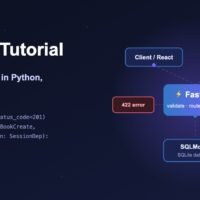
Before we add a database, it helps to picture what happens on every request. The diagram below follows one POST /books call from the client to the database and back.
The important part is the middle: validation and dependencies run before your code. By the time your function starts, you already have clean, typed data and an open database session. If validation fails, your function is never called at all.
Step 3: Validate data with Pydantic
Real APIs receive JSON in the request body — for example, a form to add a new book. FastAPI uses Pydantic to describe what that JSON must look like. You write a class, and Pydantic checks every field.
from typing import Annotated

from fastapi import FastAPI, Query
from pydantic import BaseModel, Field

app = FastAPI()


class BookIn(BaseModel):
    title: str = Field(min_length=1, max_length=200)
    author: str
    price: float = Field(gt=0, description="Price in INR")
    in_stock: bool = True


@app.post("/books")
def create_book(book: BookIn):
    return {"saved": book}


@app.get("/search")
def search_books(
    q: Annotated[str, Query(min_length=2, max_length=50)],
    limit: Annotated[int, Query(ge=1, le=100)] = 10,
):
    return {"q": q, "limit": limit}
A few things to notice:
BookIninherits fromBaseModel, so FastAPI reads it from the JSON body.Field(gt=0)means “greater than 0”. A negative price is rejected automatically.in_stock: bool = Truehas a default, so it is optional in the request.Annotated[str, Query(min_length=2)]adds rules to a query parameter. ThisAnnotatedstyle is the recommended way in current FastAPI.
If someone sends {"title": "Bad", "author": "X", "price": -5}, they get this response with status 422 Unprocessable Content:
{
  "detail": [
    {
      "type": "greater_than",
      "loc": ["body", "price"],
      "msg": "Input should be greater than 0",
      "input": -5,
      "ctx": {"gt": 0.0}
    }
  ]
}
The loc field tells the caller exactly where the problem is (body → price), and msg explains it in plain English. Your frontend can show this message straight to the user.
Step 4: Add a database with SQLModel
Data in a Python list disappears when the server restarts, so we need a database. We will use SQLite (a database stored in a single file, built into Python) and SQLModel, a library from the same author as FastAPI. SQLModel combines Pydantic (for validation) and SQLAlchemy (for databases), so one class can be both a table and an API model.
A clean pattern is to create a few small models that share a common base. Each model has one clear job:
Why not use just one class? Because the client should never send the id (the database creates it), but should always receive it back. And for updates, every field is optional. Separate models keep these rules clear and stop users from overwriting fields they should not touch.
Step 5: Build the full CRUD API
CRUD means Create, Read, Update, Delete — the four basic things every data API does. Here is the complete, working app in a single file. Create main.py:
from contextlib import asynccontextmanager
from typing import Annotated

from fastapi import Depends, FastAPI, HTTPException, Query, status
from sqlmodel import Field, Session, SQLModel, create_engine, select


# ---------- Models ----------
class BookBase(SQLModel):
    title: str = Field(min_length=1, max_length=200, index=True)
    author: str = Field(min_length=1, max_length=100)
    price: float = Field(gt=0)
    in_stock: bool = True


class Book(BookBase, table=True):
    id: int | None = Field(default=None, primary_key=True)


class BookCreate(BookBase):
    pass


class BookPublic(BookBase):
    id: int


class BookUpdate(SQLModel):
    title: str | None = None
    author: str | None = None
    price: float | None = Field(default=None, gt=0)
    in_stock: bool | None = None


# ---------- Database ----------
DATABASE_URL = "sqlite:///books.db"
engine = create_engine(DATABASE_URL, connect_args={"check_same_thread": False})


def get_session():
    with Session(engine) as session:
        yield session


SessionDep = Annotated[Session, Depends(get_session)]


@asynccontextmanager
async def lifespan(app: FastAPI):
    SQLModel.metadata.create_all(engine)  # runs once at startup
    yield


app = FastAPI(title="DevDojo Books API", lifespan=lifespan)


# ---------- Routes ----------
@app.post("/books", response_model=BookPublic, status_code=status.HTTP_201_CREATED)
def create_book(book: BookCreate, session: SessionDep):
    db_book = Book.model_validate(book)
    session.add(db_book)
    session.commit()
    session.refresh(db_book)
    return db_book


@app.get("/books", response_model=list[BookPublic])
def list_books(
    session: SessionDep,
    offset: int = 0,
    limit: Annotated[int, Query(le=100)] = 20,
):
    return session.exec(select(Book).offset(offset).limit(limit)).all()


@app.get("/books/{book_id}", response_model=BookPublic)
def get_book(book_id: int, session: SessionDep):
    book = session.get(Book, book_id)
    if not book:
        raise HTTPException(status_code=404, detail="Book not found")
    return book


@app.patch("/books/{book_id}", response_model=BookPublic)
def update_book(book_id: int, data: BookUpdate, session: SessionDep):
    book = session.get(Book, book_id)
    if not book:
        raise HTTPException(status_code=404, detail="Book not found")
    book.sqlmodel_update(data.model_dump(exclude_unset=True))
    session.add(book)
    session.commit()
    session.refresh(book)
    return book


@app.delete("/books/{book_id}", status_code=status.HTTP_204_NO_CONTENT)
def delete_book(book_id: int, session: SessionDep):
    book = session.get(Book, book_id)
    if not book:
        raise HTTPException(status_code=404, detail="Book not found")
    session.delete(book)
    session.commit()
Run it with fastapi dev main.py. A books.db file appears in your folder on first start. Let us walk through the key ideas.
The lifespan function
lifespan runs code once when the app starts (before yield) and once when it stops (after yield). We use it to create the tables. This replaces the older @app.on_event("startup") style, which is deprecated.
Dependency injection with Depends
get_session() opens a database session, gives it to your route with yield, and closes it after the response — even if an error happens. SessionDep is just a short name for Annotated[Session, Depends(get_session)], so every route that needs the database simply adds session: SessionDep. This is called dependency injection: FastAPI creates the things your function needs and passes them in.
Response models
response_model=BookPublic tells FastAPI to filter and document the output. Even if the database object had private fields (like a password hash in a user table), only the fields in BookPublic are sent back. It also makes the /docs page show the exact response shape.
Partial updates with PATCH
data.model_dump(exclude_unset=True) returns only the fields the client actually sent. So {"price": 349} changes the price and leaves the title, author and stock alone. Then sqlmodel_update() copies those values onto the database object.
Errors and status codes
raise HTTPException(status_code=404, ...) stops the function and sends a clean JSON error. We also set 201 Created for new books and 204 No Content for deletes — small details that make your API feel professional to other developers.
def because the SQLite driver is synchronous. FastAPI runs def routes in a thread pool, so they do not block the server. Use async def only when everything inside it is async (for example, an async database driver or httpx.AsyncClient). Calling slow blocking code inside async def freezes the whole server.Try every endpoint (interactive)
Click a method below to see the request and the response you get from the API we just built. You can run the same commands in your terminal with curl, or click “Try it out” on /docs.
Request body:
{"title": "Atomic Habits", "author": "James Clear", "price": 399}

Response:
{"title": "Atomic Habits", "author": "James Clear", "price": 399.0, "in_stock": true, "id": 1}Response:
[
{"title": "Atomic Habits", "author": "James Clear", "price": 399.0, "in_stock": true, "id": 1}
]
limit=500 → 422 error (we set le=100 to protect the server)GET /books/1 → {"title": "Atomic Habits", ..., "id": 1}
GET /books/9999 → 404 {"detail": "Book not found"}
GET /books/abc → 422 (book_id must be an integer)Request body:
{"price": 349}
Response (title, author and in_stock unchanged):
{"title": "Atomic Habits", "author": "James Clear", "price": 349.0, "in_stock": true, "id": 1}Response: (empty body, status 204)
Deleting again → 404 {"detail": "Book not found"}The same calls with curl:
# Create a book
curl -X POST http://127.0.0.1:8000/books \
  -H "Content-Type: application/json" \
  -d '{"title": "Atomic Habits", "author": "James Clear", "price": 399}'

# List books (first 20)
curl "http://127.0.0.1:8000/books?limit=20"

# Update only the price
curl -X PATCH http://127.0.0.1:8000/books/1 \
  -H "Content-Type: application/json" \
  -d '{"price": 349}'

# Delete it
curl -X DELETE http://127.0.0.1:8000/books/1curl may point to Invoke-WebRequest. Use curl.exe instead, or simply test from the /docs page in your browser.Step 6: Test your API with pytest
Tests prove your API still works after every change. FastAPI includes TestClient, which calls your app directly in Python — no running server needed. The trick is dependency_overrides: we swap the real database session for one that uses a fresh in-memory database, so tests never touch books.db.
from fastapi.testclient import TestClient
from sqlmodel import Session, SQLModel, create_engine
from sqlmodel.pool import StaticPool

from main import app, get_session

engine = create_engine(
    "sqlite://",  # in-memory database, fresh for tests
    connect_args={"check_same_thread": False},
    poolclass=StaticPool,
)
SQLModel.metadata.create_all(engine)


def get_test_session():
    with Session(engine) as session:
        yield session


app.dependency_overrides[get_session] = get_test_session
client = TestClient(app)


def test_create_and_read_book():
    res = client.post("/books", json={"title": "Clean Code", "author": "Robert Martin", "price": 499})
    assert res.status_code == 201
    book_id = res.json()["id"]

    res = client.get(f"/books/{book_id}")
    assert res.status_code == 200
    assert res.json()["title"] == "Clean Code"


def test_invalid_price_returns_422():
    res = client.post("/books", json={"title": "Bad", "author": "X", "price": -5})
    assert res.status_code == 422


def test_missing_book_returns_404():
    assert client.get("/books/9999").status_code == 404
Run pytest -q and you should see 3 passed. StaticPool makes every connection share the same in-memory database, which is required for SQLite :memory: databases in tests.
Step 7: Run it in production
fastapi dev is for your laptop only. For a server, use fastapi run, which turns off auto-reload and listens on all network interfaces (0.0.0.0):
# Production: no auto-reload, listens on 0.0.0.0, multiple worker processes
fastapi run main.py --workers 4

# Run the tests
pip install pytest
pytest -q
For real deployments you will usually put this inside a Docker container. Our Docker Compose tutorial shows how to run an API with PostgreSQL and Redis together — swap SQLite for PostgreSQL by changing DATABASE_URL to something like postgresql+psycopg://user:pass@db:5432/books and installing psycopg[binary].
CORSMiddleware if a browser frontend on another domain will call your API, keep secrets like database passwords in environment variables (not in code), and use a migration tool such as Alembic instead of create_all() once your tables change over time.Common errors and fixes
| Error / symptom | Why it happens | How to fix it |
|---|---|---|
fastapi: command not found | You installed plain fastapi, or your virtual environment is not active. | Activate .venv and run pip install "fastapi[standard]" (keep the quotes). |
422 Unprocessable Content | Request data does not match your model — wrong type, missing field or failed rule. | Read the loc and msg in the response. Check that you send JSON with the Content-Type: application/json header. |
Error loading ASGI app. Could not import module "main" | Wrong file name or you are running the command from another folder. | Run it from the folder that contains the file, or pass the path: fastapi dev app/main.py. |
Address already in use | Another server is still running on port 8000. | Stop it with Ctrl+C, or use another port: fastapi dev main.py --port 8001. |
SQLite objects created in a thread can only be used in that same thread | FastAPI runs def routes in different threads. | Pass connect_args={"check_same_thread": False} to create_engine (already in our code). |
no such table: book | Tables were never created. | Make sure create_all() runs in lifespan and that lifespan=lifespan is passed to FastAPI(). |
| Browser shows a CORS error | Your frontend runs on a different origin (e.g. localhost:3000). | Add CORSMiddleware with allow_origins=["http://localhost:3000"]. |
Deprecation warning about httpx when running tests | Recent Starlette versions moved TestClient to the newer httpx2 package. | Run pip install httpx2. Your tests stay the same. |
Best practices
- Use separate models for input and output (
BookCreate,BookPublic,BookUpdate). Never return a database model with secrets directly. - Prefer the
Annotatedstyle forQuery,PathandDepends. It is reusable and the officially recommended approach. - Always limit list endpoints with
offset/limitand a maximum (le=100), so one request cannot load your whole table. - Return correct status codes: 201 for create, 204 for delete, 404 when not found, 422 for bad input.
- Do not mix blocking code with
async def. If unsure, use plaindef. - Split big apps with
APIRouter— for examplerouters/books.pyandrouters/users.py— and include them withapp.include_router(). - Read settings from environment variables (the
pydantic-settingspackage works well) instead of hard-coding URLs and passwords. - Write tests from day one using
TestClientanddependency_overrides.
For deeper topics like security (OAuth2 and JWT), background tasks and WebSockets, the official FastAPI tutorial and the SQLModel + FastAPI guide are excellent next steps.
FAQ
Is FastAPI better than Flask or Django?
It depends on the job. FastAPI is great for APIs: you get validation, async support and docs built in. Flask is smaller and very flexible but needs extra libraries for the same features. Django is a full framework with an admin panel, templates and an ORM — a good fit for content-heavy websites. For a new JSON API, many teams pick FastAPI.
Is FastAPI good for beginners?
Yes. If you know Python functions and classes, you can build a working API in an afternoon. The type hints you write also act as documentation, and the /docs page lets you test without any extra tools.
Do I have to use async def?
No. Plain def works perfectly and FastAPI runs it in a thread pool. Use async def only when you call async libraries with await, such as async database drivers or httpx.AsyncClient.
Can I use PostgreSQL or MySQL instead of SQLite?
Yes. SQLModel works with any database SQLAlchemy supports. Install the driver (for example psycopg[binary] for PostgreSQL), change the database URL, and remove the check_same_thread option, which is only for SQLite.
What is the difference between fastapi dev and fastapi run?
fastapi dev is for development: it auto-reloads on file changes and listens only on your own machine. fastapi run is for production: no reload, listens on all network interfaces, and supports --workers for multiple processes.
Is FastAPI used in real jobs in India?
Yes. FastAPI is very common in Indian startups and product companies, especially for AI and machine-learning backends, because most AI libraries are in Python. Knowing FastAPI, Pydantic and SQL is a strong combination for Python backend roles.
Conclusion: What You Built in This FastAPI Tutorial
In this FastAPI tutorial you built a complete REST API: endpoints with path and query parameters, data validation with Pydantic, a SQLite database with SQLModel, clean CRUD routes, automatic docs, tests with pytest and a production command. That is the same foundation used by real-world Python backends.
A good next step is to add a User model with login, or to move the database to PostgreSQL inside Docker. Try building one small feature on your own — like a “search by author” endpoint — and you will remember these patterns much better.
New posts every day on DevDojo
Practical, beginner-friendly tutorials on Python, JavaScript, AI, DevOps and interview prep. Bookmark devdojo.co.in and come back tomorrow — and tell us in the comments what you built with FastAPI!