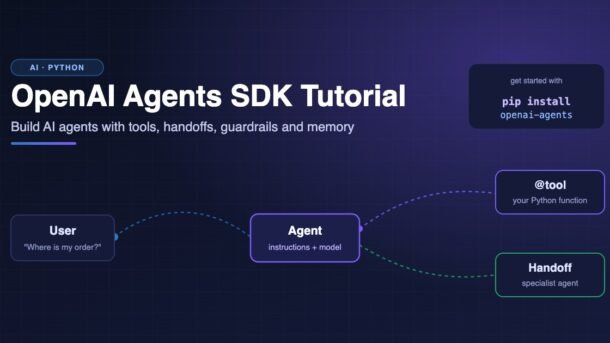
Chatbots answer questions. AI agents get things done: they look up data, call your functions, pass work to a specialist, and keep going until the task is finished. The easiest way to build one in Python today is the OpenAI Agents SDK, a small open-source library from OpenAI that gives you just a few building blocks (agents, tools, handoffs, guardrails and sessions) and handles the tricky “loop” part for you.
In this beginner-friendly tutorial you will build real, runnable examples step by step: a first agent, an agent that calls Python functions, an agent that returns clean typed data, a team of agents that hand work to each other, a safety check (guardrail), and an agent that remembers the conversation. Every example works with the current release of the SDK (version 0.23 at the time of writing) and Python 3.10 or newer.
- Install with
pip install openai-agentsand set theOPENAI_API_KEYenvironment variable. - An Agent is a model plus instructions plus tools.
Runner.run()runs the agent loop until it has a final answer. - Turn any Python function into a tool with the
@tooldecorator. The docstring and type hints become the tool description. - Use
output_type=with a Pydantic model to get structured, typed output instead of plain text. - Handoffs let a triage agent pass the conversation to a specialist agent.
- Guardrails check input or output and stop the run early. Sessions (like
SQLiteSession) give your agent memory.
What is the OpenAI Agents SDK?
The OpenAI Agents SDK is an open-source Python library (there is also a TypeScript version) for building AI agents. It grew out of OpenAI’s earlier experimental project called Swarm and is now the official, production-ready way to build agents on top of OpenAI models. It is also “provider-agnostic”, which means you can plug in other model providers too.
The big idea is simple: instead of learning a huge framework, you learn a handful of building blocks:
It also comes with tracing built in. Every run is recorded, and you can open the Traces page in the OpenAI dashboard to see each model call, tool call and handoff. This is extremely helpful when your agent does something unexpected.
How the agent loop works
When you call Runner.run(agent, "some input"), the SDK does not just send one request to the model. It runs a loop:
- Send the instructions, the conversation so far, and the list of tools to the model.
- If the model replies with a final answer, stop and return it.
- If the model asks to call a tool, run your Python function, add the result to the conversation, and go back to step 1.
- If the model asks for a handoff, switch to the other agent and go back to step 1.
The loop stops after a maximum number of turns (10 by default, which you can change with max_turns=) so that a confused agent cannot run forever.
Setup: install and API key
You need Python 3.10 or newer and an OpenAI API key (create one on the OpenAI platform under API keys; API usage is paid per token, so set a small monthly limit while you learn). Create a project folder and a virtual environment:
mkdir agents-demo
cd agents-demo
python -m venv .venv

# macOS / Linux
source .venv/bin/activate
# Windows
.venv\Scripts\activate

pip install openai-agents
Now set your API key as an environment variable for the current terminal:
# macOS / Linux
export OPENAI_API_KEY=sk-...

# Windows PowerShell
$env:OPENAI_API_KEY = "sk-...".env file that is listed in .gitignore.Your first agent
Let’s create an agent that teaches Python. An agent needs a name and instructions. If you do not choose a model, the SDK uses its default model, which is a sensible choice for learning.
import asyncio
from agents import Agent, Runner

agent = Agent(
    name="Python Tutor",
    instructions="You explain Python concepts to beginners in simple words. Keep answers short.",
)


async def main():
    result = await Runner.run(agent, "What is a list comprehension? Show one example.")
    print(result.final_output)


if __name__ == "__main__":
    asyncio.run(main())
Run it with python first_agent.py. The SDK is async-first: Runner.run() is an async function, so we wrap it in asyncio.run(). If you just want a quick script and don’t care about async, use Runner.run_sync():
from agents import Agent, Runner

agent = Agent(name="Assistant", instructions="You are a helpful assistant.")

result = Runner.run_sync(agent, "Give me 3 tips to learn Python faster.")
print(result.final_output)
To pick a specific model or tune it, pass model="model-name" and model_settings=ModelSettings(...) to Agent(...). Check OpenAI’s models page for the current names.
Give your agent tools
A model on its own only knows what it learned during training. It does not know your order database, today’s prices or your company’s rules. Tools fix that. In the OpenAI Agents SDK, any Python function can become a tool with the @tool decorator (imported from agents.decorators).
The SDK reads three things from your function automatically:
- The function name becomes the tool name.
- The docstring becomes the tool description (the model reads this to decide when to call it).
- The type hints and the
Args:section become a JSON schema for the inputs.
import asyncio
from agents import Agent, Runner
from agents.decorators import tool

# Pretend database. In a real app this would be a SQL query or an API call.
ORDERS = {
    "A101": {"status": "shipped", "city": "Pune", "eta_days": 2},
    "A102": {"status": "packing", "city": "Bengaluru", "eta_days": 4},
}


@tool
def get_order_status(order_id: str) -> str:
    """Look up the delivery status of an order.

    Args:
        order_id: The order ID, for example "A101".
    """
    order = ORDERS.get(order_id.upper())
    if order is None:
        return f"No order found with ID {order_id}."
    return (
        f"Order {order_id} is {order['status']}, going to {order['city']}, "
        f"expected in {order['eta_days']} days."
    )


@tool
def convert_currency(amount: float, rate: float) -> float:
    """Convert an amount using an exchange rate.

    Args:
        amount: The amount of money to convert.
        rate: How many units of the target currency one unit is worth.
    """
    return round(amount * rate, 2)


support_agent = Agent(
    name="Order Support",
    instructions=(
        "You help customers with their orders. "
        "Always use the tools to check facts. Never guess an order status."
    ),
    tools=[get_order_status, convert_currency],
)


async def main():
    result = await Runner.run(support_agent, "Hi! Where is my order a101?")
    print(result.final_output)


if __name__ == "__main__":
    asyncio.run(main())
When you run this, the model sees the message “Where is my order a101?”, decides to call get_order_status with order_id="a101", gets the result back, and then writes a friendly reply like: “Your order A101 has shipped and should reach Pune in about 2 days.”
from agents import function_tool and @function_tool. That still works, but the current docs use the shorter @tool from agents.decorators, so this guide uses it too. The SDK also offers ready-made “hosted” tools such as web search and file search that run on OpenAI’s servers.Structured output with Pydantic
Plain text is great for chat, but your code usually wants data: a number, a list, a true/false. Pass a Pydantic model as output_type and the agent’s final output will be an object of that class, already validated.
import asyncio
from pydantic import BaseModel, Field
from agents import Agent, Runner


class JobPost(BaseModel):
    title: str
    company: str
    city: str
    remote: bool
    skills: list[str] = Field(description="Technical skills mentioned in the post")
    min_experience_years: int


extractor = Agent(
    name="Job Post Extractor",
    instructions="Extract the job details from the text. If a value is missing, make a sensible guess.",
    output_type=JobPost,
)

TEXT = """
We're hiring a Backend Developer at DevKart in Hyderabad (hybrid, 3 days office).
You should know Python, FastAPI and PostgreSQL. 2+ years of experience needed.
"""


async def main():
    result = await Runner.run(extractor, TEXT)
    job = result.final_output  # This is a JobPost object, not a string
    print(job.title, "|", job.city, "| remote:", job.remote)
    print("Skills:", ", ".join(job.skills))
    print(job.model_dump_json(indent=2))


if __name__ == "__main__":
    asyncio.run(main())
Now result.final_output is a JobPost object, so you can save it to a database or return it from a FastAPI endpoint without any string parsing. This pattern is perfect for extracting data from emails, resumes, invoices and support tickets.
Multi-agent handoffs
One agent with 30 tools and a giant prompt quickly becomes confused. A better design is a small team: a triage agent that reads the request and hands it off to the right specialist. In the SDK, a handoff is just a list of agents on the handoffs= parameter. Behind the scenes, each one appears to the model as a special tool named like transfer_to_billing_agent.
import asyncio
from agents import Agent, Runner

billing_agent = Agent(
    name="Billing Agent",
    handoff_description="Handles payments, refunds, invoices and charges.",
    instructions="You help with billing questions. Be clear and polite.",
)

tech_agent = Agent(
    name="Tech Support Agent",
    handoff_description="Handles login problems, bugs and app errors.",
    instructions="You solve technical problems step by step.",
)

triage_agent = Agent(
    name="Triage Agent",
    instructions=(
        "You are the first point of contact. Read the customer's message and "
        "hand it off to the right specialist. Do not answer yourself."
    ),
    handoffs=[billing_agent, tech_agent],
)


async def main():
    questions = [
        "I was charged twice for my subscription this month.",
        "The app shows 'Error 500' when I try to log in.",
    ]
    for q in questions:
        result = await Runner.run(triage_agent, q)
        print(f"Q: {q}")
        print(f"Answered by: {result.last_agent.name}")
        print(f"A: {result.final_output}\n")


if __name__ == "__main__":
    asyncio.run(main())
handoff_description is what the triage agent reads to decide where to send the request, so keep it short and specific. result.last_agent tells you which agent wrote the final answer, which is handy for logging and analytics.
Agents as tools (the manager pattern)
Sometimes you don’t want to give away the conversation. You want a manager agent that stays in charge and calls other agents like functions, then combines their answers. Use agent.as_tool() for that:
from agents import Agent

hindi_agent = Agent(name="Hindi Translator", instructions="Translate the text to Hindi.")
tamil_agent = Agent(name="Tamil Translator", instructions="Translate the text to Tamil.")

manager = Agent(
    name="Translation Manager",
    instructions="Use your tools to translate. Combine the results into one reply.",
    tools=[
        hindi_agent.as_tool(tool_name="to_hindi", tool_description="Translate text to Hindi"),
        tamil_agent.as_tool(tool_name="to_tamil", tool_description="Translate text to Tamil"),
    ],
)
Guardrails: safety checks for your agent
A guardrail is a check that runs next to your agent. An input guardrail looks at the user’s message; an output guardrail looks at the agent’s final answer. If the check fails, it “trips a wire” and the SDK raises an exception, so the expensive main agent never finishes a bad request.
A common trick is to use a small, cheap agent as the checker. Here, a coding-mentor bot refuses anything that is not about programming:
guardrail.pyimport asyncio
from pydantic import BaseModel
from agents import (
Agent,
GuardrailFunctionOutput,
InputGuardrailTripwireTriggered,
RunContextWrapper,
Runner,
TResponseInputItem,
)
from agents.decorators import input_guardrail
class TopicCheck(BaseModel):
is_off_topic: bool
reason: str
# A small, fast agent whose only job is to check the input
checker_agent = Agent(
name="Topic Checker",
instructions=(
"Decide if the user's message is about programming or software. "
"Set is_off_topic to true if it is NOT about programming."
),
output_type=TopicCheck,
)
@input_guardrail
async def programming_only(
ctx: RunContextWrapper[None], agent: Agent, input: str | list[TResponseInputItem]
) -> GuardrailFunctionOutput:
result = await Runner.run(checker_agent, input, context=ctx.context)
return GuardrailFunctionOutput(
output_info=result.final_output,
tripwire_triggered=result.final_output.is_off_topic,
)
coding_agent = Agent(
name="Coding Mentor",
instructions="You help developers with coding questions.",
input_guardrails=[programming_only],
)
async def main():
for message in ["How do I reverse a string in Python?", "Write my history essay on the Mughal empire."]:
try:
result = await Runner.run(coding_agent, message)
print("Answer:", result.final_output[:120], "...")
except InputGuardrailTripwireTriggered:
print("Blocked by guardrail:", message)
if __name__ == "__main__":
asyncio.run(main())The first message gets a normal answer. The second one trips the guardrail and raises InputGuardrailTripwireTriggered, which you catch and turn into a polite “Sorry, I only help with coding” message in your app. Output guardrails work the same way with @output_guardrail and OutputGuardrailTripwireTriggered, and are useful for blocking things like leaked secrets or personal data in replies.
Memory with sessions
Each call to Runner.run() starts fresh. To build a real chat, the agent must remember earlier messages. You could pass result.to_input_list() back in yourself, but the easier way is a session. The SDK loads the history before each run and saves new messages after it.
import asyncio
from agents import Agent, Runner, SQLiteSession

agent = Agent(name="Study Buddy", instructions="Reply in 1-2 short sentences.")


async def main():
    # Same session ID = same conversation. The file keeps history after restarts.
    session = SQLiteSession("student_42", "chat_history.db")

    r1 = await Runner.run(agent, "My name is Priya and I am learning FastAPI.", session=session)
    print(r1.final_output)

    r2 = await Runner.run(agent, "What is my name and what am I learning?", session=session)
    print(r2.final_output)  # The agent remembers: Priya, FastAPI


if __name__ == "__main__":
    asyncio.run(main())
SQLiteSession("student_42") without a file name keeps history in memory only (lost when the program stops). Passing a file path like "chat_history.db" stores it on disk. In a web app, use your logged-in user’s ID or a chat ID as the session ID. The SDK also has other session backends (for example Redis and SQLAlchemy-based ones) for production.
Streaming and human approval
Stream the answer word by word
Users hate staring at a spinner. With Runner.run_streamed() you can print tokens as soon as the model produces them, just like ChatGPT does:
import asyncio
from openai.types.responses import ResponseTextDeltaEvent
from agents import Agent, Runner

agent = Agent(name="Storyteller", instructions="Tell short, fun stories.")


async def main():
    result = Runner.run_streamed(agent, input="Tell a 5-line story about a bug that became a feature.")
    async for event in result.stream_events():
        if event.type == "raw_response_event" and isinstance(event.data, ResponseTextDeltaEvent):
            print(event.data.delta, end="", flush=True)
    print()


if __name__ == "__main__":
    asyncio.run(main())
Ask a human before risky actions
Some tools should never run without a person saying “yes”: refunds, deleting data, sending emails. Mark them with needs_approval=True. The run then pauses and returns result.interruptions. You approve or reject each one and resume from the saved state:
import asyncio
from agents import Agent, Runner
from agents.decorators import tool


@tool(needs_approval=True)
def issue_refund(order_id: str, amount: float) -> str:
    """Refund money for an order.

    Args:
        order_id: The order to refund.
        amount: The amount to refund in rupees.
    """
    return f"Refund of Rs {amount} issued for order {order_id}."


agent = Agent(name="Refund Agent", instructions="Help with refunds.", tools=[issue_refund])


async def main():
    result = await Runner.run(agent, "Please refund Rs 499 for order A101.")

    if result.interruptions:  # The run paused and is waiting for a human
        state = result.to_state()
        for item in result.interruptions:
            answer = input(f"Approve {item.name} with {item.arguments}? (y/n) ")
            if answer.lower() == "y":
                state.approve(item)
            else:
                state.reject(item)
        result = await Runner.run(agent, state)

    print(result.final_output)


if __name__ == "__main__":
    asyncio.run(main())
In a real web app you would save state (it can be turned into a string with state.to_string()), show an “Approve” button to a support person, and resume later.
Which pattern should you pick?
Beginners often ask: “Do I need one agent or many?” Click the tabs below to compare the three common designs.
Best for: most apps when you are starting out, such as a support bot, a coding helper or a data extractor.
How it works: one agent, clear instructions, 2 to 10 well-described tools.
Watch out: once the prompt grows huge or the agent keeps picking the wrong tool, it is time to split it up.
Best for: customer support and help desks, where different topics need different experts and rules.
How it works: a triage agent routes the conversation; the specialist takes over and talks to the user directly.
Watch out: the triage agent loses control after the handoff. Write clear handoff_description text for each specialist.
Best for: research, report writing and translation, where one “manager” needs several results and combines them.
How it works: the manager calls sub-agents via agent.as_tool() and keeps ownership of the final answer.
Watch out: more model calls means more cost and time. Use smaller, cheaper models for simple sub-agents.
Common errors and fixes
| Error or problem | Why it happens | How to fix it |
|---|---|---|
OpenAIError: Missing credentials (older versions say “The api_key client option must be set”) | The OPENAI_API_KEY environment variable is missing in this terminal. | Run export OPENAI_API_KEY=... (or the PowerShell version) in the same terminal, or load a .env file before creating agents. |
ModuleNotFoundError: No module named 'agents' | The package isn’t installed in the active environment, or you installed the wrong package name. | Activate your virtual environment and run pip install openai-agents (the import name is agents). |
RuntimeError: asyncio.run() cannot be called from a running event loop | You are inside Jupyter or another async app that already has an event loop. | Use await Runner.run(...) directly in the notebook cell instead of asyncio.run(). |
MaxTurnsExceeded | The agent kept calling tools or handing off without reaching a final answer. | Improve instructions and tool descriptions, return clearer tool results, or raise max_turns= on Runner.run(). |
InputGuardrailTripwireTriggered not caught | A guardrail blocked the input, and the exception crashed your app. | Wrap the run in try/except and show the user a friendly message. |
| Agent ignores your tool | The docstring is vague, or the instructions don’t tell the agent when to use it. | Write a clear docstring with Args:, and add “Always use the X tool to check…” to the instructions. |
| Agent forgets the previous message | Each Runner.run() call starts with an empty history. | Pass the same session= on every call, or feed back result.to_input_list(). |
Best practices for production agents
- Start with one agent. Add handoffs only when a single agent clearly struggles.
- Keep tools small and safe. One job per tool, validate inputs, and return short, clear text or JSON.
- Use structured output whenever your code (not a human) reads the result.
- Put human approval (
needs_approval=True) on any tool that spends money, deletes data or contacts customers. - Use traces while developing. Turn tracing off with
OPENAI_AGENTS_DISABLE_TRACING=1if your company policy does not allow sending traces. - Set limits: a sensible
max_turns, timeouts on slow tools, and a spending limit on your API account. - Test with real examples. Keep a list of 20 to 50 typical user messages and re-run them whenever you change prompts or tools.
For everything else (models, context objects, lifecycle hooks, sandbox agents and voice), the official OpenAI Agents SDK documentation is excellent, and the GitHub repository has many runnable examples.
Frequently asked questions
Is the OpenAI Agents SDK free?
Yes, the SDK itself is free and open source (MIT license). You only pay for the model API calls your agents make, which are billed per token by OpenAI or whichever provider you use.
Can I use the Agents SDK with models other than OpenAI?
Yes. The SDK is provider-agnostic. It supports other providers through integrations such as LiteLLM and any OpenAI-compatible API, so you can try other hosted or local models. Some features (like hosted tools) only work with OpenAI models.
What is the difference between handoffs and agents as tools?
With a handoff, the specialist takes over the conversation and writes the final answer. With agents as tools, a manager agent stays in control, calls the other agent like a function, and writes the final answer itself.
How is it different from LangChain or LangGraph?
The Agents SDK is intentionally small: a few building blocks and plain Python. LangChain and LangGraph offer more integrations and fine-grained graph control but have a bigger learning curve. For many beginner and mid-size projects, the Agents SDK is quicker to learn and easier to debug.
Can I use it inside a FastAPI or Django app?
Yes. Because Runner.run() is async, it fits naturally inside an async def FastAPI endpoint. Use a session (keyed by user or chat ID) for memory, and Runner.run_streamed() with a streaming response for a live typing effect.
Which Python version do I need?
Python 3.10 or newer. Using the latest stable Python is recommended. See what’s new in our post on Python 3.15 new features.
Conclusion
You now know the core of the OpenAI Agents SDK: create an Agent, run it with Runner, give it Python functions as tools, get typed data with output_type, split work with handoffs, protect it with guardrails, give it memory with sessions, and keep a human in the loop for risky actions. That is everything you need to build a useful support bot, an internal helper for your team, or an AI feature in your next side project.
A great next step: take the order-support example, connect get_order_status to a real database, wrap it in a FastAPI endpoint, and add a session per user. You will have a working AI support agent in an afternoon.
New posts every day on DevDojo
Practical, beginner-friendly guides on AI, Python, JavaScript, React and DevOps. Explore more tutorials and leave a comment if you get stuck. We read every one!