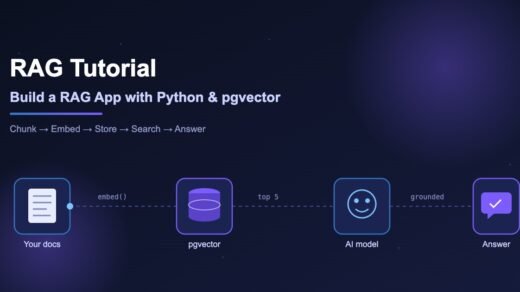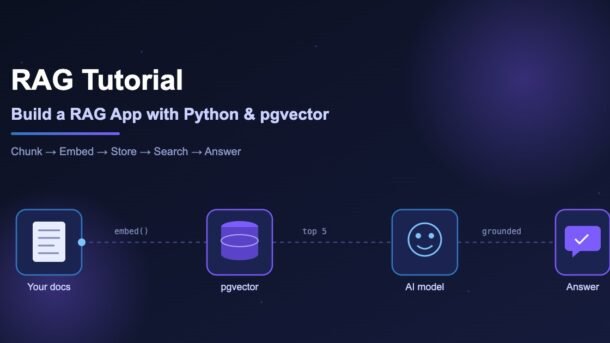
Large language models are smart, but they do not know your data — your company handbook, your product docs or last week’s support tickets. Ask them about it and they guess. This RAG tutorial shows you how to fix that by building a small, real Retrieval-Augmented Generation (RAG) app in Python, using PostgreSQL with the pgvector extension as the search engine and the OpenAI API for embeddings and answers.
By the end you will have a working command-line app that reads a folder of documents, stores them as vectors, finds the right pieces for any question and writes an answer that cites its sources. No heavy frameworks — around 150 lines of plain Python that you can fully understand.
- RAG = search your own documents first, then give the best matches to an AI model so it answers from facts, not memory.
- We split documents into chunks, turn each chunk into an embedding (a list of numbers that captures meaning) and store them in PostgreSQL + pgvector.
- At question time we embed the question, run a similarity search with the
<=>operator and send the top 5 chunks to the model. - Stack: Python 3.10+,
openai,psycopg3,pgvector, Docker imagepgvector/pgvector:pg18. - Includes a FastAPI endpoint, a common errors table and best practices for production.
What is RAG? (Retrieval-Augmented Generation explained simply)
Think of an open-book exam. A student who memorised everything may still mix up facts. A student who is allowed to open the textbook, find the right page and then write the answer will be far more accurate. RAG gives an AI model that open book.
RAG has three simple parts:
Why not just paste all your documents into the prompt? Because it gets slow and expensive fast, and models pay less attention to details buried in very long prompts. Why not fine-tune the model? Fine-tuning teaches style and behaviour well, but it is a poor way to teach facts that change every week. RAG lets you update knowledge by simply re-indexing a file.
How a RAG app works (two pipelines)
Every RAG system has two separate flows. The first one prepares your data. The second one runs each time a user asks something.
In the indexing pipeline we load files, split them into small chunks, and convert each chunk into an embedding. An embedding is a list of numbers (1,536 of them for OpenAI’s text-embedding-3-small) that represents the meaning of the text. Texts with similar meaning get similar numbers.
In the query pipeline we embed the user’s question with the same model, ask the database for the closest chunks, and send those chunks plus the question to a chat model.
Why pgvector for RAG?
There are many dedicated vector databases, but if you already use PostgreSQL, pgvector is often the simplest choice. It is an open-source extension that adds a vector column type, distance operators and fast approximate indexes (HNSW and IVFFlat) to Postgres.
| Need | What pgvector gives you |
|---|---|
| One database for everything | Vectors live next to your users, orders and permissions tables. Joins and filters just work. |
| Fast similarity search | HNSW indexes for approximate nearest-neighbour search on millions of rows. |
| Familiar tools | Backups, migrations, SQL, transactions — nothing new to learn. |
| Low cost | Runs on any managed Postgres that supports the extension, or in a local Docker container. |
New to modern Postgres? Our guide to PostgreSQL 19 new features covers what’s changed recently.
Step 1: Set up PostgreSQL with pgvector
The quickest way is the official Docker image, which ships Postgres with pgvector already compiled. Change pg18 to match the Postgres major version you want.
docker run -d --name rag-db \
  -e POSTGRES_PASSWORD=postgres \
  -e POSTGRES_DB=rag \
  -p 5432:5432 \
  pgvector/pgvector:pg18
Now create the extension and a table for our chunks. Save this as schema.sql:
CREATE EXTENSION IF NOT EXISTS vector;

CREATE TABLE IF NOT EXISTS chunks (
    id         bigserial PRIMARY KEY,
    source     text        NOT NULL,          -- file name the chunk came from
    chunk_no   int         NOT NULL,          -- position inside the file
    content    text        NOT NULL,          -- the actual text
    embedding  vector(1536) NOT NULL,         -- text-embedding-3-small size
    created_at timestamptz DEFAULT now(),
    UNIQUE (source, chunk_no)
);

-- HNSW index for fast cosine-similarity search
CREATE INDEX IF NOT EXISTS chunks_embedding_idx
    ON chunks USING hnsw (embedding vector_cosine_ops);
docker exec -i rag-db psql -U postgres -d rag < schema.sqlvector(1536) must match your embedding model’s output size exactly. If you switch to a different model later, you need a new column (or table) and a full re-index.Prefer running the database alongside your app? See our Docker Compose tutorial and just swap the image for pgvector/pgvector:pg18.
Step 2: Python project setup
Create a fresh folder and a virtual environment, then install four packages:
mkdir rag-app && cd rag-app
python -m venv .venv
source .venv/bin/activate        # Windows: .venv\Scripts\activate

pip install openai "psycopg[binary]" pgvector numpy
Set your OpenAI API key and database URL as environment variables (never hard-code keys in source files):
export OPENAI_API_KEY="sk-..."
export DATABASE_URL="postgresql://postgres:postgres@localhost:5432/rag"
Put a few .md or .txt files in a docs/ folder — for example your project README, an FAQ, or a policy document. Then create db.py for a shared connection helper:
# db.py
import os
import psycopg
from pgvector.psycopg import register_vector

def get_conn() -> psycopg.Connection:
    conn = psycopg.connect(os.environ["DATABASE_URL"], autocommit=True)
    register_vector(conn)   # teaches psycopg how to send/receive vectors
    return conn
Step 3: Split documents into chunks
Embedding a whole 40-page file as one vector would blur all its topics together. Instead we split each file into chunks of roughly 800 characters, with a small overlap so ideas that cross a boundary are not lost. Try the tabs below to compare popular strategies:
Fixed size with overlap — cut every N characters, repeat the last 100–200 characters in the next chunk.
Good for: plain text, quick prototypes. Watch out: may cut a sentence in half (overlap softens this).
Paragraph-aware — keep whole paragraphs together and pack them until the size limit. This is what our code does.
Good for: articles, docs, FAQs. Watch out: one giant paragraph still needs a hard split.
Split by Markdown headings — every ## section becomes a chunk, and the heading is added to the chunk text.
Good for: technical documentation. Watch out: very short sections carry little meaning — merge them.
Semantic chunking — embed sentences and start a new chunk where the meaning changes sharply.
Good for: long, mixed documents. Watch out: more embedding calls and more complexity; start simple first.
Here is a simple paragraph-aware chunker with overlap — no libraries needed:
# chunker.py
def chunk_text(text: str, max_chars: int = 800, overlap: int = 150) -> list[str]:
    """Pack paragraphs into chunks of about max_chars, with overlap."""
    paragraphs = [p.strip() for p in text.split("\n\n") if p.strip()]
    chunks: list[str] = []
    current = ""

    for para in paragraphs:
        # Very long paragraph: hard-split it first
        while len(para) > max_chars:
            chunks.append(para[:max_chars])
            para = para[max_chars - overlap:]

        if len(current) + len(para) + 2 <= max_chars:
            current = f"{current}\n\n{para}" if current else para
        else:
            if current:
                chunks.append(current)
            tail = current[-overlap:] if current else ""
            current = f"{tail}\n\n{para}" if tail else para

    if current:
        chunks.append(current)
    return chunks


if __name__ == "__main__":
    sample = "First paragraph about refunds.\n\nSecond paragraph about shipping."
    for i, c in enumerate(chunk_text(sample, max_chars=40, overlap=10)):
print(i, repr(c))Step 4: Create and store embeddings
Now the indexing script. It reads every file in docs/, chunks it, sends the chunks to the embeddings endpoint in batches, and upserts them into Postgres. We use text-embedding-3-small because it is cheap, fast and returns 1,536 dimensions — matching our table.
# ingest.py
from pathlib import Path

import numpy as np
from openai import OpenAI

from chunker import chunk_text
from db import get_conn

client = OpenAI()                      # reads OPENAI_API_KEY from the environment
EMBED_MODEL = "text-embedding-3-small"
BATCH_SIZE = 100


def embed(texts: list[str]) -> list[np.ndarray]:
    resp = client.embeddings.create(model=EMBED_MODEL, input=texts)
    return [np.array(item.embedding, dtype=np.float32) for item in resp.data]


def ingest(folder: str = "docs") -> None:
    conn = get_conn()
    files = [p for p in Path(folder).rglob("*") if p.suffix in {".md", ".txt"}]

    for path in files:
        chunks = chunk_text(path.read_text(encoding="utf-8"))
        # Remove old chunks for this file so re-running stays clean
        conn.execute("DELETE FROM chunks WHERE source = %s", (str(path),))

        for start in range(0, len(chunks), BATCH_SIZE):
            batch = chunks[start:start + BATCH_SIZE]
            vectors = embed(batch)
            with conn.cursor() as cur:
                cur.executemany(
                    """INSERT INTO chunks (source, chunk_no, content, embedding)
                       VALUES (%s, %s, %s, %s)""",
                    [(str(path), start + i, text, vec)
                     for i, (text, vec) in enumerate(zip(batch, vectors))],
                )
        print(f"Indexed {len(chunks):>3} chunks from {path}")


if __name__ == "__main__":
    ingest()
python ingest.py
# Indexed 12 chunks from docs/refund-policy.md
# Indexed 7 chunks from docs/shipping.mdStep 5: Search with pgvector
pgvector gives you three main distance operators. For OpenAI embeddings, cosine distance is the usual choice.
| Operator | Meaning | Index ops class |
|---|---|---|
<=> | Cosine distance (0 = same direction) | vector_cosine_ops |
<-> | Euclidean (L2) distance | vector_l2_ops |
<#> | Negative inner product | vector_ip_ops |
The operator in your query must match the ops class of your index, otherwise Postgres will skip the index and scan every row. Here is the retrieval function:
# retrieve.py
from dataclasses import dataclass

from db import get_conn
from ingest import embed


@dataclass
class Hit:
    source: str
    content: str
    similarity: float


def search(question: str, k: int = 5, min_similarity: float = 0.3) -> list[Hit]:
    q_vec = embed([question])[0]
    conn = get_conn()
    rows = conn.execute(
        """SELECT source, content, 1 - (embedding <=> %s) AS similarity
           FROM chunks
           ORDER BY embedding <=> %s
           LIMIT %s""",
        (q_vec, q_vec, k),
    ).fetchall()
    return [Hit(*r) for r in rows if r[2] >= min_similarity]


if __name__ == "__main__":
    for hit in search("How many days do I have to ask for a refund?"):
        print(f"{hit.similarity:.3f}  {hit.source}  {hit.content[:70]!r}")
Run it and you should see the refund-policy chunks at the top with the highest similarity scores. This step alone — “semantic search” — is already useful, even before an AI model writes anything.
1 - distance? Cosine distance is small when texts are similar. Subtracting from 1 turns it into a similarity score that is easier to read (closer to 1 = more similar).Step 6: Generate the answer with the retrieved context
Now we put the “G” in RAG. We build a prompt that contains the numbered chunks and clear rules: answer only from the context, say “I don’t know” when the answer is missing, and cite sources. We use the OpenAI Responses API; the chat model name comes from an environment variable so you can switch models without touching code.
# rag.py
import os
import sys

from openai import OpenAI

from retrieve import search

client = OpenAI()
CHAT_MODEL = os.getenv("CHAT_MODEL", "gpt-5-mini")

INSTRUCTIONS = """You are a helpful assistant for our documentation.
Answer ONLY using the context below.
If the answer is not in the context, reply: "I don't know based on the docs."
Cite sources like [1], [2] after the sentences that use them.
Keep answers short and clear."""


def ask(question: str) -> str:
    hits = search(question, k=5)
    if not hits:
        return "I don't know based on the docs."

    context = "\n\n".join(
        f"[{i}] (source: {h.source})\n{h.content}" for i, h in enumerate(hits, 1)
    )
    response = client.responses.create(
        model=CHAT_MODEL,
        instructions=INSTRUCTIONS,
        input=f"Context:\n{context}\n\nQuestion: {question}",
    )
    sources = "\n".join(f"[{i}] {h.source}" for i, h in enumerate(hits, 1))
    return f"{response.output_text}\n\nSources:\n{sources}"


if __name__ == "__main__":
    question = " ".join(sys.argv[1:]) or "What is the refund window?"
    print(ask(question))
python rag.py "Can I get a refund after 20 days?"
# Yes. Refunds are accepted within 30 days of delivery if the item is unused [1].
# Digital products are not refundable once downloaded [2].
#
# Sources:
# [1] docs/refund-policy.md
# [2] docs/refund-policy.mdThat’s a complete RAG pipeline: chunk → embed → store → search → answer. Each piece is small and easy to replace. Want the model to decide when to search, or combine search with other tools? That’s where agents come in — see our OpenAI Agents SDK tutorial and plug search() in as a tool.
Step 7: Serve your RAG app with FastAPI
To use RAG from a website or mobile app, wrap ask() in a tiny API:
pip install "fastapi[standard]"# api.py
from fastapi import FastAPI
from pydantic import BaseModel, Field
from rag import ask
app = FastAPI(title="Docs RAG API")
class Question(BaseModel):
question: str = Field(min_length=3, max_length=500)
@app.post("/ask")
def ask_endpoint(body: Question) -> dict:
return {"answer": ask(body.question)}fastapi dev api.py
# In another terminal:
curl -X POST http://127.0.0.1:8000/ask \
-H "Content-Type: application/json" \
-d '{"question": "How long does shipping take to India?"}'FastAPI also gives you interactive docs at http://127.0.0.1:8000/docs for free, which is handy for testing questions.
Common errors and fixes
| Error / symptom | Why it happens | Fix |
|---|---|---|
type "vector" does not exist | The extension is not enabled in this database. | Run CREATE EXTENSION vector; in the same database your app connects to. |
expected 1536 dimensions, not 3072 | Embedding model output size doesn’t match the column (e.g. you used text-embedding-3-large). | Use the matching model, pass dimensions=1536, or change the column and re-index. |
cannot adapt type 'numpy.ndarray' or operator does not exist: vector <=> double precision[] | register_vector(conn) was not called on that connection. | Always create connections through a helper like get_conn() that registers the type. |
| Search is slow on big tables | Index not used — wrong operator, or no ORDER BY ... LIMIT. | Match <=> with vector_cosine_ops, keep ORDER BY embedding <=> q LIMIT k, check with EXPLAIN. |
openai.RateLimitError (429) | Too many requests or tokens per minute while indexing. | Batch inputs, add retry with exponential backoff, or check your usage limits. |
| Answers are made up | Weak instructions or irrelevant chunks passed in. | Tell the model to answer only from context, use a similarity threshold, and return “I don’t know”. |
| Right document, wrong answer | Chunks too small, the key sentence was cut off. | Increase chunk size or overlap; include the section heading in each chunk. |
RAG best practices for production
- Build a small test set first. Write 20–30 real questions with expected answers. Re-run them every time you change chunk size, model or prompt.
- Store metadata. Keep source, title, URL, date and access level next to each chunk so you can filter (
WHERE team_id = %s) and show links. - Respect permissions. Filter chunks by the user’s access rights in SQL before they reach the model — never rely on the prompt to hide data.
- Try hybrid search. Combine vector search with Postgres full-text search (
tsvector) so exact words like error codes and product names still match. - Re-index on change. Store a hash of each file and only re-embed files that changed. It saves time and money.
- Tune the index. For HNSW, raising
hnsw.ef_search(default 40) improves recall at some speed cost:SET hnsw.ef_search = 100; - Treat documents as untrusted. Text inside documents can contain instructions (“ignore previous rules…”). Keep your rules in the instructions and never give the model powerful tools based only on retrieved text.
- Log everything. Save the question, retrieved chunk IDs and the answer. When an answer is wrong you’ll know whether retrieval or generation failed.
k small (3–5 chunks) and chunks focused.FAQ
What is RAG in simple words?
RAG (Retrieval-Augmented Generation) means the app first searches your documents for relevant text and then asks an AI model to answer using that text. It’s like letting the model take an open-book exam.
Do I need a dedicated vector database for RAG?
No. For most apps up to millions of chunks, PostgreSQL with pgvector works well and keeps everything in one place. Dedicated vector databases can help at very large scale or for special features.
Is RAG better than fine-tuning?
They solve different problems. RAG is best for adding facts that change often and need sources. Fine-tuning is better for changing tone, format or behaviour. Many teams use RAG first and fine-tune only if needed.
Can I use a free or local embedding model instead of OpenAI?
Yes. Any embedding model works as long as you use the same model for documents and questions, and your vector(N) column matches its output size. Open-source models via sentence-transformers or Ollama are popular local options.
How many chunks should I send to the model?
Start with 3–5. More chunks add cost and can distract the model. If answers miss information, improve chunking or search quality before raising k.
How do I handle PDFs?
Extract the text first (for example with the pypdf or pymupdf libraries), then pass the extracted text to the same chunker. Scanned PDFs need OCR before chunking.
Conclusion
You’ve just built a real RAG app from scratch: documents are chunked, turned into embeddings, stored in PostgreSQL with pgvector, searched by meaning and passed to an AI model that answers with sources. That’s the same core design used by documentation bots, support assistants and internal knowledge search tools at many companies.
From here, try adding hybrid search, metadata filters and a small evaluation set. Each improvement is just a few lines of Python or SQL on top of what you built in this RAG tutorial.
New posts every day on DevDojo
Practical, beginner-friendly guides on AI, backend, frontend and DevOps. Bookmark devdojo.co.in and drop your RAG questions in the comments below — we read every one.