What you should know first: read Part 7: Stream LLM Responses and Build a Chat UI and Part 3: Your First LLM API Calls. You need Python 3.10+ or Node.js 20.6+, and either an OpenAI API key or a free local model in Ollama (Part 6).
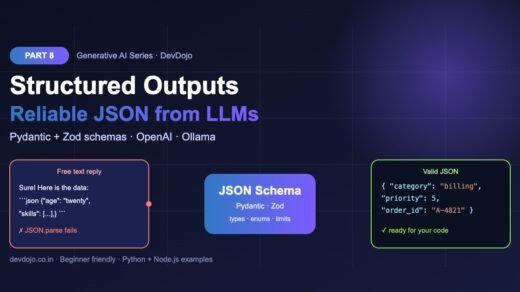
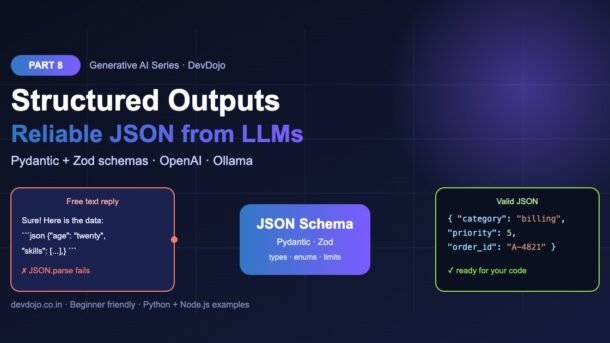
Chat answers are made for people. But the moment your code needs to use an answer — save it to a database, show it in a form, send it to another API — you need data, not a friendly paragraph. In this part you will learn structured outputs: how to make an LLM return reliable JSON that always matches a shape you define. You will see why “please reply in JSON” breaks, describe the shape once with Pydantic (Python) or Zod (Node.js), get typed objects back from OpenAI and from a local Ollama model, and add a validate-and-retry safety net for the rare cases that still go wrong.
- Structured outputs means the model’s reply is forced to follow a JSON Schema you give it: the right keys, the right types, only the allowed values.
- Only asking for JSON in the prompt is not enough. Models add extra text, code fences or trailing commas, and
JSON.parsefails. - Describe the shape once with a Pydantic model or a Zod schema. The SDK turns it into JSON Schema for you.
- OpenAI:
client.responses.parse(..., text_format=Ticket)in Python orzodTextFormat(Ticket, "ticket")in Node.js gives yououtput_parsed. - Ollama: pass the schema as
format, then validate the reply withmodel_validate_jsonorTicket.parse. - Always validate, and handle refusals, cut-off answers and wrong-but-valid values with a small retry loop.
Full Generative AI roadmap (30 parts)
Beginner
- What Is Generative AI and How Do LLMs Work?
- Tokens, Context Windows and Model Parameters
- Your First LLM API Calls in Python and Node.js (OpenAI, Anthropic, Gemini)
- Prompt Engineering Basics: Roles, Instructions and Examples
- Temperature, Top-p and Controlling Model Output
- Run LLMs Locally with Ollama
- Streaming Responses and Building a Simple Chat UI
- Structured Outputs: Getting Reliable JSON from LLMs You are here
Intermediate
- Embeddings Explained: Turning Text into Vectors Coming soon
- Vector Databases: pgvector, Chroma and Pinecone Coming soon
- RAG Fundamentals: Retrieval-Augmented Generation Coming soon
- Document Loading and Chunking Strategies Coming soon
- Better RAG: Hybrid Search, Re-ranking and Query Rewriting Coming soon
- Function Calling and Tool Use Coming soon
- Conversation Memory and Long Context Management Coming soon
- Multimodal AI: Vision, Images and Audio Inputs Coming soon
- How Image Generation Works: Diffusion Models Basics Coming soon
- LangChain vs LlamaIndex: When to Use a Framework Coming soon
- Testing LLM Apps: Evals, Metrics and Test Sets Coming soon
- Cutting Cost and Latency: Caching, Batching and Model Choice Coming soon
Advanced
- Fine-Tuning vs Prompting vs RAG: Choosing the Right Tool Coming soon
- Fine-Tuning an Open Model with LoRA Coming soon
- Transformers Deep Dive: Attention Explained Simply Coming soon
- Reasoning Models and Thinking Time Coming soon
- Guardrails, Safety and Prompt Injection Defence Coming soon
- Monitoring and Tracing LLM Apps in Production Coming soon
- Serving Open Models: vLLM, Quantization and GPUs Coming soon
- Building a Production GenAI App End to End Coming soon
- Responsible AI: Privacy, Licensing and Bias Coming soon
- Final Project: Build Your Own AI Knowledge Assistant Coming soon
What are structured outputs?
Normally an LLM can write any text it likes. Structured outputs is a feature that limits the model to text that fits a JSON Schema — a small description of the data you want: which keys, which types, which values are allowed and which keys are required. The schema works like a form with fixed boxes. The model can only fill in the boxes; it cannot add a “Sure! Here you go” line or invent a new box.
How is that possible? Remember from Part 2 that a model writes one token at a time, choosing from many possible next tokens. With structured outputs, the server (OpenAI, Ollama and others) checks every candidate token against the schema and blocks the tokens that would break it. This is called constrained decoding. If the schema says "priority" is an integer, a letter simply cannot be picked there.
Real projects use this all the time: pulling fields out of emails and invoices, sorting support tickets, turning a resume into a profile, creating quiz questions for an app, or deciding which button a chatbot should press. Anywhere the next step is code, you want structured outputs.
Why “please reply in JSON” fails
The first idea everyone tries is to write “Reply only in JSON” in the prompt. It works most of the time — and “most of the time” is the problem. Here is a very typical reply from a chat model, and what happens when your code tries to read it. These two files run without any API key:
import json

# A typical reply when you only *ask* for JSON in the prompt
reply = """Sure! Here is the data you asked for:
```json
{"name": "Asha", "age": "twenty-six", "skills": ["Python", "SQL"],}
```
Let me know if you need anything else."""

try:
    data = json.loads(reply)
    print("Parsed:", data)
except json.JSONDecodeError as err:
print("JSONDecodeError:", err)$ python naive_json.py
JSONDecodeError: Expecting value: line 1 column 1 (char 0)// A typical reply when you only *ask* for JSON in the prompt
const reply = `Sure! Here is the data you asked for:
\`\`\`json
{"name": "Asha", "age": "twenty-six", "skills": ["Python", "SQL"],}
\`\`\`
Let me know if you need anything else.`;
try {
const data = JSON.parse(reply);
console.log("Parsed:", data);
} catch (err) {
console.log(`${err.name}: ${err.message}`);
}$ node naive-json.mjs
SyntaxError: Unexpected token 'S', "Sure! Here"... is not valid JSONClick the PY and JS tabs to switch files, and ▶ Run to see the real output.
Look at everything that went wrong in one small reply: a friendly sentence before the data, Markdown ```json fences, "age" written as words instead of a number, a trailing comma and a closing sentence. Your parser fails on the very first character. Even if you strip the extra text with a regular expression, you still get the wrong type for age — and next time the model may forget a key completely.
Prompt-only vs JSON mode vs structured outputs
There are three levels of “make the model return JSON”. Click each one to compare them:
How: you write “Reply with JSON like {“name”: …}” in the prompt.
Fine for a quick test. Never trust it in production without validation.
How: set {"type": "json_object"} (OpenAI) or format: "json" (Ollama).
The reply always parses, but the model can still choose its own keys and types. You must still mention “JSON” in the prompt.
How: send a JSON Schema (from Pydantic or Zod) with strict mode.
The best choice whenever your provider supports it. The values can still be wrong (a wrong category, for example), so keep business checks in your code.
Define the shape once with Pydantic and Zod
Writing JSON Schema by hand is long and easy to get wrong. Instead, describe your data with a normal class or object, and let a library create the schema. In Python we use Pydantic; in JavaScript we use Zod. Our example is a support desk: turn a customer email into a ticket.
# 1. project folder (Python 3.10+ and Node.js 20.6+)
$ mkdir devdojo-json && cd devdojo-json
$ pip install openai pydantic ollama python-dotenv
$ npm init -y && npm pkg set type=module
$ npm install openai zod ollama
# 2a. cloud: put your key in a .env file
# OPENAI_API_KEY=sk-your-openai-key
# 2b. or free and local: make sure Ollama is running (Part 6)
$ ollama pull llama3.2# pip install pydantic
from typing import Literal
from pydantic import BaseModel, Field
class Ticket(BaseModel):
"""A customer support ticket extracted from an email."""
customer_name: str
category: Literal["billing", "bug", "feature_request", "other"]
priority: int = Field(ge=1, le=5, description="1 = low, 5 = urgent")
summary: str = Field(description="One short sentence")
order_id: str | None # nullable, but the key must always be present
if __name__ == "__main__":
schema = Ticket.model_json_schema()
print("required:", schema["required"])
print("category:", schema["properties"]["category"]["enum"])
print("priority:", schema["properties"]["priority"])$ python schema.py
required: ['customer_name', 'category', 'priority', 'summary', 'order_id']
category: ['billing', 'bug', 'feature_request', 'other']
priority: {'description': '1 = low, 5 = urgent', 'maximum': 5, 'minimum': 1, 'title': 'Priority', 'type': 'integer'}// npm install zod
import { z } from "zod";
export const Ticket = z.object({
customer_name: z.string(),
category: z.enum(["billing", "bug", "feature_request", "other"]),
priority: z.number().int().min(1).max(5).describe("1 = low, 5 = urgent"),
summary: z.string().describe("One short sentence"),
order_id: z.string().nullable(), // nullable, but the key must always be present
});
if (process.argv[1]?.endsWith("schema.mjs")) {
const schema = z.toJSONSchema(Ticket);
console.log("required:", schema.required);
console.log("category:", schema.properties.category.enum);
console.log("priority:", schema.properties.priority);
}$ node schema.mjs
required: [ 'customer_name', 'category', 'priority', 'summary', 'order_id' ]
category: [ 'billing', 'bug', 'feature_request', 'other' ]
priority: {
type: 'integer',
minimum: 1,
maximum: 5,
description: '1 = low, 5 = urgent'
}Both files print part of the JSON Schema they create. Click ▶ Run on each tab.
A few things to notice, because they matter for every schema you write:
Literal[...]/z.enum([...])limits a field to fixed values. This is perfect for categories, statuses and labels.Field(ge=1, le=5)/.min(1).max(5)adds limits, anddescriptiontells the model what the field means. Descriptions are part of your prompt — write them clearly.order_idis nullable but still required. In strict mode every key must be present. When a value may be missing, allownullinstead of leaving the key out.
Structured outputs with the OpenAI API
The OpenAI SDKs have a helper called parse. You give it your Pydantic model or Zod schema; it sends a strict JSON Schema, waits for the reply and hands you back a ready-to-use object in output_parsed. Put a sample email in email.txt (third tab) and run the script for your language. See the official OpenAI structured outputs guide for every option.
# pip install openai pydantic python-dotenv
import os
from dotenv import load_dotenv
from openai import OpenAI
from schema import Ticket  # the Pydantic model from schema.py

load_dotenv()
client = OpenAI()  # reads OPENAI_API_KEY from .env
email = open("email.txt", encoding="utf-8").read()

response = client.responses.parse(
    model=os.getenv("OPENAI_MODEL", "gpt-6-luna"),
    instructions="Extract a support ticket from the customer email.",
    input=email,
    text_format=Ticket,  # <- the SDK turns the model into a strict JSON Schema
)

ticket = response.output_parsed  # a real Ticket object, already validated
if ticket is None:
    print("No ticket. Status:", response.status)  # refusal or cut off
else:
    print(ticket.category, ticket.priority, ticket.order_id)
print(ticket.model_dump_json(indent=2))$ python extract_openai.py
billing 5 A-4821
{
"customer_name": "Rahul Mehta",
"category": "billing",
"priority": 5,
"summary": "Customer was charged twice for order A-4821 and wants a refund today.",
"order_id": "A-4821"
}// npm install openai zod
// run with: node --env-file=.env extract-openai.mjs
import { readFile } from "node:fs/promises";
import OpenAI from "openai";
import { zodTextFormat } from "openai/helpers/zod";
import { Ticket } from "./schema.mjs";
const client = new OpenAI(); // reads OPENAI_API_KEY
const email = await readFile("email.txt", "utf8");
const response = await client.responses.parse({
model: process.env.OPENAI_MODEL ?? "gpt-6-luna",
instructions: "Extract a support ticket from the customer email.",
input: email,
text: { format: zodTextFormat(Ticket, "ticket") }, // <- strict JSON Schema
});
const ticket = response.output_parsed; // typed and validated
if (!ticket) {
console.log("No ticket. Status:", response.status); // refusal or cut off
} else {
console.log(ticket.category, ticket.priority, ticket.order_id);
console.log(JSON.stringify(ticket, null, 2));
}$ node --env-file=.env extract-openai.mjs
billing 5 A-4821
{
"customer_name": "Rahul Mehta",
"category": "billing",
"priority": 5,
"summary": "Customer was charged twice for order A-4821 and wants a refund today.",
"order_id": "A-4821"
}Hi team, I'm Rahul Mehta. I was charged twice for order #A-4821 this morning
and I need the extra payment refunded today, please. Thanks!Switch between the Python, Node.js and email.txt tabs. The output is an example – your model’s summary wording may differ.
Notice what you did not write: no “reply in JSON” instruction, no json.loads, no string cleaning. The helper did all of it. In Python ticket is a real Ticket object, so your editor can autocomplete ticket.priority. In Node.js the Zod schema gives you full TypeScript types too.
None? Two things can still stop a parsed result: the model may refuse an unsafe request (the reply then contains a refusal message instead of data), or the answer may be cut off because it hit max_output_tokens (status incomplete). Half a JSON object is not valid, so always handle the “no data” case.Structured outputs with Ollama (free and local)
Ollama supports the same idea: pass a JSON Schema in the format field and the local model can only produce JSON that fits. The official ollama packages for Python and JavaScript make this short. Here we create the schema with model_json_schema() or z.toJSONSchema() and then validate the reply with the same model — small local models are much more likely to put a silly value in a correct box.
# pip install ollama pydantic   (and: ollama pull llama3.2)
from ollama import chat
from schema import Ticket

email = open("email.txt", encoding="utf-8").read()

response = chat(
    model="llama3.2",
    messages=[
        {"role": "system", "content": "Extract a support ticket from the customer email. Reply in JSON."},
        {"role": "user", "content": email},
    ],
    format=Ticket.model_json_schema(),  # <- Ollama only generates JSON that fits
    options={"temperature": 0},
)

ticket = Ticket.model_validate_json(response.message.content)  # still validate!
print(ticket.model_dump_json(indent=2))$ python extract_ollama.py
{
"customer_name": "Rahul Mehta",
"category": "billing",
"priority": 5,
"summary": "Customer was charged twice for order A-4821 and wants a refund today.",
"order_id": "A-4821"
}// npm install ollama zod (and: ollama pull llama3.2)
import { readFile } from "node:fs/promises";
import ollama from "ollama";
import { z } from "zod";
import { Ticket } from "./schema.mjs";
const email = await readFile("email.txt", "utf8");
const response = await ollama.chat({
model: "llama3.2",
messages: [
{ role: "system", content: "Extract a support ticket from the customer email. Reply in JSON." },
{ role: "user", content: email },
],
format: z.toJSONSchema(Ticket), // <- Ollama only generates JSON that fits
options: { temperature: 0 },
});
const ticket = Ticket.parse(JSON.parse(response.message.content)); // still validate!
console.log(JSON.stringify(ticket, null, 2));$ node extract-ollama.mjs
{
"customer_name": "Rahul Mehta",
"category": "billing",
"priority": 5,
"summary": "Customer was charged twice for order A-4821 and wants a refund today.",
"order_id": "A-4821"
}Make sure Ollama is running and you pulled llama3.2 (see Part 6). Then click ▶ Run.
temperature to 0 for extraction tasks. You want the same answer every time, not a creative one (you learned about temperature in Part 5). It also helps to say “Reply in JSON” in the system message, so the model’s normal habits agree with the schema.Validate and retry: your safety net
Structured outputs fix the shape. They do not stop every problem: some providers or older models only support JSON mode, a schema feature may be ignored, or you might add rules a schema cannot express. The fix is a simple loop: validate → if it fails, show the model its errors → ask again, up to a few times.
The example below uses a pretend LLM that answers badly the first time and correctly the second time, so you can run it without any API key and see real validation errors. In your app, replace ask_llm / askLLM with a real call from the sections above.
import json
from pydantic import ValidationError
from schema import Ticket

# Pretend LLM: the first reply is broken, the second one is fixed.
fake_replies = iter([
    '{"customer_name": "Rahul", "category": "payment", "priority": 9, "summary": "Charged twice"}',
    '{"customer_name": "Rahul", "category": "billing", "priority": 5, '
    '"summary": "Charged twice for one order", "order_id": "A-4821"}',
])

def ask_llm(messages):
    return next(fake_replies)  # swap in a real API call here

def get_ticket(email, max_tries=3):
    messages = [{"role": "user", "content": f"Extract a ticket as JSON:\n{email}"}]
    for attempt in range(1, max_tries + 1):
        reply = ask_llm(messages)
        try:
            return Ticket.model_validate_json(reply)
        except ValidationError as err:
            print(f"Attempt {attempt} failed with {err.error_count()} errors:")
            for e in err.errors():
                print("  -", ".".join(map(str, e["loc"])), "->", e["msg"])
            # show the model its mistakes and ask again
            messages += [
                {"role": "assistant", "content": reply},
                {"role": "user", "content": f"Fix these errors and reply with JSON only:\n{err}"},
            ]
    raise RuntimeError("No valid JSON after retries")

print("OK:", get_ticket("I was charged twice for order #A-4821"))$ python validate_retry.py
Attempt 1 failed with 3 errors:
- category -> Input should be 'billing', 'bug', 'feature_request' or 'other'
- priority -> Input should be less than or equal to 5
- order_id -> Field required
OK: customer_name='Rahul' category='billing' priority=5 summary='Charged twice for one order' order_id='A-4821'import { Ticket } from "./schema.mjs";
// Pretend LLM: the first reply is broken, the second one is fixed.
const fakeReplies = [
'{"customer_name": "Rahul", "category": "payment", "priority": 9, "summary": "Charged twice"}',
'{"customer_name": "Rahul", "category": "billing", "priority": 5, "summary": "Charged twice for one order", "order_id": "A-4821"}',
];
const askLLM = async (messages) => fakeReplies.shift(); // swap in a real API call
async function getTicket(email, maxTries = 3) {
const messages = [{ role: "user", content: `Extract a ticket as JSON:\n${email}` }];
for (let attempt = 1; attempt <= maxTries; attempt++) {
const reply = await askLLM(messages);
const result = Ticket.safeParse(JSON.parse(reply));
if (result.success) return result.data;
console.log(`Attempt ${attempt} failed with ${result.error.issues.length} errors:`);
for (const issue of result.error.issues) {
console.log(" -", issue.path.join("."), "->", issue.message);
}
messages.push(
{ role: "assistant", content: reply },
{ role: "user", content: `Fix these errors and reply with JSON only:\n${result.error.message}` },
);
}
throw new Error("No valid JSON after retries");
}
console.log("OK:", await getTicket("I was charged twice for order #A-4821"));$ node validate-retry.mjs
Attempt 1 failed with 3 errors:
- category -> Invalid option: expected one of "billing"|"bug"|"feature_request"|"other"
- priority -> Too big: expected number to be <=5
- order_id -> Invalid input: expected string, received undefined
OK: {
customer_name: 'Rahul',
category: 'billing',
priority: 5,
summary: 'Charged twice for one order',
order_id: 'A-4821'
}Run both tabs: Pydantic and Zod catch the same three mistakes with their own messages.
The error messages are clear enough for a person and for a model. That is why feeding them back works so well. Libraries such as Instructor wrap exactly this loop for you, but now you know what happens inside.
Schema rules to remember (strict mode)
Strict structured outputs support most of JSON Schema, but with a few rules. Breaking them gives an error before the model runs, which is good — you find out early.
str | None or .nullable() for optional data. Zod .optional() alone throws an error, and the Python SDK quietly marks fields with defaults as required.additionalProperties: false. The SDK helpers add this for you.reasoning field before the answer field if you want the model to think first.Common errors and fixes
| Problem | Why it happens | Fix |
|---|---|---|
JSONDecodeError / Unexpected token | You only asked for JSON in the prompt; the reply has extra text or fences. | Use structured outputs (parse or Ollama format) instead of parsing free text. |
Error: .optional() without .nullable() is not supported | Strict mode needs every key; a Zod field uses .optional(). | Make it nullable: str | None with no default, or .nullable(). |
output_parsed is None | The model refused, or the answer was cut off by max_output_tokens. | Check response.status and refusals; raise the token limit or shorten the input. |
| JSON mode error: prompt must mention JSON | Plain JSON mode needs the word “JSON” in your messages. | Add “Reply in JSON” to the instructions, or switch to a schema. |
| Valid JSON, wrong values (e.g. wrong category) | The schema controls the shape, not the meaning. | Better field descriptions, a few examples in the prompt, temperature 0, and business checks in code. |
| Local model ignores the schema | Old Ollama version, or the model is too small for the task. | Update Ollama, try a bigger model, and keep the validate-and-retry loop. |
Best practices for reliable JSON from LLMs
- One source of truth: define the shape once in Pydantic or Zod and reuse it for the API call, validation and your database or UI types.
- Use enums for choices. A category as free text will come back as “Billing”, “billing issue” and “payments”. An enum gives you exactly one spelling.
- Describe every field. Short descriptions such as “ISO date, YYYY-MM-DD” or “one short sentence” improve the values a lot.
- Allow “unknown”. Give the model a
nullor an"other"option, so it does not invent data when the email does not contain it. - Validate anyway, especially with local or older models, and log failed replies so you can improve the prompt.
- Do not trust the content blindly. The data came from user text. Check ranges, IDs and permissions before you act on it (more on this in the Guardrails part of the series).
Practice task
Build a resume parser. Create a Candidate schema with name, email (nullable), years_experience (integer, 0–50), skills (list of strings) and level ("junior" | "mid" | "senior").
- Paste a short resume into
resume.txtand extract it with OpenAI or Ollama using the code from this post. - Add the validate-and-retry loop, and test it by temporarily changing the schema so that
levelmust be"lead"— watch the retry messages. - Bonus: add a
reasoningfield beforeleveland compare whether the levels become more sensible. - Bonus 2: stream the JSON (Part 7) and show each field on screen as soon as it is complete.
Frequently asked questions
What is the difference between JSON mode and structured outputs?
JSON mode only promises valid JSON syntax. Structured outputs promise that the JSON also matches your schema: the same keys, types and allowed values every time.
Do I still need to validate when using structured outputs?
Yes, it is cheap and safe. The schema guarantees the shape, but refusals, cut-off answers, local models and wrong-but-valid values still happen. Validation turns those into clear errors.
Is structured output the same as function calling?
They use the same schema idea. Structured outputs shape the model’s final answer; function calling (tool use) lets the model ask your code to run a function with arguments that match a schema. We cover tools in Part 14.
Can I use structured outputs with Claude or Gemini?
Yes. Most major providers now support JSON Schema based outputs, and the same Pydantic and Zod schemas work. Only the SDK call changes, so check each provider’s docs for the exact parameter name.
Does structured output make answers worse?
For extraction and classification it usually makes them better. For long creative writing, keep the text in a single string field, or let the model write freely and extract the data in a second call.
Can I stream structured outputs?
Yes. The SDKs can stream partial JSON while it is being written, so you can show fields as they arrive. Just validate the final, complete object.
Conclusion
You now know how to get reliable JSON from LLMs. Prompt-only JSON breaks, JSON mode fixes the syntax, and structured outputs fix the shape by forcing the model to follow a JSON Schema. You defined that schema once with Pydantic and Zod, used it with OpenAI’s parse helper and with a free local model in Ollama, and added a validate-and-retry loop that turns rare failures into clear, fixable errors. This is the bridge between “an AI that chats” and “an AI that powers real features”.
Missed the previous part? Read Part 7: Stream LLM Responses and Build a Chat UI. Using FastAPI? Our FastAPI tutorial uses the same Pydantic models for request and response bodies.
New posts every day on DevDojo
Follow the full Generative AI series – 30 parts from “what is an LLM” to building a production AI assistant. Bookmark devdojo.co.in and share the schema you built in the comments.