What you should know first: read Agentic AI Part 2: Anatomy of an AI Agent (the four parts of an agent) and Part 1: What Is Agentic AI?. Basic Python or JavaScript is enough.
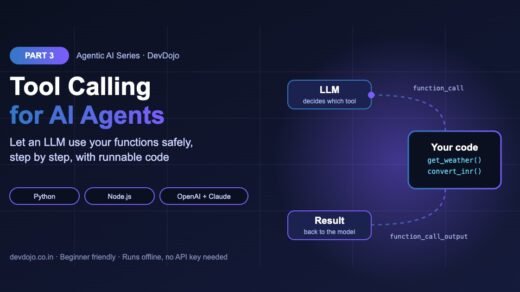
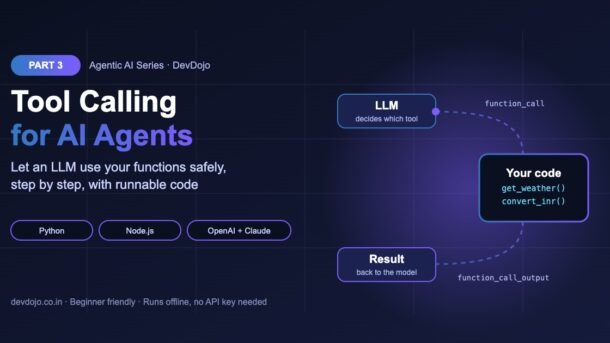
In Part 2 we called tools the “hands” of an AI agent. Today we look closely at how those hands actually work. Tool calling (also called function calling) is the feature that lets a large language model (LLM) ask your program to run a real function, such as checking the weather, reading a database or sending an email, and then use the result in its answer. Without tool calling, an LLM can only talk. With it, an LLM can do things. That is the single biggest step from a chatbot to an agent.
You will learn the full tool-calling round trip, how to describe tools with JSON Schema, how parallel tool calls work, how to handle errors safely, and how the same idea looks in the OpenAI and Anthropic (Claude) APIs. Every main example runs offline with a small fake model, so you can try it without an API key.
- Tool calling lets an LLM ask your code to run a function. The model never runs the function itself.
- You describe each tool with a name, a description and a JSON Schema for its arguments.
- The round trip: send tools → model returns a tool call → you run it → send the result back → model answers.
- Models can ask for several tools at once (parallel tool calls). Match each result with its
call_id. - Never crash on a bad call: validate arguments and return errors as text so the model can recover.
What is tool calling in AI agents?
An LLM is trained on text. It does not know today’s weather, your order status or the files on your laptop. Tool calling fixes this. You give the model a list of tools (functions) it is allowed to use. When the model decides one would help, it does not answer with normal text. Instead, it replies with a small, structured request like this:
// What the model sends back instead of text (OpenAI Responses API shape)
const toolCall = {
  type: "function_call",
  call_id: "call_1",
  name: "get_weather",
  arguments: '{"city": "Pune", "unit": "celsius"}',
};Your program reads that request, runs the matching function, and sends the result back. The model then writes the final answer using real data. Think of the model as a manager who can only write notes, and your code as the assistant who actually does the work.
The tool-calling round trip, step by step
Every tool call follows the same five steps, no matter which provider you use. Click through the steps below to see what the data looks like at each point.
You send the user’s message and the list of tools. Each tool has a name, a plain-English description and a JSON Schema for its arguments. The description is how the model knows when to use the tool.
The model returns a function_call item instead of text: name: "get_weather", arguments: "{\"city\": \"Pune\", \"unit\": \"celsius\"}" and a unique call_id. Note that arguments is a JSON string, so you must parse it.
Your code looks up the function by name, parses the arguments, runs it and turns the result into a string (usually JSON). You append the original tool call and a function_call_output with the same call_id to the conversation.
You call the model again with the updated history. Now it can see the real data and writes a final answer, or asks for another tool. Keep looping until there are no more tool calls, with a maximum number of turns as a safety limit.
Describing tools with JSON Schema
A tool definition is just data. The model never sees your Python or JavaScript code; it only sees the name, the description and the parameters schema. So write them for the model like you would write docs for a new teammate. Here are two tools and the real functions behind them:
# Step 1: describe your functions as tools (JSON Schema).
TOOLS = [
    {
        "type": "function",
        "name": "get_weather",
        "description": "Get the current weather for a city. Use for any weather question.",
        "parameters": {
            "type": "object",
            "properties": {
                "city": {"type": "string", "description": "City name, e.g. 'Pune'"},
                "unit": {"type": "string", "enum": ["celsius", "fahrenheit"]},
            },
            "required": ["city", "unit"],
            "additionalProperties": False,
        },
        "strict": True,
    },
    {
        "type": "function",
        "name": "convert_inr",
        "description": "Convert an amount in Indian rupees (INR) to another currency.",
        "parameters": {
            "type": "object",
            "properties": {
                "amount": {"type": "number"},
                "to": {"type": "string", "enum": ["USD", "EUR", "GBP"]},
            },
            "required": ["amount", "to"],
            "additionalProperties": False,
        },
        "strict": True,
    },
]

# Step 2: the real Python functions behind the tools.
def get_weather(city, unit):
    fake = {"pune": 29, "delhi": 24, "london": 11}
    c = fake.get(city.lower())
    if c is None:
        raise ValueError(f"No weather data for '{city}'")
    t = c if unit == "celsius" else round(c * 9 / 5 + 32)
    return {"city": city, "temp": t, "unit": unit}

def convert_inr(amount, to):
    rates = {"USD": 0.012, "EUR": 0.010, "GBP": 0.009}  # demo rates only
    return {"inr": amount, to: round(amount * rates[to], 2)}

FUNCTIONS = {"get_weather": get_weather, "convert_inr": convert_inr}A few things to notice:
"strict": Trueturns on structured outputs for the tool in the OpenAI API, so the arguments always match your schema. Strict mode needs"additionalProperties": Falseand every field listed inrequired.enumlimits a field to fixed values (likecelsius/fahrenheit). This removes a whole class of mistakes.- Descriptions say when to use the tool, not just what it does: “Use for any weather question.”
Build a tool-calling loop (runs offline)
Now the core of every agent: the loop. Below, fake_model() pretends to be an LLM and returns data in the same shape as the OpenAI Responses API. That means you can learn the full flow without an API key and later swap in a real model with almost no changes. The Node.js tab shows the same loop in JavaScript.
# Step 3: the tool-calling loop (runs offline with a fake model).
import json
from tools import TOOLS, FUNCTIONS

def fake_model(messages, tools):
    """Pretends to be an LLM. Same output shape as the OpenAI Responses API."""
    if messages[-1].get("type") != "function_call_output":
        return [  # two tool calls in ONE turn (parallel tool calls)
            {"type": "function_call", "call_id": "call_1", "name": "get_weather",
             "arguments": '{"city": "Pune", "unit": "celsius"}'},
            {"type": "function_call", "call_id": "call_2", "name": "convert_inr",
             "arguments": '{"amount": 5000, "to": "USD"}'},
        ]
    results = [json.loads(m["output"]) for m in messages if m.get("type") == "function_call_output"]
    w, money = results[0], results[1]
    text = (f"It is {w['temp']}°C in {w['city']} right now, and "
            f"₹{money['inr']} is about ${money['USD']}.")
    return [{"type": "message", "content": [{"type": "output_text", "text": text}]}]

def run_tool(call):
    """Run one tool safely and ALWAYS return a string for the model."""
    try:
        args = json.loads(call["arguments"])
        result = FUNCTIONS[call["name"]](**args)
        return json.dumps(result)
    except Exception as err:  # send errors back instead of crashing
        return json.dumps({"error": str(err)})

def run_agent(question, max_turns=5):
    messages = [{"role": "user", "content": question}]
    for turn in range(1, max_turns + 1):
        output = fake_model(messages, TOOLS)
        calls = [o for o in output if o["type"] == "function_call"]
        if not calls:  # no tool calls -> final answer
            return output[-1]["content"][0]["text"]
        messages += output  # keep the model's tool calls in history
        for call in calls:
            result = run_tool(call)
            print(f"turn {turn}: {call['name']}({call['arguments']}) -> {result}")
            messages.append({"type": "function_call_output",
                             "call_id": call["call_id"], "output": result})
    return "Stopped: too many turns."

print("Answer:", run_agent("Weather in Pune, and what is 5000 rupees in dollars?"))$ python agent_loop.py
turn 1: get_weather({"city": "Pune", "unit": "celsius"}) -> {"city": "Pune", "temp": 29, "unit": "celsius"}
turn 1: convert_inr({"amount": 5000, "to": "USD"}) -> {"inr": 5000, "USD": 60.0}
Answer: It is 29°C in Pune right now, and ₹5000 is about $60.0.// The same tool-calling loop in Node.js (runs offline with a fake model).
const FUNCTIONS = {
get_weather: ({ city, unit }) => {
const fake = { pune: 29, delhi: 24, london: 11 };
const c = fake[city.toLowerCase()];
if (c === undefined) throw new Error(`No weather data for '${city}'`);
return { city, temp: unit === "celsius" ? c : Math.round(c * 9 / 5 + 32), unit };
},
convert_inr: ({ amount, to }) => {
const rates = { USD: 0.012, EUR: 0.01, GBP: 0.009 }; // demo rates only
return { inr: amount, [to]: +(amount * rates[to]).toFixed(2) };
},
};
function fakeModel(messages) {
if (messages.at(-1).type !== "function_call_output") {
return [
{ type: "function_call", call_id: "call_1", name: "get_weather",
arguments: '{"city":"Delhi","unit":"fahrenheit"}' },
{ type: "function_call", call_id: "call_2", name: "get_weather",
arguments: '{"city":"Atlantis","unit":"celsius"}' },
];
}
const outs = messages.filter((m) => m.type === "function_call_output")
.map((m) => JSON.parse(m.output));
const text = `Delhi is ${outs[0].temp}°F. Sorry, I have no data for Atlantis (${outs[1].error}).`;
return [{ type: "message", content: [{ type: "output_text", text }] }];
}
function runTool(call) {
try {
const args = JSON.parse(call.arguments);
const fn = FUNCTIONS[call.name];
if (!fn) throw new Error(`Unknown tool: ${call.name}`);
return JSON.stringify(fn(args));
} catch (err) {
return JSON.stringify({ error: err.message }); // let the model recover
}
}
async function runAgent(question, maxTurns = 5) {
const messages = [{ role: "user", content: question }];
for (let turn = 1; turn <= maxTurns; turn++) {
const output = fakeModel(messages);
const calls = output.filter((o) => o.type === "function_call");
if (calls.length === 0) return output.at(-1).content[0].text;
messages.push(...output);
for (const call of calls) {
const result = runTool(call);
console.log(`turn ${turn}: ${call.name}(${call.arguments}) -> ${result}`);
messages.push({ type: "function_call_output", call_id: call.call_id, output: result });
}
}
return "Stopped: too many turns.";
}
console.log("Answer:", await runAgent("Weather in Delhi and Atlantis?"));$ node agent_loop.mjs
turn 1: get_weather({"city":"Delhi","unit":"fahrenheit"}) -> {"city":"Delhi","temp":75,"unit":"fahrenheit"}
turn 1: get_weather({"city":"Atlantis","unit":"celsius"}) -> {"error":"No weather data for 'Atlantis'"}
Answer: Delhi is 75°F. Sorry, I have no data for Atlantis (No weather data for 'Atlantis').Click the tabs to switch between Python and Node.js, then press ▶ Run to see the real output in the terminal.
The important lines are the ones that change messages. After every model turn, we add the model’s tool calls to the history, then one function_call_output per call with the matching call_id. When the model returns no tool calls, the loop ends. The max_turns limit stops an agent that keeps calling tools forever.
Parallel tool calls: several tools in one turn
In the Python run above, the model asked for two tools in one reply: the weather and the currency conversion. This is called parallel tool calling. The two calls do not depend on each other, so the model sends both at once and saves a full round trip.
Your loop already supports this because it runs every call in the list. Two rules matter:
- Answer every call. If the model made two calls, send two outputs. A missing output usually causes an API error.
- Match by
call_id, not by order. Two calls can use the same tool with different arguments, so the ID is the only safe way to pair results.
If tools depend on each other (for example “find the user, then read their orders”), the model will call them one after another across turns. If your tools must never run together, OpenAI lets you set parallel_tool_calls=False.
Handling tool errors safely
Tools fail all the time: a city is not found, an API times out, or the model sends bad arguments. A beginner mistake is to let the exception crash the whole agent. A better pattern is to catch the error and send it back to the model as the tool result. The model reads it and can retry with fixed arguments, ask the user a question or explain the problem. You saw this in the Node.js tab above: Atlantis was not found, and the model still gave a useful answer.
Even with strict schemas, check arguments yourself before running anything important (payments, deletes, emails). Here is a small validator you can run:
# Check the model's arguments before running a tool.
import json

SCHEMA = {"required": ["amount", "to"], "allowed_to": ["USD", "EUR", "GBP"]}

def validate_convert(raw_arguments):
    try:
        args = json.loads(raw_arguments)
    except json.JSONDecodeError:
        return None, "Arguments were not valid JSON"
    missing = [k for k in SCHEMA["required"] if k not in args]
    if missing:
        return None, f"Missing argument(s): {', '.join(missing)}"
    if not isinstance(args["amount"], (int, float)) or args["amount"] <= 0:
        return None, "amount must be a positive number"
    if args["to"] not in SCHEMA["allowed_to"]:
        return None, f"to must be one of {SCHEMA['allowed_to']}"
    return args, None

tests = ['{"amount": 1000, "to": "EUR"}',
         '{"amount": -5, "to": "USD"}',
         '{"to": "JPY"}',
         '{amount: 10}']
for raw in tests:
    args, error = validate_convert(raw)
print(f"{raw:32} -> {'OK ' + str(args) if args else 'ERROR: ' + error}")$ python validate.py
{"amount": 1000, "to": "EUR"} -> OK {'amount': 1000, 'to': 'EUR'}
{"amount": -5, "to": "USD"} -> ERROR: amount must be a positive number
{"to": "JPY"} -> ERROR: Missing argument(s): amount
{amount: 10} -> ERROR: Arguments were not valid JSONPress ▶ Run to see which arguments pass and which are rejected.
Tool calling with the OpenAI and Claude APIs
Once the loop makes sense, connecting a real model is easy. Install the official SDKs:
# Python
$ pip install openai anthropic
# Node.js
$ npm install openai @anthropic-ai/sdk
# Set your keys (macOS/Linux; on Windows use "set")
$ export OPENAI_API_KEY="sk-..."
$ export ANTHROPIC_API_KEY="sk-ant-..."
The two tabs below run the same weather tool with the OpenAI Responses API and with Anthropic’s tool use API. Both reuse tools.py from earlier. Model names change often, so use any current tool-capable model from your provider’s model list.
# Real tool calling with the OpenAI Responses API (pip install openai).
import json
from openai import OpenAI
from tools import TOOLS, FUNCTIONS

client = OpenAI()  # reads OPENAI_API_KEY from your environment
MODEL = "gpt-6-luna"  # any tool-capable model from your model list
history = [{"role": "user", "content": "What's the weather in London in celsius?"}]

response = client.responses.create(model=MODEL, input=history, tools=TOOLS)

for item in response.output:
    if item.type == "function_call":
        args = json.loads(item.arguments)
        result = FUNCTIONS[item.name](**args)
        print("Model asked for:", item.name, args)
        history.append(item)  # the call itself must stay in the history
        history.append({"type": "function_call_output",
                        "call_id": item.call_id,
                        "output": json.dumps(result)})

final = client.responses.create(model=MODEL, input=history, tools=TOOLS)
print("Answer:", final.output_text)$ python openai_tools.py
Model asked for: get_weather {'city': 'London', 'unit': 'celsius'}
Answer: It's currently about 11°C in London.# The same idea with Anthropic Claude (pip install anthropic).
import json
import anthropic
from tools import TOOLS, FUNCTIONS
client = anthropic.Anthropic() # reads ANTHROPIC_API_KEY
MODEL = "claude-sonnet-4-5" # any current Claude model works
# Claude uses "input_schema" instead of "parameters".
claude_tools = [{"name": t["name"], "description": t["description"],
"input_schema": t["parameters"]} for t in TOOLS]
messages = [{"role": "user", "content": "What's the weather in London in celsius?"}]
reply = client.messages.create(model=MODEL, max_tokens=1024,
tools=claude_tools, messages=messages)
if reply.stop_reason == "tool_use":
messages.append({"role": "assistant", "content": reply.content})
results = []
for block in reply.content:
if block.type == "tool_use":
print("Model asked for:", block.name, block.input)
out = FUNCTIONS[block.name](**block.input)
results.append({"type": "tool_result", "tool_use_id": block.id,
"content": json.dumps(out)})
messages.append({"role": "user", "content": results})
reply = client.messages.create(model=MODEL, max_tokens=1024,
tools=claude_tools, messages=messages)
print("Answer:", reply.content[0].text)$ python claude_tools.py
Model asked for: get_weather {'city': 'London', 'unit': 'celsius'}
Answer: It's currently 11°C in London.Switch between the OpenAI and Claude tabs to compare the two APIs. Press ▶ Run for example output.
| Idea | OpenAI Responses API | Anthropic Messages API |
|---|---|---|
| Tool schema field | parameters | input_schema |
| Model asks for a tool | output item type: "function_call" | content block type: "tool_use", stop_reason: "tool_use" |
| Arguments | arguments (JSON string, parse it) | input (already a dict/object) |
| Call ID | call_id | id |
| Send the result | input item function_call_output | tool_result block in a user message |
Controlling when tools are used
By default the model decides by itself whether to call a tool (tool_choice="auto"). You can change this:
"auto"– the model picks a tool or answers directly. Best for most agents."required"(OpenAI) /{"type": "any"}(Claude) – the model must call at least one tool. Useful for extraction tasks.- A specific tool – force one tool, for example always call
save_leadto get structured data. "none"– no tools this turn, just text.
tool_choice. Part 6 of this series is all about writing good tool descriptions.Common errors and fixes
| Error or symptom | Why it happens | Fix |
|---|---|---|
No tool call found for function call output with call_id … | You sent the result but not the original function_call item. | Append the model’s tool call to the history before the output (or use previous_response_id). |
TypeError: string indices must be integers | arguments is a JSON string, not a dict. | Run json.loads() / JSON.parse() first. |
| Strict schema rejected | Strict mode needs additionalProperties: false and all fields in required. | Add both; make optional fields nullable, e.g. "type": ["string", "null"]. |
| Agent loops forever | The model keeps calling tools, often because a tool keeps failing. | Set max_turns and return clear error messages. |
| Model ignores your tool | Vague name or description. | Use a clear verb name (get_order_status) and say when to use it. |
| Tool result is huge | You returned a full API response or file. | Return only the fields the model needs; this saves tokens. |
Best practices for tool calling
- Keep tools small and focused. One clear job per tool. Start with 2–5 tools per agent.
- Return strings the model can read. Short JSON with clear field names works best.
- Always return something. On failure, return
{"error": "…"}instead of raising. - Log every call. Print or store the tool name, arguments and result. It is the easiest way to debug an agent.
- Use read-only tools first. Add tools that change data (send, pay, delete) only with validation and human approval.
- Set limits. Maximum turns, timeouts on slow tools, and a size limit on results.
Want to share tools between many apps and agents? That is exactly what the Model Context Protocol does. See our guide How to Build an MCP Server in TypeScript (and Part 10 of this series). If you prefer a framework that runs the loop for you, read the OpenAI Agents SDK tutorial.
Practice task
- In
tools.py, add a new tool such ascount_words(text)that returns the number of words in a text. - Write its schema with a clear description,
requiredfields and"additionalProperties": False. - Change
fake_model()so it asks for your new tool, then runagent_loop.pyand check the printed log. - Bonus: make your tool raise an error for bad input and confirm the agent still finishes with a helpful answer.
FAQ
Does the LLM run my function?
No. The model only returns the tool name and arguments. Your code runs the function and sends the result back. This keeps you in control of security and side effects.
Is function calling the same as tool calling?
Yes. “Function calling” is the older OpenAI name. “Tool calling” or “tool use” is the general term used by most providers today.
Which models support tool calling?
All major modern LLMs from OpenAI, Anthropic, Google and most open models (for example through Ollama) support it. Check the model’s docs for “tools” or “function calling” support.
What does strict mode do?
In the OpenAI API, "strict": true makes the model’s arguments always match your JSON Schema exactly. You still need to validate business rules, like “amount must be positive”.
How many tools can I give one agent?
Technically many, but accuracy drops as the list grows and every tool definition costs tokens. Start with a few focused tools and split big jobs across several agents later.
Can a model call tools in parallel?
Yes. Modern models can return several tool calls in one turn. Run them all (even at the same time with threads or Promise.all) and return one result per call_id.
Full Agentic AI roadmap (30 parts)
Beginner
- What Is Agentic AI and How Do AI Agents Work?
- Anatomy of an AI Agent: Models, Tools, Instructions and Memory
- Tool Calling for Agents: Letting an LLM Use Your Functions You are here
- Build Your First AI Agent from Scratch in Python (No Framework) Coming soon
- The ReAct Pattern: Reason, Act, Observe in Practice Coming soon
- Writing Good Agent Instructions and Tool Descriptions Coming soon
- Agent Memory: Short-Term, Long-Term and Scratchpads Coming soon
- Planning Agents: Breaking Big Goals into Steps Coming soon
Intermediate
- Workflow Patterns: Chaining, Routing and Parallel Steps Coming soon
- Model Context Protocol (MCP): Connecting Agents to Tools and Data Coming soon
- Agent Frameworks Compared: OpenAI Agents SDK, LangGraph, Claude Agent SDK and More Coming soon
- Building Stateful Agents with LangGraph Coming soon
- Agentic RAG: Agents That Search, Read and Cite Coming soon
- Browser and Computer-Use Agents Coming soon
- Coding Agents: How AI Writes, Runs and Fixes Code Coming soon
- Human-in-the-Loop: Approvals, Interrupts and Checkpoints Coming soon
- Multi-Agent Systems: Handoffs, Supervisors and Teams Coming soon
- Agent-to-Agent Communication with the A2A Protocol Coming soon
- Guardrails and Structured Outputs for Agents Coming soon
- Tracing and Debugging Agents Coming soon
Advanced
- Evaluating Agents: Task Success, Trajectories and Test Suites Coming soon
- Agent Security: Prompt Injection, Permissions and Sandboxing Coming soon
- Controlling Agent Cost and Latency Coming soon
- Long-Running Agents: Queues, Retries and Durable Execution Coming soon
- Deep Research Agents: Search, Synthesise and Report Coming soon
- Reflection and Self-Correcting Agents Coming soon
- Voice and Real-Time Agents Coming soon
- Deploying Agents to Production: APIs, Serverless and Containers Coming soon
- Monitoring and Improving Agents in Production Coming soon
- Final Project: Build a Multi-Agent Developer Assistant Coming soon
Conclusion
Tool calling is what turns an LLM into an agent. The model reads your tool descriptions, asks for a function with JSON arguments, and your code runs it and returns the result. You built the full loop in Python and Node.js, handled parallel calls and errors, and saw how the same pattern maps to the OpenAI and Claude APIs. Keep this loop in mind: almost every agent framework you will meet later is a polished version of these 40 lines.
New posts every day on DevDojo
Follow the full Agentic AI series – 30 parts from “what is an agent” to a multi-agent developer assistant. Bookmark devdojo.co.in and tell us in the comments which tool you will give your first agent.