What you should know first: read Agentic AI Part 1: What Is Agentic AI and How Do AI Agents Work?, where we built our first agent loop. Basic Python or JavaScript is enough. If LLM words like “tokens” and “context window” are new to you, see Generative AI Part 2: Tokens, Context Windows and Model Parameters.
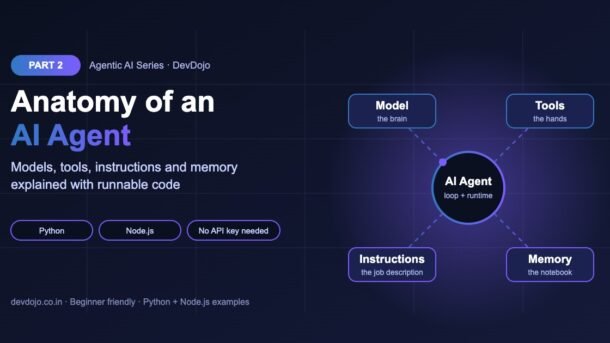
In Part 1 you saw that an AI agent is “an LLM in a loop that can use tools”. That is true, but when you sit down to build one, you quickly ask: which model should I pick? How do I describe my tools? What do I write in the instructions? Where does the agent remember things? This post answers all of that. We will take a close look at the anatomy of an AI agent: the four building blocks every agent is made of (the model, the tools, the instructions and the memory) plus the small runtime loop that connects them. You will build each part in Python and Node.js, run everything without an API key, and then plug the same design into a real LLM.
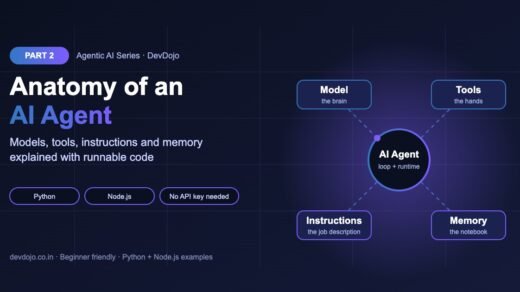
- Every AI agent has four parts: a model (the brain that decides), tools (functions it can call), instructions (its job description) and memory (what it knows so far).
- A small runtime loop in your code connects them: send instructions + memory + tool list to the model, run the tool it picks, save the result, repeat until it answers or a step limit is hit.
- A tool = name + description + input schema + a real function. The description is what the model reads, so write it clearly.
- Good instructions have six sections: role, goal, rules, tool tips, output format and when to stop.
- Memory comes in three kinds: short-term (chat history), scratchpad (notes for this task) and long-term (saved facts that survive restarts).
Full Agentic AI roadmap (30 parts)
Beginner
- What Is Agentic AI and How Do AI Agents Work?
- Anatomy of an AI Agent: Models, Tools, Instructions and Memory You are here
- Tool Calling for Agents: Letting an LLM Use Your Functions Coming soon
- Build Your First AI Agent from Scratch in Python (No Framework) Coming soon
- The ReAct Pattern: Reason, Act, Observe in Practice Coming soon
- Writing Good Agent Instructions and Tool Descriptions Coming soon
- Agent Memory: Short-Term, Long-Term and Scratchpads Coming soon
- Planning Agents: Breaking Big Goals into Steps Coming soon
Intermediate
- Workflow Patterns: Chaining, Routing and Parallel Steps Coming soon
- Model Context Protocol (MCP): Connecting Agents to Tools and Data Coming soon
- Agent Frameworks Compared: OpenAI Agents SDK, LangGraph, Claude Agent SDK and More Coming soon
- Building Stateful Agents with LangGraph Coming soon
- Agentic RAG: Agents That Search, Read and Cite Coming soon
- Browser and Computer-Use Agents Coming soon
- Coding Agents: How AI Writes, Runs and Fixes Code Coming soon
- Human-in-the-Loop: Approvals, Interrupts and Checkpoints Coming soon
- Multi-Agent Systems: Handoffs, Supervisors and Teams Coming soon
- Agent-to-Agent Communication with the A2A Protocol Coming soon
- Guardrails and Structured Outputs for Agents Coming soon
- Tracing and Debugging Agents Coming soon
Advanced
- Evaluating Agents: Task Success, Trajectories and Test Suites Coming soon
- Agent Security: Prompt Injection, Permissions and Sandboxing Coming soon
- Controlling Agent Cost and Latency Coming soon
- Long-Running Agents: Queues, Retries and Durable Execution Coming soon
- Deep Research Agents: Search, Synthesise and Report Coming soon
- Reflection and Self-Correcting Agents Coming soon
- Voice and Real-Time Agents Coming soon
- Deploying Agents to Production: APIs, Serverless and Containers Coming soon
- Monitoring and Improving Agents in Production Coming soon
- Final Project: Build a Multi-Agent Developer Assistant Coming soon
The anatomy of an AI agent at a glance
Think of an AI agent like a new employee you hire for a support desk. To do the job well, that person needs four things:
None of these parts is an agent on its own. A model without tools can only talk. Tools without a model never run. Without instructions the agent has no focus, and without memory it forgets the result of the tool it called one second ago. The magic happens in your code, which connects the four parts in a loop.
Explore the four parts
Click each part to see what it does, what can go wrong, and the one question to ask when you design it.
Job: read the instructions, memory and tool list, then decide: answer now, or call a tool?
Goes wrong when: the model is too small for the task, so it picks the wrong tool or invents arguments.
Design question: “What is the cheapest model that still passes my test cases?”
Job: do real work in the outside world: read data, call APIs, change things.
Goes wrong when: descriptions are vague, two tools overlap, or a tool can do something dangerous with no checks.
Design question: “Could a new team member use this tool correctly from its name and description alone?”
Job: give the agent its identity, goal, rules, tool tips and stopping rule.
Goes wrong when: instructions are a wall of text, contradict each other, or never say when to stop.
Design question: “If the agent breaks a rule, is the rule actually written down clearly?”
Job: keep the chat history, tool results and saved facts the model needs.
Goes wrong when: history grows past the context window, or old, wrong facts are never cleaned up.
Design question: “What must the agent remember for this task, and what can it forget?”
Part 1 of the agent: the model (the brain)
The model is the large language model that makes every decision. In each turn of the loop it receives three things (instructions, memory and the list of tools) and returns either a final answer or a tool call, like “call get_order_status with order_id = A102“. It never runs the tool itself. Your code does that.
How to choose a model for an agent
Agents put more pressure on a model than a simple chat does, because the model must make many correct decisions in a row. Look at these five things:
| What to check | Why it matters for agents |
|---|---|
| Tool calling support | The model must return clean, structured tool calls. All major API models (OpenAI, Anthropic, Google, and many open models) support this today. |
| Reasoning quality | Multi-step tasks need a model that plans well and recovers from errors. Bigger or “reasoning” models do this better. |
| Context window | Every tool result is added to memory. Long tasks need a big context window or memory trimming. |
| Speed (latency) | An agent may call the model 5–20 times for one task. A slow model makes the whole agent feel slow. |
| Cost | Many calls × many tokens adds up quickly. Small models can be 10× or more cheaper. |
Keep the model name in an environment variable (for example OPENAI_MODEL) instead of hard-coding it. Model names change often, and this lets you switch without editing code.
Part 2 of the agent: tools (the hands)
A tool is just a normal function plus a short description that the model can read. Each tool has four pieces:
- Name: short and clear, like
get_order_status. - Description: one or two sentences saying what it does and when to use it. The model chooses tools mainly by reading this.
- Input schema: a JSON Schema describing the arguments (names and types).
- Function: the real code your program runs.
Writing JSON schemas by hand gets boring, so let’s build a tiny tool registry. In Python a decorator reads the function’s name, docstring and type hints and builds the schema automatically. The Node.js version registers each tool with its schema and function side by side. Both include a safe call_tool helper that refuses unknown tools.
# A tiny tool registry: turn normal Python functions into agent tools.
import inspect
import json

TYPE_MAP = {str: "string", int: "integer", float: "number", bool: "boolean"}
REGISTRY = {}

def tool(func):
    """Decorator: read the function's name, docstring and type hints."""
    params = {}
    for name, p in inspect.signature(func).parameters.items():
        params[name] = {"type": TYPE_MAP.get(p.annotation, "string")}
    REGISTRY[func.__name__] = {
        "function": func,
        "schema": {
            "type": "function",
            "name": func.__name__,
            "description": inspect.getdoc(func),
            "parameters": {
                "type": "object",
                "properties": params,
                "required": list(params),
                "additionalProperties": False,
            },
        },
    }
    return func

@tool
def get_order_status(order_id: str):
    """Look up the delivery status of a customer order by its ID, e.g. 'A102'."""
    orders = {"A101": "delivered", "A102": "out for delivery"}
    return orders.get(order_id.upper(), "not found")

@tool
def convert_currency(amount: float, rate: float):
    """Convert an amount using an exchange rate. Returns the converted value."""
    return round(amount * rate, 2)

def call_tool(name, arguments_json):
    """What the agent runtime does when the model asks for a tool."""
    if name not in REGISTRY:
        return f"error: unknown tool '{name}'"
    args = json.loads(arguments_json)
    return REGISTRY[name]["function"](**args)

print(json.dumps(REGISTRY["get_order_status"]["schema"], indent=2))
print(call_tool("get_order_status", '{"order_id": "a102"}'))
print(call_tool("convert_currency", '{"amount": 25, "rate": 83.2}'))
print(call_tool("delete_database", '{}'))$ python tools.py
{
"type": "function",
"name": "get_order_status",
"description": "Look up the delivery status of a customer order by its ID, e.g. 'A102'.",
"parameters": {
"type": "object",
"properties": {
"order_id": {
"type": "string"
}
},
"required": [
"order_id"
],
"additionalProperties": false
}
}
out for delivery
2080.0
error: unknown tool 'delete_database'// The same tool registry in Node.js: each tool = schema + function.
const REGISTRY = {};
function tool({ name, description, properties }, fn) {
REGISTRY[name] = {
fn,
schema: {
type: "function",
name,
description,
parameters: {
type: "object",
properties,
required: Object.keys(properties),
additionalProperties: false,
},
},
};
}
tool(
{
name: "get_order_status",
description: "Look up the delivery status of a customer order by its ID, e.g. 'A102'.",
properties: { order_id: { type: "string" } },
},
({ order_id }) => {
const orders = { A101: "delivered", A102: "out for delivery" };
return orders[order_id.toUpperCase()] ?? "not found";
}
);
tool(
{
name: "convert_currency",
description: "Convert an amount using an exchange rate. Returns the converted value.",
properties: { amount: { type: "number" }, rate: { type: "number" } },
},
({ amount, rate }) => Math.round(amount * rate * 100) / 100
);
function callTool(name, argumentsJson) {
if (!REGISTRY[name]) return `error: unknown tool '${name}'`;
return REGISTRY[name].fn(JSON.parse(argumentsJson));
}
console.log(JSON.stringify(REGISTRY.get_order_status.schema, null, 2));
console.log(callTool("get_order_status", '{"order_id": "a102"}'));
console.log(callTool("convert_currency", '{"amount": 25, "rate": 83.2}'));
console.log(callTool("delete_database", "{}"));$ node tools.mjs
{
"type": "function",
"name": "get_order_status",
"description": "Look up the delivery status of a customer order by its ID, e.g. 'A102'.",
"parameters": {
"type": "object",
"properties": {
"order_id": {
"type": "string"
}
},
"required": [
"order_id"
],
"additionalProperties": false
}
}
out for delivery
2080
error: unknown tool 'delete_database'Switch between Python and Node.js with the tabs, then press ▶ Run to see the real output.
Notice the last line: when the model asks for a tool that does not exist (delete_database), the runtime returns an error message instead of crashing. That error goes back into memory so the model can correct itself. This is the format OpenAI’s Responses API expects for function tools. See the official function calling guide for all options.
Part 3 of the agent: instructions (the job description)
The instructions (also called the system prompt) are the first thing the model reads every turn. They are your main way to shape behaviour without changing code. A messy paragraph gives messy results, so use a fixed structure with six short sections:
# Build clear agent instructions from six simple sections.
def build_instructions(role, goal, rules, tool_tips, output_format, stop_when):
    lines = [f"# Role\n{role}", f"# Goal\n{goal}", "# Rules"]
    lines += [f"- {r}" for r in rules]
    lines += ["# How to use tools"] + [f"- {t}" for t in tool_tips]
    lines += [f"# Output format\n{output_format}", f"# When to stop\n{stop_when}"]
    return "\n".join(lines)

INSTRUCTIONS = build_instructions(
    role="You are ShopHelp, a friendly support agent for an Indian online store.",
    goal="Solve the customer's order or refund question in as few steps as possible.",
    rules=[
        "Never guess order details. Always check with a tool first.",
        "Never promise a refund. Explain the policy instead.",
        "If the customer is angry or asks for a human, say you will connect them.",
    ],
    tool_tips=[
        "get_order_status: use when the customer gives an order ID.",
        "get_refund_policy: use for any return or refund question.",
    ],
    output_format="Two or three short sentences in simple English.",
    stop_when="Stop as soon as the question is answered, or after 5 tool calls.",
)
print(INSTRUCTIONS)
print(f"\n({len(INSTRUCTIONS.split())} words)")$ python instructions.py
# Role
You are ShopHelp, a friendly support agent for an Indian online store.
# Goal
Solve the customer's order or refund question in as few steps as possible.
# Rules
- Never guess order details. Always check with a tool first.
- Never promise a refund. Explain the policy instead.
- If the customer is angry or asks for a human, say you will connect them.
# How to use tools
- get_order_status: use when the customer gives an order ID.
- get_refund_policy: use for any return or refund question.
# Output format
Two or three short sentences in simple English.
# When to stop
Stop as soon as the question is answered, or after 5 tool calls.
(119 words)Press ▶ Run to print the finished instructions.
About 120 words is plenty for a focused agent. Using headings and bullet points makes the instructions easy for the model to follow and easy for you to edit. If you notice the agent breaking a rule, first check whether the rule is actually written clearly. We go deeper into this in Part 6, “Writing Good Agent Instructions and Tool Descriptions”.
Part 4 of the agent: memory (the notebook)
An LLM has no memory between API calls. Every time you call it, it only knows what you send in that request. So “memory” in an agent is really data your code stores and sends back to the model. There are three useful kinds:
Here is a small, runnable version of all three. Short-term memory keeps only the newest messages so it never overflows the context window. Long-term memory writes to a JSON file, so a brand-new object (like after a restart) still remembers the user’s city.
# Three kinds of agent memory in one small file.
import json
from pathlib import Path

class ShortTermMemory:
    """The conversation so far. Trimmed so it fits the context window."""
    def __init__(self, max_messages=6):
        self.messages = []
        self.max_messages = max_messages

    def add(self, role, content):
        self.messages.append({"role": role, "content": content})
        if len(self.messages) > self.max_messages:
            self.messages = self.messages[-self.max_messages:]  # keep newest

class Scratchpad:
    """Working notes for the current task only. Cleared when the task ends."""
    def __init__(self):
        self.notes = {}

class LongTermMemory:
    """Facts that survive restarts, saved in a JSON file."""
    def __init__(self, path="memory.json"):
        self.path = Path(path)
        self.facts = json.loads(self.path.read_text()) if self.path.exists() else {}

    def remember(self, key, value):
        self.facts[key] = value
        self.path.write_text(json.dumps(self.facts, indent=2))

    def recall(self, key):
        return self.facts.get(key, "I don't know yet")

short = ShortTermMemory(max_messages=4)
for i in range(1, 7):
    short.add("user", f"message {i}")
print("Short-term keeps:", [m["content"] for m in short.messages])

pad = Scratchpad()
pad.notes["order_A102"] = "out for delivery"
print("Scratchpad:", pad.notes)

long_term = LongTermMemory()
long_term.remember("user_city", "Pune")
print("Long-term recall:", LongTermMemory().recall("user_city")) # new object, same file$ python memory.py
Short-term keeps: ['message 3', 'message 4', 'message 5', 'message 6']
Scratchpad: {'order_A102': 'out for delivery'}
Long-term recall: PunePress ▶ Run to see which messages survive trimming and what the long-term memory recalls.
The runtime loop that connects everything
The four parts sit still until something drives them. That “something” is the runtime: the loop in your code. You met it in Part 1. Here is what it does on every step:
- Send instructions + memory + tool schemas to the model.
- If the model returns a final answer, stop and return it.
- If it returns a tool call, check the tool exists, run it, and catch errors.
- Add the tool result to memory.
- Repeat, but never more than
max_stepstimes.
The step limit, the unknown-tool check and the logging are not “extra”. They are what keeps an agent safe and debuggable. Anthropic’s article Building effective agents gives the same advice: keep the loop simple and make every step visible.
Build an agent with all four parts
Now let’s put the anatomy together in one small Agent class. To keep it free and runnable, the “model” is a fake function with a few if rules. The important thing is its signature: it receives exactly what a real LLM receives (instructions, memory, tools) and returns either a tool call or an answer. In the next section we swap it for a real model without touching the rest.
# All four parts of an agent in one class. Runs without an API key.
from dataclasses import dataclass, field

def get_order_status(order_id):
    return {"A101": "delivered", "A102": "out for delivery"}.get(order_id, "not found")

def get_refund_policy(topic):
    return "Refunds are allowed within 7 days of delivery."

def fake_model(instructions, memory, tools):
    """Stands in for the LLM. A real model reads the same three inputs."""
    last = memory[-1]["content"]
    if memory[-1]["role"] == "user" and "A101" in last:
        return {"tool": "get_order_status", "args": {"order_id": "A101"}}
    if memory[-1]["role"] == "tool" and last == "delivered":
        return {"tool": "get_refund_policy", "args": {"topic": "refund"}}
    if memory[-1]["role"] == "tool":
        return {"answer": f"Your order A101 was delivered. {last}"}
    return {"answer": "Could you share your order ID?"}

@dataclass
class Agent:
    name: str
    model: callable                      # 1. the brain
    instructions: str                    # 2. the job description
    tools: dict                          # 3. the hands
    memory: list = field(default_factory=list)  # 4. the notebook
    max_steps: int = 5                   # safety limit for the loop

    def run(self, user_message):
        self.memory.append({"role": "user", "content": user_message})
        for step in range(1, self.max_steps + 1):
            decision = self.model(self.instructions, self.memory, self.tools)
            if "answer" in decision:
                print(f"Step {step}: ANSWER")
                return decision["answer"]
            name, args = decision["tool"], decision["args"]
            if name not in self.tools:
                result = f"error: unknown tool {name}"
            else:
                result = self.tools[name](**args)
            print(f"Step {step}: {name}({args}) -> {result}")
            self.memory.append({"role": "tool", "content": result})
        return "Stopped: step limit reached"

support_agent = Agent(
    name="ShopHelp",
    model=fake_model,
    instructions="You are ShopHelp, a polite support agent. Use tools for facts.",
    tools={"get_order_status": get_order_status, "get_refund_policy": get_refund_policy},
)
print(support_agent.run("Can I return order A101?"))
print("Memory size:", len(support_agent.memory), "messages")$ python anatomy_agent.py
Step 1: get_order_status({'order_id': 'A101'}) -> delivered
Step 2: get_refund_policy({'topic': 'refund'}) -> Refunds are allowed within 7 days of delivery.
Step 3: ANSWER
Your order A101 was delivered. Refunds are allowed within 7 days of delivery.
Memory size: 3 messages// All four parts of an agent in one object. Runs without an API key.
const tools = {
get_order_status: ({ order_id }) =>
({ A101: "delivered", A102: "out for delivery" })[order_id] ?? "not found",
get_refund_policy: () => "Refunds are allowed within 7 days of delivery.",
};
function fakeModel(instructions, memory, tools) {
// Stands in for the LLM. A real model reads the same three inputs.
const last = memory.at(-1);
if (last.role === "user" && last.content.includes("A101"))
return { tool: "get_order_status", args: { order_id: "A101" } };
if (last.role === "tool" && last.content === "delivered")
return { tool: "get_refund_policy", args: { topic: "refund" } };
if (last.role === "tool")
return { answer: `Your order A101 was delivered. ${last.content}` };
return { answer: "Could you share your order ID?" };
}
function createAgent({ name, model, instructions, tools, maxSteps = 5 }) {
const memory = []; // the notebook
return {
name,
memory,
run(userMessage) {
memory.push({ role: "user", content: userMessage });
for (let step = 1; step <= maxSteps; step++) {
const decision = model(instructions, memory, tools);
if (decision.answer) {
console.log(`Step ${step}: ANSWER`);
return decision.answer;
}
const fn = tools[decision.tool];
const result = fn ? fn(decision.args) : `error: unknown tool ${decision.tool}`;
console.log(`Step ${step}: ${decision.tool}(${JSON.stringify(decision.args)}) -> ${result}`);
memory.push({ role: "tool", content: result });
}
return "Stopped: step limit reached";
},
};
}
const supportAgent = createAgent({
name: "ShopHelp",
model: fakeModel,
instructions: "You are ShopHelp, a polite support agent. Use tools for facts.",
tools,
});
console.log(supportAgent.run("Can I return order A101?"));
console.log("Memory size:", supportAgent.memory.length, "messages");$ node anatomy-agent.mjs
Step 1: get_order_status({"order_id":"A101"}) -> delivered
Step 2: get_refund_policy({"topic":"refund"}) -> Refunds are allowed within 7 days of delivery.
Step 3: ANSWER
Your order A101 was delivered. Refunds are allowed within 7 days of delivery.
Memory size: 3 messagesBoth tabs print the same steps. Click ▶ Run on each to compare.
Read the output step by step. The agent checks the order (tool 1), sees it was delivered, looks up the refund policy (tool 2), then answers using both results from memory. Each part of the anatomy has one clear place in the code, which makes it easy to change one part without breaking the others.
Plug in a real LLM
Ready to use a real model? First set up the project. We use the official OpenAI SDK here, but the same four-part design works with any provider.
# 1. Create a project folder
$ mkdir agentic-ai-part2 && cd agentic-ai-part2

# 2. Python: virtual environment + OpenAI SDK
$ python -m venv .venv
$ source .venv/bin/activate      # Windows: .venv\Scripts\activate
$ pip install openai python-dotenv

# 3. Save your key and model in .env (never commit this file)
$ echo "OPENAI_API_KEY=sk-your-key" > .env
$ echo "OPENAI_MODEL=gpt-6-luna" >> .env
$ echo ".env" >> .gitignore
Now the real agent. Look for the four numbered comments: model, instructions, tools, memory. The memory list is kept between the two run() calls, so the second question (“what was the order ID?”) can be answered without any tool.
# pip install openai python-dotenv  (needs OPENAI_API_KEY in .env)
import json
import os
from dotenv import load_dotenv
from openai import OpenAI

load_dotenv()
client = OpenAI()
MODEL = os.getenv("OPENAI_MODEL", "gpt-6-luna")          # 1. model

INSTRUCTIONS = (                                          # 2. instructions
    "You are ShopHelp, a friendly support agent for an online store. "
    "Never guess order details: always use a tool. "
    "Answer in two or three short sentences."
)

def get_order_status(order_id: str):                      # 3. tools
    orders = {"A101": "delivered", "A102": "out for delivery"}
    return orders.get(order_id.upper(), "not found")

TOOL_FUNCTIONS = {"get_order_status": get_order_status}
TOOLS = [{
    "type": "function",
    "name": "get_order_status",
    "description": "Get the delivery status of an order by its ID, e.g. A102.",
    "parameters": {
        "type": "object",
        "properties": {"order_id": {"type": "string"}},
        "required": ["order_id"],
        "additionalProperties": False,
    },
    "strict": True,
}]

memory = []                                               # 4. memory

def run(user_message, max_steps=5):
    memory.append({"role": "user", "content": user_message})
    for _ in range(max_steps):
        response = client.responses.create(
            model=MODEL, instructions=INSTRUCTIONS, input=memory, tools=TOOLS
        )
        memory.extend(response.output)                    # remember the reply
        calls = [o for o in response.output if o.type == "function_call"]
        if not calls:
            return response.output_text
        for call in calls:
            result = TOOL_FUNCTIONS[call.name](**json.loads(call.arguments))
            print(f"  tool: {call.name} -> {result}")
            memory.append({"type": "function_call_output",
                           "call_id": call.call_id, "output": str(result)})
    return "Stopped: step limit reached"

print(run("Where is my order A102?"))
print(run("And what was the order ID I asked about?")) # memory at work$ python real_agent.py
tool: get_order_status -> out for delivery
Your order A102 is out for delivery, so it should reach you soon.
You asked about order A102.Press ▶ Run to see an example of what this prints. Real answers will be worded a little differently each time.
response.output into memory: the Responses API needs to see its own earlier tool call next to the function_call_output with the same call_id. If you only save the tool result, you get an error about a missing tool call.Common errors and fixes
| Problem | Likely cause | Fix |
|---|---|---|
| Agent never uses a tool and guesses instead | Vague tool description, or instructions don’t say “use tools for facts” | Describe when to use the tool and add a rule like “Never guess order details” |
| Agent calls the wrong tool | Two tools with overlapping descriptions | Merge them, or make each description clearly different |
KeyError / crash on an unknown tool name | The runtime trusts the model blindly | Check the name against your registry and return an error string |
TypeError: unexpected keyword argument | Model sent an argument your function doesn’t accept | Use "strict": true and additionalProperties: false in the schema |
| “No tool call found for function call output” | Tool result saved without the model’s tool-call item | Add response.output to memory before the outputs |
| Context length exceeded after many steps | Memory grows forever | Trim or summarise old messages; keep tool results short |
| Agent loops forever | No stopping rule and no step limit | Add “When to stop” to instructions and max_steps in code |
Best practices for each part
- Model: keep the name in config, test with a strong model first, then try cheaper ones against the same test cases.
- Tools: few, focused tools beat many overlapping ones. Return short, useful results (not a 5,000-line JSON dump). Start read-only.
- Instructions: use the six-section structure, keep it short, and put important rules near the top.
- Memory: decide what must be remembered and for how long. Never store secrets like passwords or API keys in agent memory.
- Runtime: always have a step limit, catch tool errors, and log every step so you can see why the agent did something.
Practice task
Your task: extend the Agent class from “Build an agent with all four parts”:
- Add a third tool,
get_delivery_date(order_id), that returns a date for orderA102. - Update the fake model so that the question “When will A102 arrive?” calls
get_order_statusand thenget_delivery_date. - Add a
LongTermMemoryobject (from the memory example) that saves the customer’s last order ID, and print it after the run. - Bonus: set
max_steps=1and check that the agent stops with “Stopped: step limit reached”.
Hint: you only need to change the tools dictionary and the fake model. The loop stays the same. That is the whole point of a clean anatomy.
FAQ: anatomy of an AI agent
What are the main components of an AI agent?
Four parts: a model (LLM) that makes decisions, tools that let it act, instructions that define its role and rules, and memory that holds what it knows. A runtime loop in your code connects them.
Is the system prompt the same as agent instructions?
Yes, mostly. “Instructions” is the name used by many agent SDKs (for example the instructions parameter in OpenAI’s Responses API). It is sent to the model on every step, like a system prompt.
Does the LLM run the tools itself?
No. The model only says which tool to call and with which arguments. Your code runs the function and sends the result back. This keeps you in control.
How many tools should one agent have?
Start with 2–5 focused tools. As the number grows, the model gets more confused about which one to use. When you need many tools, split the work across several agents (Part 17).
What is the difference between short-term and long-term memory?
Short-term memory is the current conversation and tool results, sent with each request. Long-term memory is saved outside the model (file, database or vector store) and loaded when needed, so it survives restarts.
Do I need a vector database for agent memory?
Not at first. A list for short-term memory and a JSON file or normal database table for long-term facts is enough for most beginner projects. Vector search helps when you have lots of notes to search by meaning.
Conclusion
You now know the full anatomy of an AI agent. The model decides, the tools act, the instructions guide and the memory remembers, and a small runtime loop in your code ties them together with a step limit and error handling. You built a tool registry, structured instructions, three kinds of memory and a complete agent in Python and Node.js, then saw how to connect the same design to a real LLM. When an agent misbehaves, you can now ask a clear question: which of the four parts is the problem?
Missed the basics? Go back to Agentic AI Part 1. Want to see a full SDK in action? Read our OpenAI Agents SDK tutorial.
New posts every day on DevDojo
Follow the full Agentic AI series – 30 parts from “what is an agent” to building a multi-agent developer assistant. Bookmark devdojo.co.in and tell us in the comments which part of the agent anatomy you want to explore first.