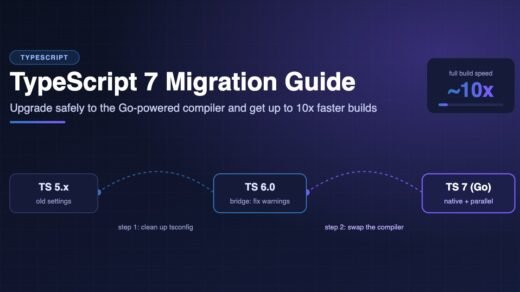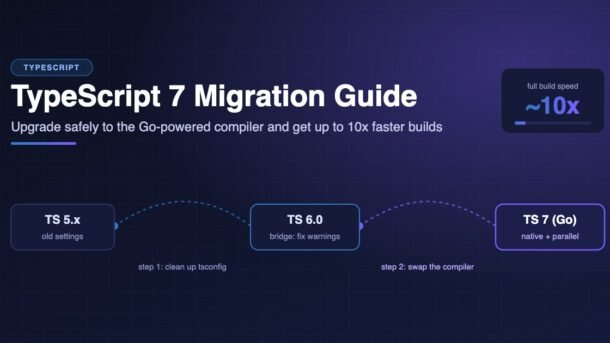
For more than ten years, the TypeScript compiler was written in TypeScript itself. That changed with TypeScript 7. Microsoft rewrote the whole compiler in Go, and the result is a native tool that type-checks most projects about 8 to 12 times faster while using less memory. If you have ever waited a minute for tsc to finish, or watched your editor freeze on a large project, this upgrade is for you.
But TypeScript 7 is not just “the same thing, faster”. It also removes old settings (like baseUrl and target: "es5"), turns on strict mode by default, and does not yet ship the programmatic API that some tools (typescript-eslint, Vue, Svelte, Angular) depend on. In this guide you will learn, step by step, how to move a real project to TypeScript 7 without breaking your build, your editor, or your CI pipeline.
- TypeScript 7 is the native Go port of the compiler. Install it with
npm install -D typescriptand keep using the sametsccommand. - Full builds are roughly 10x faster, thanks to native code and type-checking spread across several CPU cores.
- New defaults:
strict: true,module: "esnext",types: [], androotDirset to the folder that holds yourtsconfig.json. - Removed:
baseUrl,target: "es5",moduleResolution: "node"(node10), and AMD/UMD/SystemJS module output. - Safest path: upgrade to TypeScript 6.0 first, fix every deprecation warning, then switch to 7.
- If a tool still needs the old API, run TypeScript 6 and 7 side by side until 7.1 arrives.
What is TypeScript 7?
TypeScript 7 is the first stable release of the native TypeScript compiler, announced by Microsoft in July after a beta in April and a release candidate in June. During development it was called “Project Corsa” and was tested through a package named @typescript/native-preview with a tsgo command. Now it is simply the typescript package, and the command is still tsc.
The important thing to understand is that the language did not change much. Your .ts files, interfaces, generics and type tricks all work the same way. What changed is the engine that reads and checks your code. The team ported the existing compiler code to Go line by line, so type-checking results stay almost identical to TypeScript 6.
TypeScript 6.0 (released in March) is the “bridge” version. It is the last version built on the old JavaScript codebase, and its main job is to warn you about every setting that TypeScript 7 removes. That is why the smoothest upgrade goes 5.x → 6.0 → 7.
Why is TypeScript 7 so much faster?
There are two big reasons:
- Native code. Go compiles to machine code. There is no JavaScript engine warming up, no just-in-time compilation and less memory overhead for every object the compiler creates.
- Real parallelism. Go makes it easy to run work on many CPU cores that share memory. TypeScript 7 parses files in parallel and splits type-checking across several “checker” workers (four by default). The old compiler ran on a single thread.
Here are some real full-build numbers published by the TypeScript team:
Memory use also dropped by about 6% to 26% in the team’s tests. For a small side project you may only save a second or two, but on a large company monorepo the difference can be minutes per build and much faster CI runs.
Check before you upgrade
Spend five minutes answering these questions before you touch package.json. They decide whether you can switch fully today or should run both versions for a while.
- Does your project use typescript-eslint with type-aware rules? It uses the TypeScript programmatic API, which TypeScript 7.0 does not ship yet.
- Do you use Vue, Svelte, Astro, MDX or Angular templates? Tools such as
vue-tscand Angular’s template type-checking also need the old API. - Do you use a webpack loader that runs the compiler (for example
ts-loaderin type-checking mode)? Same story. - Does your tsconfig use
baseUrl,target: "es5"ormoduleResolution: "node"? These must be changed first. - Do you rely on global types from
@types/*likeprocess,describeorexpect? You will need to list them intypes.
tsc --noEmit type-check step gets faster.Step-by-step TypeScript 7 migration
Step 1: Upgrade to TypeScript 6.0 first
TypeScript 6.0 shows a deprecation warning for every option that TypeScript 7 removes. Install it and run a type-check:
npm install -D typescript@6
npx tsc --noEmit
If the list of warnings is long and you need the build green today, you can silence them temporarily. Just remember: TypeScript 7 ignores this escape hatch, because the options are gone for good.
{
  "compilerOptions": {
    "ignoreDeprecations": "6.0"
  }
}
Step 2: Fix every deprecation warning
The TypeScript team built a small helper tool that fixes the two most common problems, baseUrl and rootDir, across all your config files (including extends and project references):
# remove baseUrl and rewrite your "paths" entries
npx @andrewbranch/ts5to6 --fixBaseUrl .

# set an explicit rootDir so output folders don't move
npx @andrewbranch/ts5to6 --fixRootDir .
Commit these changes separately, then remove ignoreDeprecations and run npx tsc --noEmit again until it is clean. The next section explains each change by hand, so you understand what the tool did.
Step 3: Install TypeScript 7
npm install -D typescript@7
npx tsc --version
# Version 7.0.x
Nothing else changes in your scripts. tsc, tsc -b, tsc --watch and tsc --noEmit all work as before. If you tried the preview earlier, you can now remove @typescript/native-preview and replace any tsgo commands with tsc.
Step 4: Type-check and fix new errors
Because strict is now true by default, projects that never set it will suddenly see many new errors. Here is a typical example:
interface User {
  name: string;
  email?: string;
}

// Before: worked without strict mode
// After: error TS7006: Parameter 'u' implicitly has an 'any' type.
export function greet(u) {
  return "Hello " + u.name;
}

// Fixed version
export function greetUser(u: User): string {
  return `Hello ${u.name}`;
}

// strictNullChecks: email may be undefined
export function emailDomain(u: User): string {
  return u.email?.split("@")[1] ?? "unknown";
}
If you get hundreds of errors, don’t panic. Set "strict": false explicitly for now, finish the upgrade, and then turn strict checks on one by one (noImplicitAny, then strictNullChecks, and so on) in later pull requests.
Step 5: Update your editor and CI
In VS Code, install the official TypeScript 7 extension from the marketplace so the editor uses the native language server (Visual Studio turns it on automatically). Other editors, such as WebStorm, can use it through the Language Server Protocol. Finally, check your CI pipeline. If you followed our guide on GitHub Actions CI/CD for Node.js, your npm run typecheck step needs no change. It just finishes much sooner.
tsconfig changes you must make for TypeScript 7
This is the part of the migration where most people get stuck. The table below lists what changed. After it, we go through the most common fixes with before-and-after examples.
| Setting | Old behaviour | TypeScript 7 | What to do |
|---|---|---|---|
strict | Off unless set | On by default | Fix errors, or set "strict": false for now |
module | Depended on target | esnext by default | Set nodenext for Node.js, esnext for bundlers |
target | es5 allowed | Defaults to latest stable ES; es5 removed | Use es2022 or newer; let your bundler handle old browsers |
types | All @types/* loaded | [] (nothing loaded) | List what you need: ["node", "vitest/globals"] |
rootDir | Guessed from your files | Folder of tsconfig.json | Set "rootDir": "./src" if you emit files |
baseUrl | Supported | Removed | Put the full path inside paths |
moduleResolution | node / classic allowed | Only bundler, node16, nodenext | bundler for Vite/Next.js, nodenext for Node |
esModuleInterop | Could be false | Always on | Delete the line; fix import * as x calls if needed |
| AMD / UMD / SystemJS output | Supported | Removed | Use a bundler for those formats |
downlevelIteration | Supported | Removed | Not needed with modern targets |
Fix 1: Replace baseUrl with full paths
Many projects used baseUrl only to make paths work. Since TypeScript 4.1, paths works without it, so simply move the folder prefix into each mapping:
{
  "compilerOptions": {
    "baseUrl": "./src",
    "paths": {
      "@app/*": ["app/*"],
      "@lib/*": ["lib/*"]
    }
  }
}{
"compilerOptions": {
"paths": {
"@app/*": ["./src/app/*"],
"@lib/*": ["./src/lib/*"]
}
}
}If your code also used bare imports like import x from "utils/date" (which worked because of baseUrl), add a catch-all mapping: "*": ["./src/*"].
Fix 2: List your global types
Because types now defaults to an empty list, TypeScript no longer loads every @types package in node_modules. That makes builds faster, but you will see errors like Cannot find name 'process' or Cannot find name 'describe'. Fix them by naming the packages you actually use:
{
  "compilerOptions": {
    "types": ["node", "jest"]
  }
}
Fix 3: Set rootDir when you emit JavaScript
If you compile src/index.ts to dist/ and suddenly your output appears at dist/src/index.js, it is because rootDir now defaults to the folder containing tsconfig.json. Make it explicit:
{
  "compilerOptions": {
    "rootDir": "./src",
    "outDir": "./dist"
  },
  "include": ["./src"]
}
Fix 4: Compiling a single file
Running tsc hello.ts inside a folder that has a tsconfig.json now stops with error TS5112, because it is unclear which settings you want. Add the new flag to skip the config file on purpose:
npx tsc --ignoreConfig hello.tsRecommended TypeScript 7 config by project type
Pick your project type below to see a clean, TypeScript 7-ready tsconfig.json and the notes that matter for it.
For an Express, Fastify or plain Node.js server that tsc compiles to dist/:
{
  "compilerOptions": {
    "target": "es2023",
    "module": "nodenext",
    "moduleResolution": "nodenext",
    "rootDir": "./src",
    "outDir": "./dist",
    "types": ["node"],
    "strict": true,
    "skipLibCheck": true,
    "sourceMap": true
  },
  "include": ["./src"]
}
Remember that nodenext needs file extensions in relative imports: import { db } from "./db.js".
Vite (and esbuild) only remove types, so TypeScript is used purely for checking. A typical tsconfig.app.json:
{
  "compilerOptions": {
    "target": "es2022",
    "lib": ["es2022", "dom", "dom.iterable"],
    "module": "esnext",
    "moduleResolution": "bundler",
    "jsx": "react-jsx",
    "types": ["vite/client"],
    "noEmit": true,
    "strict": true,
    "skipLibCheck": true,
    "paths": { "@/*": ["./src/*"] }
  },
  "include": ["src"]
}
Keep your "typecheck": "tsc -b" or "tsc --noEmit" script as it is. If you lint with type-aware typescript-eslint rules, use the side-by-side setup shown in the next section.
Recent Next.js releases (16.4 and newer) run your project’s own tsc command during next build instead of loading the compiler API, so TypeScript 7 works out of the box:
npm install -D typescript@^7
npx next build
Keep the tsconfig.json that Next.js generates. Only check two things: no baseUrl (use "paths": { "@/*": ["./src/*"] }) and "moduleResolution": "bundler". Error messages are now printed directly by tsc, without Next.js code frames. Read more in our Next.js use cache guide.
For a package you publish to npm with type declarations:
{
  "compilerOptions": {
    "target": "es2022",
    "module": "nodenext",
    "moduleResolution": "nodenext",
    "rootDir": "./src",
    "outDir": "./dist",
    "declaration": true,
    "declarationMap": true,
    "types": [],
    "strict": true
  },
  "include": ["./src"]
}
Run npx tsc and compare the new .d.ts files with the old ones (for example with git diff dist) before publishing a new version.
Running TypeScript 6 and 7 side by side
TypeScript 7.0 ships without a stable programmatic API. The team has said a new (and different) API is planned for TypeScript 7.1. Until then, tools that import "typescript" in JavaScript, such as typescript-eslint, vue-tsc, Svelte and Astro checkers, or Angular’s compiler, still need TypeScript 6.
The official answer is a compatibility package called @typescript/typescript6. It contains TypeScript 6 but names its command tsc6, so it does not clash with TypeScript 7’s tsc. Using npm aliases, you give the name typescript to version 6 (for tools) and install version 7 under another name (for fast checking):
{
  "scripts": {
    "typecheck": "tsc --noEmit",
    "lint": "eslint ."
  },
  "devDependencies": {
    "@typescript/native": "npm:typescript@^7.0.2",
    "typescript": "npm:@typescript/typescript6@^6.0.2"
  }
}
Now npm run typecheck uses the fast TypeScript 7 tsc, while ESLint (and any other tool that imports typescript) quietly gets the TypeScript 6 API. When 7.1 lands and your tools support it, delete the alias and install plain typescript again.
npm install -D typescript@npm:@typescript/typescript6 if you want to stay on TypeScript 6 for now but keep your package.json ready for the switch.New TypeScript 7 flags: checkers, builders and single-threaded mode
TypeScript 7 adds three command-line flags to control how much parallel work it does:
# use 8 type-checking workers (faster on big machines, uses more memory)
npx tsc --noEmit --checkers 8

# monorepo with project references: build up to 4 projects at once
npx tsc -b --builders 4

# turn off all parallel work (useful for debugging or tiny CI runners)
npx tsc --noEmit --singleThreaded
For most people the defaults are fine. Consider lowering --checkers on small CI machines with 2 CPU cores and limited RAM, and raising it on a powerful laptop or build server. Measure with a simple timer before and after:
time npx tsc --noEmit
time npx tsc --noEmit --checkers 8
The rebuilt --watch mode is another quiet win. It now uses a Go port of the Parcel file watcher, which the team says is more stable and uses fewer resources than the old Node.js-based watcher.
Common TypeScript 7 errors and fixes
These are the problems developers hit most often during the upgrade, with the quickest fix for each.
| Error or symptom | Why it happens | Fix |
|---|---|---|
Cannot find name 'process' / 'Buffer' | types now defaults to [] | Add "types": ["node"] and install @types/node |
Cannot find name 'describe' / 'expect' | Test globals are no longer loaded automatically | Add "jest" or "vitest/globals" to types, or import them explicitly |
Unknown or removed option baseUrl | Option removed in TypeScript 7 | Move the prefix into paths or run ts5to6 --fixBaseUrl |
| Hundreds of new “implicitly has an ‘any’ type” errors | strict is on by default | Fix gradually, or set "strict": false explicitly for now |
Output goes to dist/src/... instead of dist/... | rootDir default changed | Set "rootDir": "./src" |
error TS5112: tsconfig.json is present but will not be loaded... | You passed file names while a tsconfig exists | Use tsc --ignoreConfig file.ts or just run tsc |
| typescript-eslint crashes or says it can’t load TypeScript | TypeScript 7.0 has no programmatic API | Use the npm alias setup with @typescript/typescript6 |
vue-tsc, svelte-check or Angular builds fail | Same missing API | Stay on TypeScript 6 for these projects until 7.1 |
target "es5" is not supported | ES5 output was removed | Target es2022 or newer; let Babel or your bundler handle very old browsers |
| Editor shows different errors than the terminal | VS Code is still using the old built-in TypeScript | Install the TypeScript 7 VS Code extension and reload the window |
.js files with JSDoc, TypeScript 7 reworked that support. Old Closure-style tags such as @enum and @class are gone, and a value can no longer be used as a type. Use @typedef and typeof instead.TypeScript 7 best practices
module, target, types and rootDir make your config clear to every teammate.tsc --noEmit only for checking. This is the setup that gains the most from TypeScript 7.npm ci, so every machine runs the same compiler build.--checkers 2 on small runners if you see out-of-memory errors, and a higher number on large ones.Here is a handy script set for a typical project after the upgrade:
{
  "scripts": {
    "dev": "vite",
    "build": "npm run typecheck && vite build",
    "typecheck": "tsc --noEmit",
    "typecheck:watch": "tsc --noEmit --watch",
    "typecheck:ci": "tsc --noEmit --checkers 2"
  }
}
Frequently Asked Questions
Is TypeScript 7 ready for production?
Yes. TypeScript 7.0 is a stable release, and its type-checking results are designed to match TypeScript 6. The main limit is tooling that needs the programmatic API, which is planned for TypeScript 7.1.
Do I need to learn Go to use TypeScript 7?
No. Go is only the language the compiler itself is written in. You still write TypeScript, install it from npm, and run tsc exactly as before.
Is tsgo still a separate command?
No. tsgo was the command name during the preview (@typescript/native-preview). In TypeScript 7 the native compiler is the normal typescript package and the command is tsc. Nightly builds now come from typescript@next.
Will my app run faster after upgrading?
Not directly. TypeScript 7 makes type-checking and compiling faster. The JavaScript that runs in the browser or on Node.js is basically the same. You save time in your editor, in local builds and in CI.
Can I skip TypeScript 6 and jump straight from 5.x to 7?
You can, but it is harder. TypeScript 6 gives you friendly deprecation warnings that point at exactly what to change. If you jump directly, the same problems appear as hard errors with less guidance.
Does TypeScript 7 work with React, Vite and Next.js?
Yes. Vite and similar bundlers only strip types, so they are not affected. Recent Next.js versions run the local tsc command during next build, so TypeScript 7 works there too. Only type-aware linting needs the side-by-side setup for now.
Should beginners learning TypeScript use version 7?
Yes. Start new projects with TypeScript 7. Its strict defaults catch more mistakes early, and the fast feedback in the editor makes learning more pleasant. If you are new to typed tools, our MCP server in TypeScript tutorial is a fun practice project.
Conclusion
TypeScript 7 is the biggest change to the TypeScript toolchain since the language was created, yet for your day-to-day code it feels familiar. The real work in the migration is cleaning up your tsconfig.json: remove baseUrl, list your types, set rootDir, move off es5 and old module settings, and decide how to handle strict. Do that on TypeScript 6 first, switch to 7 in a small follow-up change, and use the TypeScript 6 compatibility package for any tool that still needs the old API.
The reward is a compiler and editor that are roughly ten times faster, which means shorter CI runs, quicker feedback and less waiting. For every detail, read the official TypeScript 7.0 announcement and the TypeScript 6.0 release notes, which explain each deprecated option.
New posts every day on DevDojo
Practical guides on AI, React, Next.js, Node.js, Python and DevOps, written in simple English. Bookmark devdojo.co.in and come back tomorrow for the next one. Got a migration question? Leave a comment below!