If you have ever seen a birthday show up one day early, a meeting reminder fire an hour late after daylight saving, or new Date(2026, 1, 1) give you March instead of February, you already know dates in JavaScript are painful. The JavaScript Temporal API is the new built-in fix. It gives you clear types for dates, times, time zones and durations, its values never change by accident, and it is now enabled by default in Node.js 26 and in recent browsers.
In this beginner-friendly tutorial you will learn what Temporal is, which type to use for which job, how to handle time zones and daylight saving, how to calculate durations, and how to move your existing Date code over step by step. Every example was run on Node.js 26 and the real output is shown in the code editors.
- Temporal is a new global object (like
Math) that replaces most uses ofDate. No library to install on Node.js 26+. - Use
PlainDate/PlainTime/PlainDateTimefor calendar data with no time zone,ZonedDateTimefor real events in a place, andInstantfor exact timestamps. - Temporal objects are immutable:
add()andwith()return new objects, so nothing changes behind your back. - Months start at 1, time zones and daylight saving are handled for you, and
until()gives a properDuration. - For older browsers or Node.js 24 and below, add
temporal-polyfill.
Why JavaScript dates are hard
The Date object was copied from Java in 1995 in about ten days, and it has carried the same design problems ever since. Three of them cause most real-world bugs:
0 and December is 11, but days start at 1. Easy to get wrong, hard to spot in review.setDate() and friends change the original object. If two variables point to it, both change.Date only knows UTC and “the computer’s local zone”. Showing a time in Tokyo needs extra tricks.Here is what that looks like in practice, side by side with the Temporal version of the same tasks:
// The old Date object: three classic surprises
const d = new Date(2026, 0, 31);        // months start at 0, so 0 = January
d.setMonth(d.getMonth() + 1);           // "add one month"...
console.log(d.toDateString());          // ...lands in March, not February!

const start = new Date('2026-11-01');
const copy = start;                     // not a copy - same object
copy.setDate(15);
console.log(start.getDate());           // start changed too: 15

// Date-only strings are read as UTC midnight, so the day can shift
const nov1 = new Date('2026-11-01');
console.log(nov1.toLocaleDateString('en-US', { timeZone: 'America/New_York' }));$ node date-problems.mjs
Tue Mar 03 2026
15
10/31/2026// The same tasks with Temporal
const jan31 = Temporal.PlainDate.from('2026-01-31');
console.log(jan31.add({ months: 1 }).toString()); // clamps to end of Feb
const start = Temporal.PlainDate.from('2026-11-01');
const later = start.with({ day: 15 }); // returns a NEW object
console.log(start.toString(), later.toString()); // start is unchanged
console.log(start.month, start.dayOfWeek, start.daysInMonth);$ node temporal-fix.mjs
2026-02-28
2026-11-01 2026-11-15
11 7 30Click the two tabs to compare the old Date with Temporal, and press ▶ Run to see the real output.
Look at the first line of each output. “Add one month” to 31 January with Date silently rolls over into March. Temporal gives you 28 February, the last valid day of the month. The second line shows that changing copy also changed start with Date, while Temporal’s with() returns a brand-new value.
What is the JavaScript Temporal API?
The JavaScript Temporal API is a new standard date and time API designed by TC39, the committee that designs JavaScript. It is a global namespace object called Temporal, just like Math or Intl. Instead of one Date type that tries to do everything, Temporal gives you a small family of types, each with one clear job:
Three ideas make Temporal easy to work with once you get used to them:
- Pick the type that matches your data. A birthday has no time zone, so it is a
PlainDate. A flight departure happens in one place at one moment, so it is aZonedDateTime. - Everything is immutable. Methods like
add(),subtract(),with()andround()always return a new object. - Strings are strict ISO 8601. Temporal reads and writes formats like
2026-11-08T19:00and refuses vague strings such as"11/08/2026"that could mean two different days.
Where can you use Temporal today?
Node.js 26 ships with Temporal turned on by default, so server-side code and scripts can use it with no install and no flag. Firefox and Chromium-based browsers such as Chrome and Edge also ship it in their recent versions, while support in some other browsers is still rolling out. Always check the compatibility table on MDN before you rely on it in front-end code, and use a polyfill if you need to support older browsers.
# Temporal is built in from Node.js 26 - check what you have
$ node -v
v26.13.0
$ node -e "console.log(typeof Temporal)"
object
# "undefined" means your runtime has no Temporal yet - use the polyfill below.mjs ES module files.Plain dates and times (no time zone)
“Plain” means “wall-clock value with no time zone attached”. It is the right choice for most calendar data: birthdays, holidays, shop opening hours, a due date on a to-do list. You create plain values with from(), and you can read individual parts like year, month and dayOfWeek as simple numbers.
// Temporal basics: pick the type that matches your data
const today = Temporal.Now.plainDateISO();          // just a date
const time  = Temporal.PlainTime.from('19:00');     // just a clock time
const meet  = Temporal.PlainDateTime.from('2026-11-08T19:00');

console.log('Today is', today.toString());
console.log('Time    ', time.toString());
console.log('Meeting ', meet.toString());

// Math is simple and never changes the original value
const nextWeek = meet.add({ days: 7 });
console.log('Next week', nextWeek.toString());
console.log('Earlier?', Temporal.PlainDateTime.compare(meet, nextWeek)); // -1

// Read the parts you need
console.log(meet.year, meet.month, meet.day, meet.hour);
console.log('Weekday number (Mon=1):', meet.dayOfWeek);$ node basics.mjs
Today is 2026-10-31
Time 19:00:00
Meeting 2026-11-08T19:00:00
Next week 2026-11-15T19:00:00
Earlier? -1
2026 11 8 19
Weekday number (Mon=1): 7Press ▶ Run to open the terminal. “Today” will be your own date when you run it.
A few things to notice:
Temporal.Now.plainDateISO()gives today’s date in the computer’s time zone. UseTemporal.Now.instant()when you need the exact current moment.- You cannot compare Temporal objects with
<or>. Use the staticcompare()method (it returns -1, 0 or 1, perfect forArray.sort()) orequals(). dayOfWeekruns from 1 (Monday) to 7 (Sunday), following the ISO standard. 8 November 2026 is a Sunday, so it prints 7.
Time zones and daylight saving with ZonedDateTime
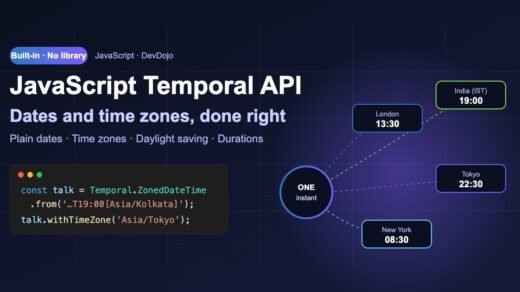
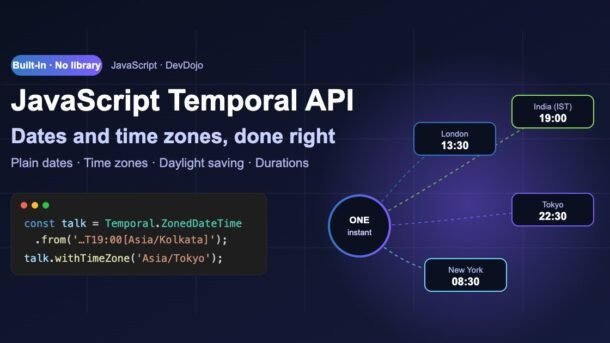
This is where Temporal really shines. A ZonedDateTime is an exact moment plus an IANA time zone name such as Asia/Kolkata or America/New_York. Because it knows the zone’s rules, it can show the same moment in any city and it handles daylight saving correctly.
// A webinar at 7:00 PM in India - what time is it for everyone else?
const webinar = Temporal.ZonedDateTime.from(
  '2026-11-08T19:00[Asia/Kolkata]'
);

for (const zone of ['Asia/Kolkata', 'Europe/London', 'America/New_York', 'Asia/Tokyo']) {
  const local = webinar.withTimeZone(zone);
  console.log(zone.padEnd(17), local.toPlainDateTime().toString());
}

// The exact moment never changes, only how we display it
console.log('Same instant?', webinar.withTimeZone('Asia/Tokyo').epochMilliseconds === webinar.epochMilliseconds);$ node timezones.mjs
Asia/Kolkata 2026-11-08T19:00:00
Europe/London 2026-11-08T13:30:00
America/New_York 2026-11-08T08:30:00
Asia/Tokyo 2026-11-08T22:30:00
Same instant? true// Daylight saving: New York clocks go back on 1 Nov 2026
const before = Temporal.ZonedDateTime.from('2026-10-31T09:00[America/New_York]');
const plusDay = before.add({ days: 1 }); // same wall-clock time next day
const plus24h = before.add({ hours: 24 }); // exactly 24 real hours later
console.log('add 1 day :', plusDay.toString());
console.log('add 24 hrs :', plus24h.toString());
console.log('Hours in 1 Nov:', plusDay.hoursInDay);$ node dst.mjs
add 1 day : 2026-11-01T09:00:00-05:00[America/New_York]
add 24 hrs : 2026-11-01T08:00:00-05:00[America/New_York]
Hours in 1 Nov: 25Two files: one meeting shown in four cities, and a daylight saving example. Switch tabs and press ▶ Run.
In the first file, a webinar planned for 7:00 PM in India is shown in London, New York and Tokyo with one method call: withTimeZone(). The underlying moment stays the same, which the last line proves by comparing epochMilliseconds.
The second file is the classic daylight saving trap. New York moves its clocks back one hour on 1 November 2026, so that day has 25 hours. Temporal lets you say exactly what you mean:
days follow the calendar, hours follow real elapsed time.ZonedDateTime for real-world events that repeat across those dates.Durations, differences and formatting
Subtracting two Date objects gives you milliseconds, and you have to do the maths for days, months and years yourself (and months have different lengths!). Temporal’s until() and since() return a Temporal.Duration that already knows about calendars.
// How long between two dates?
const joined = Temporal.PlainDate.from('2024-03-16');
const today  = Temporal.PlainDate.from('2026-10-31');

const gap = joined.until(today, { largestUnit: 'years' });
console.log(gap.toString());                       // ISO 8601 duration
console.log(`${gap.years} years, ${gap.months} months, ${gap.days} days`);

// Total days, and a duration rounded for humans
console.log('Total days:', joined.until(today).days);
const d = Temporal.Duration.from({ minutes: 135 });
console.log(d.round({ largestUnit: 'hours' }).toString()); // PT2H15M

// Format with the user's language
console.log(today.toLocaleString('en-IN', { dateStyle: 'full' }));
console.log(today.toLocaleString('en-US', { dateStyle: 'medium' }));$ node durations.mjs
P2Y7M15D
2 years, 7 months, 15 days
Total days: 959
PT2H15M
Saturday, 31 October 2026
Oct 31, 2026largestUnitcontrols how the result is split. Without it, aPlainDatedifference is given in days (959 here).P2Y7M15Dis the ISO 8601 way of writing “2 years, 7 months, 15 days”. You can send it in JSON and read it back withTemporal.Duration.from().toLocaleString()uses the built-inIntlformatter, soen-INanden-USusers each get the format they expect. No formatting library is needed for most screens.
Converting between Date and Temporal
You do not have to rewrite your whole app in one go. Many libraries, databases and APIs still give you Date objects, so you will move between the two often. The bridge is the Instant type:
// Moving between Date and Temporal
const legacy = new Date('2026-10-31T13:30:00Z');

const instant = legacy.toTemporalInstant();        // Date -> Temporal.Instant
const inIndia = instant.toZonedDateTimeISO('Asia/Kolkata');
console.log(inIndia.toString());

const back = new Date(inIndia.epochMilliseconds);  // Temporal -> Date
console.log(back.toISOString());

// Store instants in the database as UTC strings
console.log(JSON.stringify({ createdAt: instant }));$ node convert.mjs
2026-10-31T19:00:00+05:30[Asia/Kolkata]
2026-10-31T13:30:00.000Z
{"createdAt":"2026-10-31T13:30:00Z"}Date.prototype.toTemporalInstant() turns an old Date into an Instant, and epochMilliseconds takes you back. When you save to a database or send JSON, an Instant becomes a plain UTC string, which every backend understands.
Using the polyfill in browsers and older Node.js
If your users are on browsers without Temporal, or your server still runs Node.js 22 or 24, install a polyfill. It gives you the same API, so your code will keep working when you later remove it.
# For browsers without Temporal, or Node.js 24 and older
$ npm install temporal-polyfill
# Another option is the reference polyfill from the proposal champions:
$ npm install @js-temporal/polyfill// Works in any modern browser or older Node.js (e.g. Node 22)
import { Temporal } from 'temporal-polyfill';
const deadline = Temporal.PlainDate.from('2026-12-31');
const today = Temporal.PlainDate.from('2026-10-31');
const left = today.until(deadline);
console.log(`Days left this year: ${left.days}`);
console.log(`Runtime: Node.js ${process.version}`);$ node polyfill.mjs
Days left this year: 61
Runtime: Node.js v22.23.4This one runs on Node.js 22, which has no built-in Temporal, so the polyfill fills the gap.
lib setting. If yours does not, the polyfill package ships its own types. See our TypeScript 7 migration guide for setting up tsconfig.Which Temporal type should I use?
Choosing the right type is the one real decision Temporal asks you to make. Pick a situation below to see the recommended type:
Use Temporal.PlainDate. A birthday is “8 November” for everyone, no matter where they are. If you store it with a time zone, it can show up one day early for users in another country – a very common bug with Date.
Temporal.PlainDate.from('2026-11-08')
Use Temporal.ZonedDateTime. A meeting happens at one exact moment, but each person sees it in their own local time. Create it in the organiser’s zone, then call withTimeZone() for each viewer.
Temporal.ZonedDateTime.from('2026-11-08T19:00[Asia/Kolkata]')
Use Temporal.Instant. Logs, “created at” columns and API responses need the exact moment, not a local clock reading. Store it as a UTC string like 2026-10-31T13:30:00Z and convert to a time zone only when you display it.
Temporal.Now.instant()
Use Temporal.Duration together with until() or since(). It keeps years, months, days and hours separate, and round() or total() turn it into something you can show.
today.until(deadline, { largestUnit: 'days' })
Common errors and fixes
Temporal fails loudly instead of guessing. These are real error messages from Node.js 26:
| Error message | Why it happens | Fix |
|---|---|---|
TypeError: Do not use Temporal.PlainDate.prototype.valueOf; use ... compare for comparison. | You compared two Temporal values with <, > or used them in maths. | Use Temporal.PlainDate.compare(a, b) or a.equals(b). |
RangeError: ... Time zone annotation is required for parsing a zoned date time. | You passed '2026-11-08T19:00' to ZonedDateTime.from() without a zone. | Add the zone in brackets: '2026-11-08T19:00[Asia/Kolkata]'. |
RangeError: ... Parsed day value not in a valid range. | The string has an impossible date such as 30 February. | Validate user input, or build from an object, which clamps to the last valid day by default. |
RangeError: ... Invalid ISO date. | You used a zero-based month like with Date: new Temporal.PlainDate(2026, 0, 1). | Months start at 1 in Temporal: new Temporal.PlainDate(2026, 1, 1). |
RangeError: ... Required fields missing from Instant string. | Instant.from() needs an exact moment, so a string without Z or an offset is rejected. | Use '2026-11-08T13:30Z', or parse as ZonedDateTime and call toInstant(). |
ReferenceError: Temporal is not defined | Your runtime does not ship Temporal yet (for example Node.js 22). | Upgrade to Node.js 26 or import from temporal-polyfill. |
Best practices for working with dates in JavaScript
- Store instants, display zoned times. Save timestamps as UTC
Instantstrings and convert to the viewer’s zone only in the UI. - Keep the time zone name, not just the offset.
+05:30tells you the offset today;Asia/Kolkatatells Temporal the rules for every date, including daylight saving in other countries. - Use Plain types for “calendar” data. Birthdays, due dates and holidays should never shift because a user travels.
- Be explicit about units. Choose
daysvshourson purpose, and passlargestUnittountil(). - Validate input early. Wrap
from()intry/catchfor user-entered strings and show a friendly message onRangeError. - Migrate gradually. Convert at the edges with
toTemporalInstant()and remove date libraries like Moment.js one module at a time.
FAQ
Is Temporal a replacement for the Date object?
For new code, yes. Date is not going away because millions of websites depend on it, but Temporal is the recommended way to work with dates and times in modern JavaScript.
Do I still need Moment.js, date-fns or Day.js?
For most apps, no. Time zones, durations, calendar maths and formatting (via toLocaleString) are built in. You might still use a library for special formatting like “3 days ago”, although Intl.RelativeTimeFormat covers that too.
Which Node.js version supports Temporal?
Node.js 26 enables Temporal by default. On Node.js 24 and older, install temporal-polyfill or @js-temporal/polyfill and import Temporal from it.
How do I store Temporal values in a database?
Call toString() (or let JSON.stringify do it). Store an Instant in a UTC timestamp column, and if the original zone matters, store the zone name such as Asia/Kolkata in a separate column.
Does Temporal work with React, Angular or Vue?
Yes. It is plain JavaScript, so it works in any framework. Just remember that Temporal objects are not plain JSON objects; convert them to strings before putting them in state that gets serialized.
Conclusion
The JavaScript Temporal API finally gives developers a date and time toolkit that matches how time works in the real world: dates without time zones, exact moments, proper time zone and daylight saving rules, and durations that understand calendars. Start using it in your Node.js 26 scripts today, add the polyfill for the browser, and convert your old Date code one module at a time.
ZonedDateTime, withTimeZone() and until() – everything from this post.New posts every day on DevDojo
Hands-on tutorials on JavaScript, Node.js, React, AI and DevOps – with runnable code and real output. Bookmark devdojo.co.in and follow along with our daily series.