What you should know first: this is the first part, so no earlier part is needed. It helps if you can open a terminal, run a few commands and make a Git commit. Basic JavaScript or Python is enough for the code examples.
You have probably seen job posts asking for “DevOps experience” or “CI/CD pipelines”, and wondered what those words really mean. In this first part of the DevOps CI/CD series you will learn, in simple words, what is DevOps, why companies care about it, and how a CI/CD pipeline turns every git push into tested, ready-to-ship software. Then you will build a tiny pipeline yourself: first as a shell script on your laptop, then as a real GitHub Actions workflow that runs in the cloud.
- DevOps is a way of working where developers (Dev) and operations (Ops) act as one team and automate the path from code to production.
- CI (Continuous Integration) = merge small changes often, and automatically build and test every change.
- CD means Continuous Delivery (always ready to release, a human approves) or Continuous Deployment (every passing change goes live automatically).
- A pipeline is a list of automated stages (build → test → package → deploy). If one stage fails, the pipeline stops and tells you.
- Good DevOps is measured with the DORA metrics: how often you deploy, how fast changes reach users, how often they fail, and how fast you recover.
Full DevOps CI/CD roadmap (30 parts)
Beginner
- What Is DevOps and How Does CI/CD Work? You are here
- Linux and Shell Basics Every DevOps Engineer Needs Coming soon
- Git for Teams: Branches, Pull Requests and Trunk-Based Development Coming soon
- Automated Testing for Pipelines: Unit, Integration and End-to-End Coming soon
- Your First CI Pipeline with GitHub Actions Coming soon
- Docker Basics: Images, Containers and Dockerfiles Coming soon
- Writing Small, Secure, Production-Ready Dockerfiles Coming soon
- Container Registries and Image Versioning Coming soon
- Build Artifacts, Versioning and Semantic Releases Coming soon
- Continuous Delivery vs Continuous Deployment: Your First Release Pipeline Coming soon
Intermediate
- Environments, Configuration and Secrets Management Coming soon
- GitHub Actions Deep Dive: Matrix Builds, Caching and Reusable Workflows Coming soon
- GitLab CI/CD and Jenkins: How Other CI Tools Work Coming soon
- Infrastructure as Code with Terraform Coming soon
- Configuration Management with Ansible Coming soon
- Kubernetes Essentials for CI/CD Coming soon
- Packaging Apps for Kubernetes with Helm and Kustomize Coming soon
- GitOps with Argo CD Coming soon
- Deployment Strategies: Rolling, Blue-Green and Canary Coming soon
- Feature Flags and Progressive Delivery Coming soon
Advanced
- DevSecOps: Code, Dependency and Container Scanning in CI Coming soon
- Software Supply Chain Security: SBOMs, Signing and SLSA Coming soon
- Observability: Metrics, Logs and Traces with Prometheus, Grafana and OpenTelemetry Coming soon
- Alerts, SLOs and Incident Response Coming soon
- Fast CI for Monorepos: Affected Builds and Remote Caching Coming soon
- Self-Hosted Runners and Scaling CI Cost-Effectively Coming soon
- Platform Engineering and Internal Developer Platforms Coming soon
- AI in DevOps: AI Code Review and Agentic Pipelines Coming soon
- Measuring DevOps with DORA Metrics Coming soon
- Final Project: A Complete Pipeline from Commit to Production Coming soon
What is DevOps? (simple definition)
DevOps is a combination of two words: Development (the people who write the code) and Operations (the people who run that code on servers and keep it healthy). DevOps is a culture and a set of practices where these two groups work as one team, share responsibility for the product, and automate as much of the work as possible, from testing to deployment to monitoring.
A simple way to remember it:
DevOps is not a single tool, a programming language or only a job title. You cannot install DevOps. Tools like GitHub Actions, Docker, Kubernetes and Terraform support DevOps, but the real change is in how the team works: small batches, fast feedback and shared ownership. Many people summarise the culture with the word CALMS: Culture, Automation, Lean (small batches, less waste), Measurement and Sharing.
The problem DevOps solves
Imagine a typical company before DevOps. Developers spend three months building features. When they are “done”, they hand a big package of code to the operations team with a document of setup steps. Operations try to install it on production servers on a Saturday night. Something breaks. Developers say “it works on my machine”, operations say “your code is broken”, and users wait.
The two teams also have opposite goals: developers are rewarded for change (new features), and operations are rewarded for stability (no outages). This gap is often called the wall of confusion.
DevOps fixes this with a few simple ideas:
The DevOps lifecycle (the infinity loop)
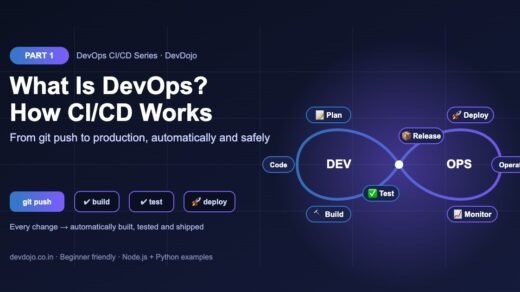
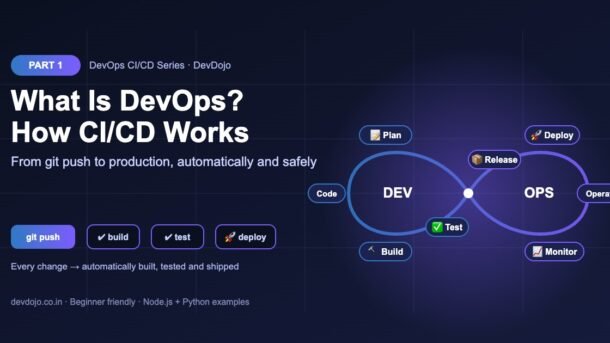
You will often see DevOps drawn as an infinity loop, like in the banner at the top. The left side is Dev and the right side is Ops. Work flows around the loop forever, because software is never “finished”:
| Stage | What happens | Example tools |
|---|---|---|
| 1. Plan | Decide what to build next and split it into small tasks. | Jira, GitHub Issues, Linear |
| 2. Code | Write code in short-lived branches and open pull requests. | Git, GitHub, GitLab, VS Code |
| 3. Build | Install dependencies and compile or bundle the app. | npm, Maven, Gradle, Docker |
| 4. Test | Run automatic checks: linting, unit tests, integration tests, security scans. | Jest, node:test, pytest, Playwright |
| 5. Release | Package a versioned artifact that is ready to deploy. | GitHub Releases, container registries |
| 6. Deploy | Put the release on servers, safely and repeatably. | GitHub Actions, Argo CD, Kubernetes |
| 7. Operate | Run and scale the infrastructure, manage configuration. | Terraform, Ansible, cloud consoles |
| 8. Monitor | Watch errors, speed and usage, and feed what you learn back into “Plan”. | Prometheus, Grafana, OpenTelemetry |
Do not worry about the tool names yet. This series covers each stage one by one, in that order.
What is CI/CD?
CI/CD is the heart of DevOps automation. It is the “conveyor belt” that carries your code from the Code stage to the Deploy stage of the loop. The letters stand for three related practices. Click the tabs below to compare them:
Continuous Integration (CI) means every developer merges small changes into the main branch often (at least daily), and every merge is automatically built and tested.
- Goal: find bugs within minutes, while the change is still fresh in your head.
- Ends with: a green (pass) or red (fail) result, and often a build artifact.
- Example: you open a pull request → GitHub Actions runs lint + tests → the PR shows a green tick.
Continuous Delivery goes one step further: every change that passes CI is automatically prepared for release and deployed to a test (staging) environment.
- Goal: the main branch is always ready to release.
- Production release: a human clicks “approve” (a manual gate).
- Good for: banks, apps that go through store reviews, or teams that want a final check.
Continuous Deployment removes the manual gate: every change that passes all automated checks goes straight to production, with no human click.
- Goal: users get fixes and features within minutes.
- Needs: very good automated tests, monitoring and an easy rollback.
- Good for: web apps and SaaS products that release many times a day.
DevOps is the bigger picture: a culture and set of practices where development and operations work as one team and automate the path from idea to production.
- CI/CD is a core practice of DevOps, but DevOps also includes infrastructure as code, monitoring, incident response and shared ownership.
- Remember: you can buy CI/CD tools, but you cannot buy DevOps. It is how a team works.
A quick way to remember the difference between the two “CDs”: in continuous delivery the release button exists and a person presses it; in continuous deployment the pipeline presses it for you. Most teams start with CI, then add continuous delivery, and only move to continuous deployment once their tests and monitoring are strong.
Anatomy of a CI/CD pipeline
A pipeline is a set of automated stages that run, in order, every time something changes in your repository. Each stage must pass before the next one starts. That “stop the line” rule is what makes pipelines so useful: broken code never reaches users.
Here are the words you will see in every CI/CD tool:
- Trigger: the event that starts the pipeline, such as a push, a pull request, a schedule or a manual button.
- Runner (or agent): the machine that runs the work. In GitHub Actions it is a fresh virtual machine for each job.
- Stage / Job / Step: a stage is a phase (build, test), a job is a group of steps that runs on one runner, and a step is a single command or action.
- Artifact: the output of the build (a zip, a
dist/folder, a Docker image). The same artifact is tested and then deployed, so what you tested is exactly what goes live. - Environment: where the app is deployed, such as staging (for testing) and production (for real users).
- Gate: a check that must pass before moving on, like an approval or a minimum test coverage.
Hands-on: a small app with tests
A pipeline is only as good as the checks it runs, so let us start with a tiny piece of “business logic”: a function that calculates a shopping cart total with 18% GST. We will write it in Node.js and add three automated tests using the built-in node:test runner (no extra libraries needed).
# 1. Create the project (needs Node.js 22+ and Git)
$ mkdir devops-part1 && cd devops-part1
$ mkdir src test
$ git init

# 2. Create package.json (copy it from the editor above), then
#    generate package-lock.json so "npm ci" works in the pipeline
$ npm install

# 3. Run the tests by hand once
$ npm test// A tiny piece of "business logic" our pipeline will check on every push.
export const GST_RATE = 0.18; // 18% GST
export function totalWithGst(items) {
if (!Array.isArray(items)) {
throw new TypeError("items must be an array");
}
const subtotal = items.reduce((sum, item) => sum + item.price * item.qty, 0);
const total = subtotal * (1 + GST_RATE);
return Math.round(total * 100) / 100; // round to 2 decimals (paise)
}import { test } from "node:test";
import assert from "node:assert/strict";
import { totalWithGst } from "../src/price.js";
test("adds 18% GST to the cart total", () => {
const cart = [{ price: 100, qty: 2 }, { price: 50, qty: 1 }];
assert.equal(totalWithGst(cart), 295);
});
test("an empty cart costs nothing", () => {
assert.equal(totalWithGst([]), 0);
});
test("rejects bad input", () => {
assert.throws(() => totalWithGst("not a cart"), TypeError);
});$ npm test
> devops-part1@1.0.0 test
> node --test --test-reporter=spec
✔ adds 18% GST to the cart total (0.907775ms)
✔ an empty cart costs nothing (0.133256ms)
✔ rejects bad input (0.388574ms)
ℹ tests 3
ℹ suites 0
ℹ pass 3
ℹ fail 0
ℹ cancelled 0
ℹ skipped 0
ℹ todo 0
ℹ duration_ms 104.318471{
"name": "devops-part1",
"version": "1.0.0",
"type": "module",
"scripts": {
"lint": "node --check src/price.js",
"test": "node --test --test-reporter=spec",
"build": "mkdir -p dist && cp src/*.js dist/"
}
}Click the tabs to switch files, then open price.test.js and press ▶ Run to see the test results.
package-lock.json matters: pipelines use npm ci instead of npm install. It installs the exact versions from the lock file and fails if the lock file is missing or out of date. That is how CI avoids the classic “but it works on my machine” problem.CI/CD works the same way for any language. Here is the same logic and the same three tests in Python, using the built-in unittest module:
# The same business logic in Python - CI/CD works for any language.
GST_RATE = 0.18  # 18% GST


def total_with_gst(items):
    if not isinstance(items, list):
        raise TypeError("items must be a list")
    subtotal = sum(item["price"] * item["qty"] for item in items)
return round(subtotal * (1 + GST_RATE), 2)import unittest
from price import total_with_gst
class TestPrice(unittest.TestCase):
def test_adds_gst(self):
cart = [{"price": 100, "qty": 2}, {"price": 50, "qty": 1}]
self.assertEqual(total_with_gst(cart), 295.0)
def test_empty_cart(self):
self.assertEqual(total_with_gst([]), 0)
def test_rejects_bad_input(self):
with self.assertRaises(TypeError):
total_with_gst("not a cart")
if __name__ == "__main__":
unittest.main()$ python -m unittest -v
test_adds_gst (test_price.TestPrice.test_adds_gst) ... ok
test_empty_cart (test_price.TestPrice.test_empty_cart) ... ok
test_rejects_bad_input (test_price.TestPrice.test_rejects_bad_input) ... ok
----------------------------------------------------------------------
Ran 3 tests in 0.000s
OKSame idea in Python. Open test_price.py and press ▶ Run.
Your first pipeline: a shell script
Before we use any CI tool, let us build a pipeline with nothing but a shell script. This shows that a pipeline is not magic: it is just a list of commands that must all succeed, in order. The line set -euo pipefail tells Bash to stop at the first failing command, which gives us the “stop the line” behaviour.
#!/usr/bin/env bash
# ci.sh - a tiny "pipeline" you can run on your own laptop.
# Each stage must pass before the next one starts.
set -euo pipefail

echo "▶ Stage 1/4: Install"
npm ci --silent

echo "▶ Stage 2/4: Lint (syntax check)"
npm run --silent lint

echo "▶ Stage 3/4: Test"
npm test --silent

echo "▶ Stage 4/4: Build"
npm run --silent build
echo "✅ Pipeline passed. Build output is in ./dist"$ ./ci.sh
▶ Stage 1/4: Install
▶ Stage 2/4: Lint (syntax check)
▶ Stage 3/4: Test
✔ adds 18% GST to the cart total (1.131146ms)
✔ an empty cart costs nothing (0.188576ms)
✔ rejects bad input (0.398218ms)
ℹ tests 3
ℹ suites 0
ℹ pass 3
ℹ fail 0
ℹ cancelled 0
ℹ skipped 0
ℹ todo 0
ℹ duration_ms 114.566688
▶ Stage 4/4: Build
✅ Pipeline passed. Build output is in ./distPress ▶ Run to see the pipeline pass all four stages.
Make the file executable once with chmod +x ci.sh. Now let us see what happens when someone makes a mistake. Change GST_RATE to 0.12 in src/price.js and run the pipeline again:
# A teammate changes GST_RATE from 0.18 to 0.12 by mistake...
$ ./ci.sh
▶ Stage 1/4: Install
▶ Stage 2/4: Lint (syntax check)
▶ Stage 3/4: Test
✖ adds 18% GST to the cart total (1.492308ms)
✔ an empty cart costs nothing (0.19392ms)
✔ rejects bad input (0.356971ms)
ℹ tests 3
ℹ suites 0
ℹ pass 2
ℹ fail 1
ℹ cancelled 0
ℹ skipped 0
ℹ todo 0
ℹ duration_ms 96.820684

✖ failing tests:

test at test/price.test.js:5:1
✖ adds 18% GST to the cart total (1.492308ms)
  AssertionError [ERR_ASSERTION]: Expected values to be strictly equal:

  280 !== 295
  ... (stack trace trimmed)

$ echo $?   # exit code 1 = failure, so the pipeline stops
1
Look closely: Stage 4 (Build) never ran. The test caught the bug, the script exited with code 1, and nothing was built. In a real pipeline, that also means nothing gets deployed. Change the value back to 0.18 and the pipeline is green again.
0 means success, anything else means failure. If your test command always exits with 0, your pipeline will never catch anything.The same pipeline on GitHub Actions
A script on your laptop only runs when you remember to run it. The real power of CI comes when a server runs it automatically for every push and every pull request, for every person on the team. Let us move our pipeline to GitHub Actions, the free CI/CD service built into GitHub.
Create a file at .github/workflows/ci.yml. GitHub automatically finds every YAML file in that folder:
# .github/workflows/ci.yml - runs our pipeline on GitHub's servers
name: CI

on:
  push:
    branches: [main]        # every push to main
  pull_request:
    branches: [main]        # every pull request into main

jobs:
  build-and-test:
    runs-on: ubuntu-latest  # a fresh Linux machine for every run
    steps:
      - name: Check out the code
        uses: actions/checkout@v6

      - name: Set up Node.js
        uses: actions/setup-node@v6
        with:
          node-version: 24
          cache: npm

      - name: Install dependencies
        run: npm ci

      - name: Lint
        run: npm run lint

      - name: Test
        run: npm test

      - name: Build
        run: npm run build

      - name: Save the build as an artifact
        uses: actions/upload-artifact@v6
        with:
          name: dist
path: dist/# .github/workflows/python-ci.yml - the same idea for a Python project
name: Python CI
on:
push:
branches: [main]
pull_request:
branches: [main]
jobs:
test:
runs-on: ubuntu-latest
steps:
- uses: actions/checkout@v6
- name: Set up Python
uses: actions/setup-python@v6
with:
python-version: "3.13"
- name: Run the tests
run: python -m unittest -vTwo tabs: the Node.js workflow and the same idea for a Python project. Both live in the .github/workflows/ folder.
Let us read the Node.js workflow line by line:
on:is the trigger. This workflow runs on every push tomainand on every pull request that targetsmain.jobs:holds one job calledbuild-and-test.runs-on: ubuntu-latestasks GitHub for a fresh Linux runner, so every run starts from a clean machine.actions/checkoutdownloads your code onto the runner.actions/setup-nodeinstalls Node.js 24 and caches npm downloads to make later runs faster.- The
run:steps are the same commands as ourci.sh: install, lint, test and build. If any step fails, the job stops and is marked red. actions/upload-artifactsaves thedist/folder so you (or a later deploy job) can download exactly what was tested.
Now commit and push:
# Commit the code and the workflow, then push to GitHub
$ git add .
$ git commit -m "Add price module, tests and CI workflow"
$ git branch -M main
$ git remote add origin https://github.com/<your-username>/devops-part1.git
$ git push -u origin main

# Now open your repo on GitHub → the "Actions" tab
# You will see the "CI" workflow running for this push
Open the Actions tab of your repository and you will see the run with a yellow dot (running), then a green tick (passed) or a red cross (failed). Open a pull request with the 0.12 bug and GitHub will show the failing check right on the PR, before anyone merges it. That is continuous integration in action.
@v6 after each action is its major version. Check each action’s GitHub page now and then for a newer major version, and let Dependabot open update PRs for you (we set this up later in the series). Want a deeper GitHub Actions walkthrough right now? Read our GitHub Actions CI/CD for Node.js beginner’s guide; Part 5 and Part 12 of this series go even further.The DevOps tools map
New learners often feel lost in the huge list of DevOps tools. The good news: you only need one tool per job to get started, and the ideas carry over between tools. Here is a simple map:
| Job to do | Popular tools | Covered in |
|---|---|---|
| Version control | Git, GitHub, GitLab, Bitbucket | Part 3 |
| CI/CD pipelines | GitHub Actions, GitLab CI/CD, Jenkins, CircleCI, Azure Pipelines | Parts 5, 12, 13 |
| Containers | Docker, Podman | Parts 6–8 |
| Infrastructure as code | Terraform, OpenTofu, Pulumi, Ansible | Parts 14–15 |
| Orchestration and GitOps | Kubernetes, Helm, Argo CD, Flux | Parts 16–18 |
| Security | CodeQL, Trivy, Dependabot, Sigstore | Parts 21–22 |
| Monitoring | Prometheus, Grafana, OpenTelemetry | Parts 23–24 |
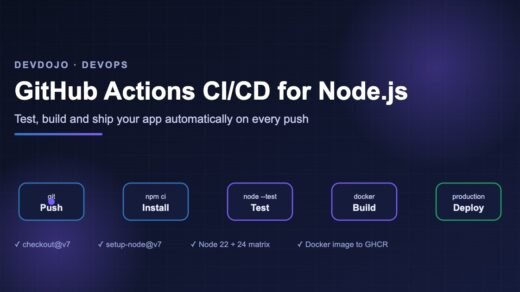
If you want a sneak peek at containers, we already have a hands-on Docker Compose tutorial and a Kubernetes tutorial for beginners.
Measuring DevOps: the DORA metrics
How do you know if a team is “good at DevOps”? The most widely used answer comes from DORA (DevOps Research and Assessment), a research programme that has studied thousands of teams for over ten years. It tracks a small set of software delivery metrics. They started as four “key metrics”, and DORA now also tracks a fifth one, deployment rework rate:
The two speed metrics (frequency and lead time) and the stability metrics (fail rate, recovery time, rework) usually improve together. Small, automated, well-tested changes are both faster and safer. That is the core promise of CI/CD. We dive into measuring these numbers in Part 29.
Common errors and fixes
| Problem | Why it happens | Fix |
|---|---|---|
| Workflow never runs on GitHub | File is in the wrong folder, or the branch name in on: does not match (e.g. master vs main). | Put it in .github/workflows/ exactly, and check your default branch name. |
npm ci fails: “can only install with an existing package-lock.json” | The lock file was never created or not committed. | Run npm install locally and commit package-lock.json. |
| Tests pass locally but fail in CI | Different Node.js/Python version, missing environment variable, or a test that depends on your timezone or local files. | Pin the version in the workflow, pass needed variables, and make tests self-contained. |
Permission denied: ./ci.sh | The script is not executable. | Run chmod +x ci.sh and commit (Git stores the executable bit). |
| YAML error: “mapping values are not allowed here” | Wrong indentation or a tab character in the YAML file. | Use 2 spaces, never tabs. A YAML extension in VS Code highlights mistakes. |
| Pipeline is green but the bug still shipped | No test covered that case, or a command hid its failure (exit code 0). | Add a test for the bug first, and use set -euo pipefail in scripts. |
| A password appears in the build log | Secret was hard-coded or printed with echo. | Store it in repository Secrets and read it as ${{ secrets.NAME }}. Rotate the leaked value. |
Best practices for beginners
- Commit small and often. Merge to
mainat least once a day. Small changes are easy to test and easy to undo. - Keep the pipeline fast. Aim for CI feedback in under 10 minutes. Slow pipelines get ignored.
- Fix a red build first. A broken main branch blocks everyone. Treat it as the team’s top priority.
- Build once, deploy many times. Create one artifact and promote the same one to staging and production.
- Make pipelines code. Keep workflow files in Git, review them in pull requests like any other code.
- Never put secrets in code. Use the secret store of your CI tool or a secrets manager.
- Protect the main branch. Require the CI check to pass before a pull request can be merged.
Practice task
Your mission (about 30 minutes):
- Create the
devops-part1project from this post and run./ci.shuntil it is green. - Add a fourth test: a cart with
{ price: 99.99, qty: 3 }should cost353.96(check the rounding yourself first). - Push the project to a new GitHub repository with the
ci.ymlworkflow and get a green tick in the Actions tab. - Open a pull request that breaks the GST rate. Confirm the check turns red on the PR, then fix it.
- Bonus: in your repository settings, add a branch protection rule (or ruleset) for
mainthat requires the CI check to pass before merging.
Frequently asked questions
Is DevOps a tool, a job title or a culture?
Mainly a culture and a set of practices. Tools support it, and many companies also have “DevOps engineer” or “platform engineer” roles whose job is to build pipelines and infrastructure for other teams. But every developer on a DevOps team shares responsibility for shipping and running the software.
What is the difference between CI and CD?
CI (continuous integration) automatically builds and tests every change. CD takes the tested result further: continuous delivery keeps it always ready to release with a manual approval, and continuous deployment releases it to production automatically.
Do I need to learn Linux for DevOps?
Yes, basic Linux and shell skills are very useful because most servers, containers and CI runners use Linux. You do not need to be an expert. Part 2 of this series covers exactly the commands you need.
Which CI/CD tool should a beginner learn first?
GitHub Actions is a great first choice: it is built into GitHub, free for public repositories, and uses simple YAML. The concepts (triggers, jobs, steps, artifacts, secrets) transfer directly to GitLab CI/CD, Jenkins and others.
Can a fresher get a DevOps job?
Yes. Many freshers start as developers or support engineers and grow into DevOps roles. Build a few projects with real pipelines (test, Docker image, deploy), put them on GitHub, and be ready to explain each step. Following this series end to end will give you that portfolio.
Conclusion
You now know what DevOps is: a culture where development and operations work as one team, ship small changes often, and automate everything they can. You learned how CI/CD fits in (continuous integration, continuous delivery and continuous deployment), the parts of a pipeline (triggers, runners, jobs, steps and artifacts), and how teams measure success with the DORA metrics. Most importantly, you built a real pipeline twice: once as a shell script and once on GitHub Actions, and you saw it stop a bug before it could ship.
New posts every day on DevDojo
Follow the full DevOps CI/CD series – 30 parts from “what is DevOps” to a complete pipeline from commit to production. Bookmark devdojo.co.in and tell us in the comments which CI/CD tool your team uses.